
如何在xpath表达式中使用本地名称获取节点列表?
我正在使用soapui进行自动化测试。我正在尝试编写一个xpath表达式,以便使用以下xml进行属性传输
<snapshots query="after=2014-04-16 12:30:00-0700" mask="op" xmlns="http://ws.example.com/roma/201907" xmlns:xsi="http://www.w3.org/2001/XMLSchema-instance">
    <AsOf>2014-04-16T19:20:44-07:00</AsOf>
    <offers>
        <offer entityId="6500588"/>
        <offer entityId="6500589"/>
        <offer entityId="6500590"/>
        <offer entityId="6557335">
            <rubber>KJM</rubber>
            <code>B44733</code>
            <offerCode>PA</offerCode>
            <status name="Completed">C</status>
            <startDate basis="GMT-4">2013-04-01</startDate>
            <endDate basis="GMT-4">2014-04-15</endDate>
            <template>
                <sourceKey-Ref entityId="36KTV" code="KPA513C36KTV" uri="/snapshot/sourcekey/36KTV"/>
                <pTemplateCode>PPAKXC</pTemplateCode>
                <panelCode>HPA5LTM</panelCode>
                <itemCode>PA1467</itemCode>
            </template>
            <venue code="28">
                <supervenue>5</supervenue>
            </venue>
            <currencyDetail currency="USD">
                <unitPrice>29.95</unitPrice>
                <numberPayments>1</numberPayments>
            </currencyDetail>
            <hData>
                <legacyScriptCode>300</legacyScriptCode>
                <hpKeycode>189161</hpKeycode>
                <hpProductNumber>014399</hpProductNumber>
                <hpMpgCode>300</hpMpgCode>
            </hData>
        </offer>
        <offer entityId="6557336">
            <rubber>KJM</rubber>
            <code>B44734</code>
            <offerCode>VY</offerCode>
            <status name="Completed">C</status>
            <startDate basis="GMT-4">2013-04-01</startDate>
            <endDate basis="GMT-4">2014-04-15</endDate>
            <template>
                <sourceKey-Ref entityId="36KTV" code="KPA513C36KTV" uri="/snapshot/sourcekey/36KTV"/>
                <pTemplateCode>PPAKXC</pTemplateCode>
                <panelCode>HPA5LTM</panelCode>
                <offerCode>OVYC8UM9</offerCode>
                <itemCode>VY4023</itemCode>
            </template>
            <venue code="28">
                <supervenue>5</supervenue>
            </venue>
            <currencyDetail currency="USD">
                <unitPrice>0.00</unitPrice>
                <numberPayments>1</numberPayments>
            </currencyDetail>
            <hData>
                <legacyScriptCode>947</legacyScriptCode>
                <hpKeycode>189162</hpKeycode>
                <hpProductNumber>602185</hpProductNumber>
                <hpMpgCode>947</hpMpgCode>
            </hData>
        </offer>
        <offer entityId="6557337">
            <rubber>KJM</rubber>
            <code>B44736</code>
            <offerCode>VY</offerCode>
            <status name="Completed">C</status>
            <startDate basis="GMT-4">2013-04-01</startDate>
            <endDate basis="GMT-4">2014-04-15</endDate>
            <template>
                <sourceKey-Ref entityId="36KTV" code="KPA513C36KTV" uri="/snapshot/sourcekey/36KTV"/>
                <pTemplateCode>PPAKXC</pTemplateCode>
                <panelCode>HPA5LTM</panelCode>
                <offerCode>OVYC8UMA</offerCode>
                <itemCode>VY4012</itemCode>
            </template>
            <venue code="28">
                <supervenue>5</supervenue>
            </venue>
            <currencyDetail currency="USD">
                <unitPrice>0.00</unitPrice>
                <numberPayments>1</numberPayments>
                <firstPaymentAmount>0.00</firstPaymentAmount>
                <firstShippingAmount>5.98</firstShippingAmount>
            </currencyDetail>
            <hData>
                <legacyScriptCode>947</legacyScriptCode>
                <hpKeycode>189163</hpKeycode>
                <hpProductNumber>602094</hpProductNumber>
                <hpMpgCode>947</hpMpgCode>
            </hData>
        </offer>
    </offers>
</snapshots>我希望在hpKeycode表达式中使用local-name()的所有XPath。我试过了
//*[local-name()='hpKeycode']但这只给出了第一个节点,即189161。这
/*[local-name()='hpKeycode'][2]也不管用。任何帮助都将不胜感激。
回答 2
Stack Overflow用户
发布于 2014-05-12 08:01:41
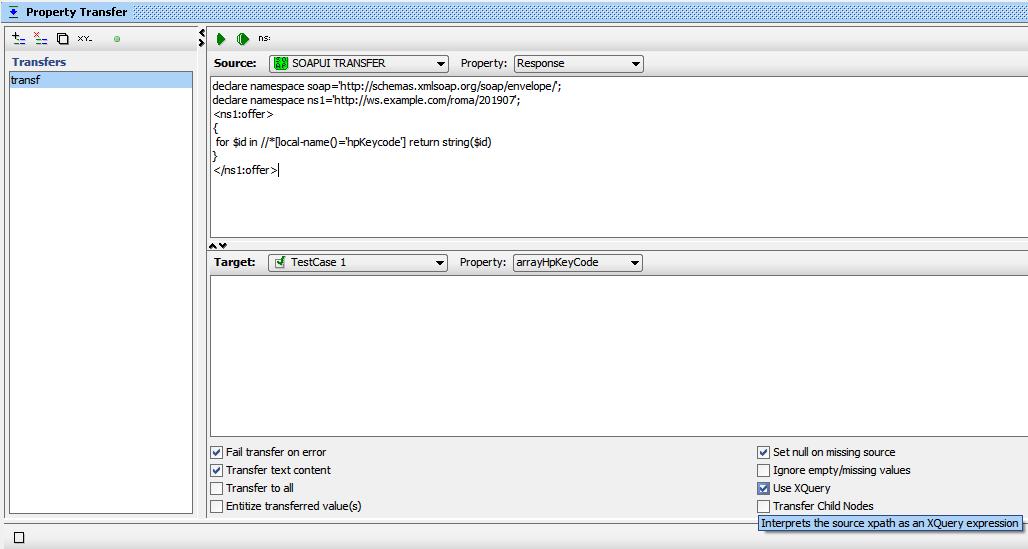
你可以试试XQuery。在属性转移步骤中,选择使用XQuery复选框,如您在下面的图像中所看到的那样。并使用以下代码:
declare namespace soap='http://schemas.xmlsoap.org/soap/envelope/';
declare namespace ns1='http://ws.example.com/roma/201907';
<ns1:offer>
{
  for $id in //*[local-name()='hpKeycode'] return string($id)
}
</ns1:offer>
编辑:
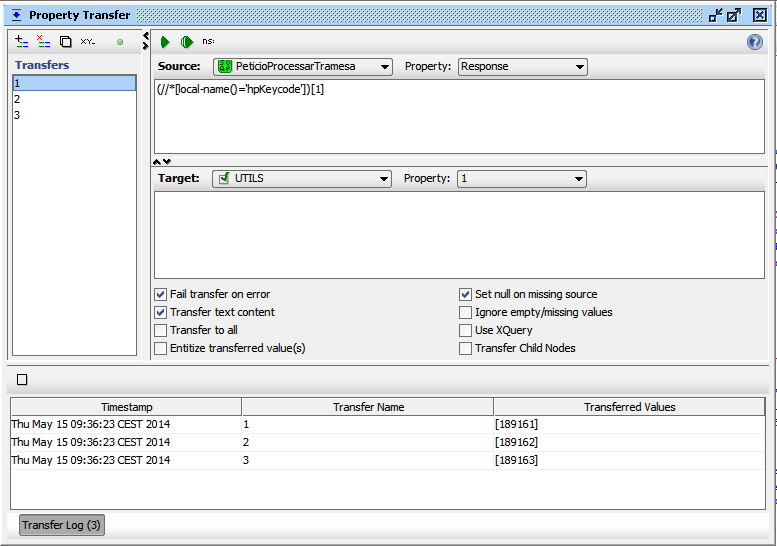
如果您想避免使用XQuery,可以在您的财产转移上添加三次传输,每一次使用:
第一id (//*[local-name()='hpKeycode'])[1]
第二id (//*[local-name()='hpKeycode'])[2]
第三id (//*[local-name()='hpKeycode'])[3]
希望这能帮上忙
Stack Overflow用户
发布于 2014-05-15 14:24:53
这将不会以您预期的方式工作,因为您正在提取一组值。您需要指定您希望在树的更高位置上的节点分支。
就像道路一样..。如果你给某人指路,你需要告诉他们在每个岔路口走哪条路。比方说,你想告诉他们如何到达三个可能的机场之一,每个机场都位于不同的城市。如果你说“当你到达机场1,2,3,进入2号”。他们会感到困惑,说“什么城市?”也许“他们不可能在同一个地方存在”。
解决方案:
以下是您所提供的xml (都在soapui中工作)所需的内容。
Xpath 2.0
//*:offer[4]/*:hData/*:hpKeycode
//*:offer[5]/*:hData/*:hpKeycode
//*:offer[6]/*:hData/*:hpKeycode
Xpath 1.0
//*[local-name()='offer'][4]/*[local-name()='hData']/*[local-name()='hpKeycode']
//*[local-name()='offer'][5]/*[local-name()='hData']/*[local-name()='hpKeycode']
//*[local-name()='offer'][6]/*[local-name()='hData']/*[local-name()='hpKeycode']
希望这个更详细的解释有帮助!
https://stackoverflow.com/questions/23585499
复制相似问题
腾讯云开发者

Copyright © 2013 - 2026 Tencent Cloud. All Rights Reserved. 腾讯云 版权所有
深圳市腾讯计算机系统有限公司 ICP备案/许可证号:粤B2-20090059  粤公网安备44030502008569号
腾讯云计算(北京)有限责任公司 京ICP证150476号 | 京ICP备11018762号