
如何在响应页面中有一个最大宽度的侧边栏?
如何在响应页面中有一个最大宽度的侧边栏?
提问于 2014-05-04 19:14:51
这就是我试图用我的页面实现的布局:
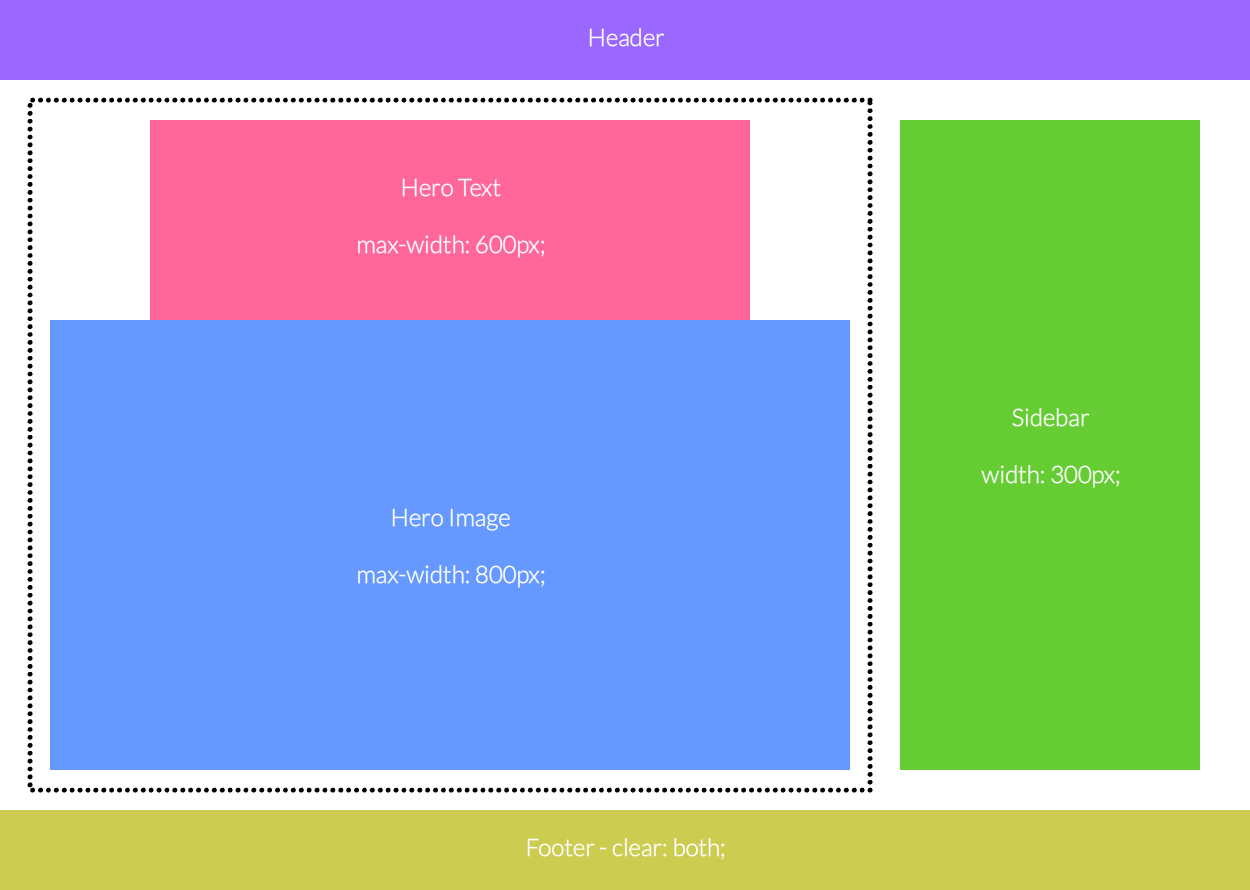
基本上,英雄和侧边栏是页面上的两列。英雄文本和图像应该放在一个div中,因此它们应该被当作一个元素来处理,就像侧栏一样。具有div ID的content具有max-width: 1150px;。我将英雄文本和图像分开包含的原因是,我想指出,英雄图像是带有div的background-image,而不是img元素。
这些元素的结构如下:
<div id="content">
    <div id="hero">
        <div id="heroText">
        </div>
        <div id="heroImage">
        </div>
    </div>
    <div id="sidebar">
    </div>
</div>我现在使用的方法是将float: left;放在带有ID hero的div上,将float: right;放在ID sidebar的div上。
当我这样做,并将我的浏览器调整到1200 my以下(边距+英雄max-width +侧栏width)时,侧边栏将位于英雄下方,而不是英雄在max-width值800px以下收缩。
我如何使英雄开始收缩,而不是现在发生的,英雄坚持到浏览器缩小到低于900 to (边距+英雄width)。
目前使用的CSS如下:
#content
{
    margin: 0px auto;
    max-width: 1150px;
    padding-bottom: 50px;
    padding-left: 50px;
    padding-right: 50px;
    padding-top: 25px;
}
#hero
{
    float: left;
    max-width: 800px;
    width: 100%;
}
#heroText
{
    font-family: Lato;
    font-size: 24pt;
    font-weight: lighter;
    height: 150px;
    margin: 0px auto;
    max-width: 600px;
    text-align: center;
}
#heroText p
{
    margin-bottom: 20px;
    margin-top: 0px;
}
#heroImage
{
    background-image: url(heroImage.png);
    background-repeat: no-repeat;
    background-size: contain;
    height: 450px;
    text-align: center;
}
#heroButton
{
    margin-top: 90px;
    width: 240px;
}
#news
{
    float: right;
    width: 300px;
}
#newsPane
{
    background-color: #666666;
    border-radius: 10px;
    display: inline-block;
    color: #fff;
    height: 450px;
    width: 300px;
}
#newsPaneText
{
    font-size: 12pt;
    font-weight: lighter;
    max-height: 350px;
    overflow: auto;
    padding-left: 10px;
    padding-right: 10px;
}
#newsPaneText h1
{
    font-size: 18pt;
    font-weight: lighter;
    margin-top: 5px;
}
#newsPaneText small
{
    font-size: 10pt;
    font-weight: bold;
}
#newsPaneButton
{
    margin-left: 60px;
    margin-top: 25px;
    width: 180px;
}
#emailPane
{
    background-color: #e5e5e5;
    border-radius: 10px;
    color: #333;
    display: inline-block;
    height: 130px;
    margin-top: 20px;
}
#emailForm
{
    padding-left: 10px;
    padding-right: 10px;
    margin-top: 5px;
}
#emailField
{
    background-color: #fff;
    border: none;
    border-radius: 5px;
    color: #333;
    font-family: Lato;
    font-size: 14pt;
    height: 27px;
    margin-top: 10px;
    padding: 0px;
    width: 280px;
}
#emailSubmitButton
{
    float: right;
    margin-top: 10px;
    width: 120px;
}
#emailFormStatus
{
    float: left;
    font-size: 11pt;
    font-weight: bold;
    margin-top: 15px;
}回答 1
Stack Overflow用户
回答已采纳
发布于 2014-05-05 05:57:15
小提琴
HTML:
<div id="content">
    <div id="news">
    </div>
    <div id="hero">
        <div id="heroText">
        </div>
        <div id="heroImage">
        </div>
    </div>
</div>
CSS:
#content {
    margin: 0px auto;
    max-width: 1150px;
    padding-bottom: 50px;
    padding-left: 50px;
    padding-right: 50px;
    padding-top: 25px;
}
#hero {
    max-width:800px;
    margin-right:300px;
}
#heroText {
    font-family: Lato;
    font-size: 24pt;
    font-weight: lighter;
    height: 150px;
    margin: 0px auto;
    max-width: 600px;
    text-align: center;
    background:#FF6699;
}
#heroImage {
    background-image: url(heroImage.png);
    background-repeat: no-repeat;
    background-size: contain;
    height: 450px;
    text-align: center;
    background:#6699FF;
}
#news {
    float: right;
    width: 300px;
    height:600px;
    background:#66CC33;
}页面原文内容由Stack Overflow提供。腾讯云小微IT领域专用引擎提供翻译支持
原文链接:
https://stackoverflow.com/questions/23460448
复制相关文章
相似问题
腾讯云开发者

Copyright © 2013 - 2026 Tencent Cloud. All Rights Reserved. 腾讯云 版权所有
深圳市腾讯计算机系统有限公司 ICP备案/许可证号:粤B2-20090059  粤公网安备44030502008569号
腾讯云计算(北京)有限责任公司 京ICP证150476号 | 京ICP备11018762号