
自举旋转木马宽度大于图片
自举旋转木马宽度大于图片
提问于 2014-05-02 03:16:04
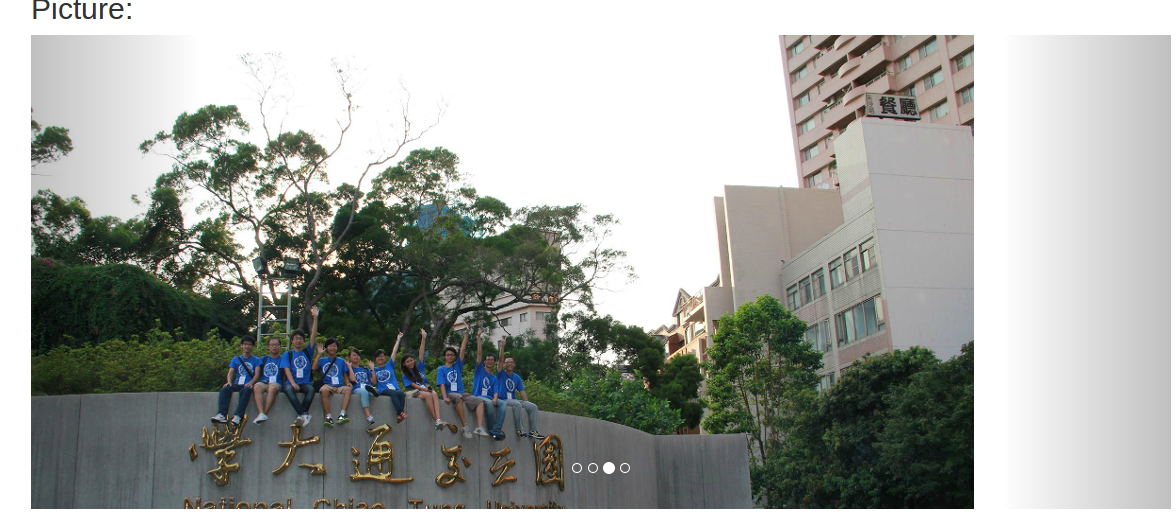
在Bootstrap中使用旋转木马来实现滑动图像效果,但是当窗口宽度变大时,幻灯片盒变大,而图像区域的宽度保持原样。
当图片的宽度太大时,如何修改代码,将框的左边边距放在图片的左边边距?
编辑:演示地址:http://zgzhen.freeshell.ustc.edu.cn/posters/nctu2013
我想要的效果:自动调整旋转木马盒的大小,这样右边的控制面板就不会超出范围。
<ol class="carousel-indicators">
<li data-target="#carousel-example-generic" data-slide-to="0" class="active"></li>
<li data-target="#carousel-example-generic" data-slide-to="1"></li>
<li data-target="#carousel-example-generic" data-slide-to="2"></li>
<li data-target="#carousel-example-generic" data-slide-to="3"></li>
</ol>

<div class="carousel-inner">
<div class="item active">
  <img src="../images/upload/nctu/1.png" alt="...">
</div>
<!-- other pictures-->
</div>
<!-- Controls -->
<a class="left carousel-control" href="#carousel-example-generic" data-slide="prev"></a>
<a class="right carousel-control" href="#carousel-example-generic" data-slide="next"></a>
</div></div>回答 1
Stack Overflow用户
回答已采纳
发布于 2014-05-02 03:20:32
您的问题还不够清楚,您是要对图像进行居中,还是要填充图像。请试一试,让我知道更多的帮助。将下面的代码粘贴到CSS样式表中。
.carousel-inner .item img{
    width: 100%;
}页面原文内容由Stack Overflow提供。腾讯云小微IT领域专用引擎提供翻译支持
原文链接:
https://stackoverflow.com/questions/23420198
复制相关文章
相似问题
腾讯云开发者

Copyright © 2013 - 2026 Tencent Cloud. All Rights Reserved. 腾讯云 版权所有
深圳市腾讯计算机系统有限公司 ICP备案/许可证号:粤B2-20090059  粤公网安备44030502008569号
腾讯云计算(北京)有限责任公司 京ICP证150476号 | 京ICP备11018762号