
android系统中两指中点的缩放
我有一个HorizontalScrollView,其中有多个视图。我已经实现了pinch zoom gesture,其中的多个视图,在我的两个手指之间,是缩放的。
但我正面临一个小问题。当我做捏缩放,中点的捏缩放是移动的,但对于用户体验,我希望这个点是固定的,其他事情应该调整自己,同时缩放,使中间点保持静态。
有人能告诉我怎么做吗。
自定义视图的onDraw()方法是
                Rect r =new Rect(0, 0, 700, 40);

    public void onDraw(Canvas canvas) {

        float kk=mScaleFactor;    //this variable will be set by pinch zoom event and represent how much to scale
        sf*=kk;                   // this view must scale according to previous scaling


        canvas.save();
        canvas.scale(sf , 1);
        paint.setStyle(Paint.Style.FILL);
        paint.setColor(Color.BLUE);
        canvas.drawRect(r, paint);
        width=sf*700;
        canvas.restore();
        requestLayout();                               //this will change view width to fit the expanded rectangle
        }
在onMeasure上调用requestLayout方法
        @Override protected void onMeasure(int widthMeasureSpec,
              int heightMeasureSpec) {
            setMeasuredDimension((int)width, 340);
}上面的自定义视图被HorizontalScrollView的子类调用12次。因此,HorizontalScrollview有12个子视图。
在这节课上,我要做以下几件事
- 检测两个手指的触点坐标。
- 计算触摸第一指的子视图的索引。
- 计算触摸第二指的子视图的索引。
- 将缩放缩放因子传递到开始和最后之间的所有子视图。这两个指标是在前两个步骤中计算的。
- 最后,在子视图上调用called ()。因此,子对象可以根据父视图传递的比例因子进行缩放。
但这里有一个问题。两个手指的中点应该保持静止,其他的东西应该在缩放时进行调整。但我的中点是随着比例移动的。
有人能帮我做这个吗。如果需要任何代码,请告诉我。
HorizontalScrollview的手势侦听器代码是
      private class ScaleListener extends ScaleGestureDetector.SimpleOnScaleGestureListener {
        @Override
        public boolean onScale(ScaleGestureDetector detector) {
               mScaleFactor *= detector.getScaleFactor();
            mScaleFactor = Math.max(0.1f, Math.min(mScaleFactor, 5.0f));

            ViewGroup pp=takeparent(); //give object of this class

            for(int i=start;i<=last;i++)
            {
                LinearLayout ll=(LinearLayout)pp.getChildAt(i);
                DrawView view=(DrawView)ll.findViewById(R.id.drawview);
                view.mScaleFactor=mScaleFactor;
                view.invalidate();
                view.donesf=true;
            }
我的样本应用
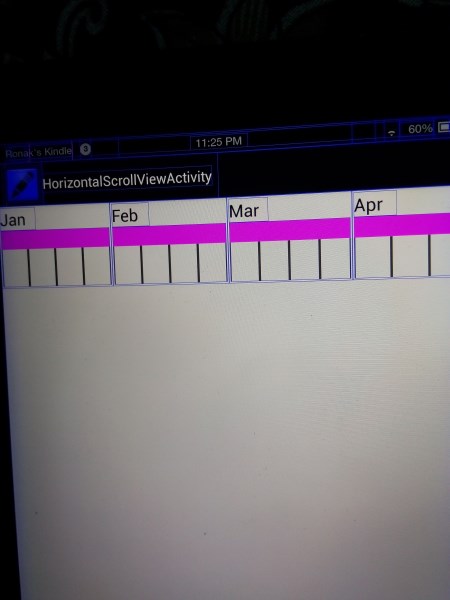
评论中建议的编辑:
        private class ScaleListener extends ScaleGestureDetector.SimpleOnScaleGestureListener {
        @Override
        public boolean onScale(ScaleGestureDetector detector) {
               mScaleFactor *= detector.getScaleFactor();
            mScaleFactor = Math.max(0.1f, Math.min(mScaleFactor, 5.0f));

            ViewGroup pp=takeparent(); pp contains all the custom child views

            //start and last are indices of range of child for which we have to apply gesture
            for(int i=start;i<=last;i++)
            {
                LinearLayout ll=(LinearLayout)pp.getChildAt(i);
                DrawView view=(DrawView)ll.findViewById(R.id.drawview);

                view.mScaleFactor=mScaleFactor;
                view.pivotx=detector.getFocusX()+view.getLeft();
                view.pivoty=detector.getFocusY()+view.getTop();
                view.invalidate();
            }


            return true;
        }
这是自定义视图onDraw方法
       public void onDraw(Canvas canvas) {

        sf=mScaleFactor  //this scale factor is set by parent view
        width=sf*700;  //this width will be use to rescale the view's width in requestLayout()

        canvas.save();

        canvas.scale(sf,1,pivotx,pivoty);  //pivotX and pivotY are also set by parent's onScale method of gestureListener
        canvas.drawRect(r, paint);
        requestLayout();
        canvas.restore();

        }
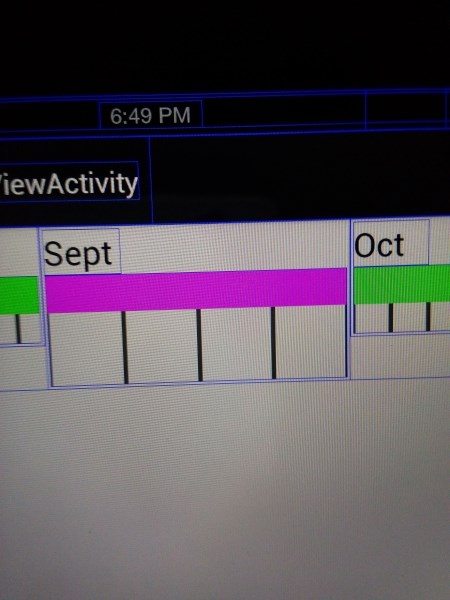
回答 1
Stack Overflow用户
发布于 2014-04-29 08:08:43
对于正在缩放的视图,可以设置不应该使用setPivotX()和setPivotY()移动的“不变”点。当我使用ScaleGestureDetector时,我使用focus点。例如:
    @Override
    public boolean onScaleBegin(ScaleGestureDetector detector)
    {
        ...
        mScaledView.setPivotX(detector.getFocusX());
        mScaledView.setPivotY(detector.getFocusY());
        ...
我不确定在您的情况下,您是否想要对所有的子视图,或者仅仅是父视图执行此操作,但是通常您只需要对一个“父”视图执行此操作,并且它将对该视图的子视图正常工作。
与此相关的是,我不太明白为什么要将缩放因子向下传递给每个子视图,因为扩展父视图也会缩放它的所有子视图。也许您只需要在您的FrameLayout中添加一个单独的ViewGroup (或其他一些ViewGroup后代),然后对其进行扩展(在适当设置它的枢轴之后)?
更新评论
考虑到你只想在手指之间缩小视图,我相信你有几个选项,取决于你的应用程序:
1)只动态地将这些视图添加到中间FrameLayout中,该中间视图将缩放并具有其枢轴集,使非缩放视图成为HorizontalScrollView的直接子视图;或
( 2)在第一次调整孩子的位置后,将焦点传给每个缩放的子视图。例如,假设您的DrawView直接或间接地从android.view.View继承(我强烈建议这样做),那么您可以这样做:
    for (int i = start; i <= last; i++) {
        LinearLayout ll = (LinearLayout)pp.getChildAt(i);
        DrawView view = (DrawView)ll.findViewById(R.id.drawview);

        view.setScaleX(mScaleFactor);
        view.setScaleY(mScaleFactor);
        view.setPivotX(detector.getFocusX() - view.getLeft());    // Note: minus, not plus...
        view.setPivotY(detector.getFocusY() - view.getTop());
        view.invalidate();
}https://stackoverflow.com/questions/23358112
复制相似问题
腾讯云开发者

Copyright © 2013 - 2026 Tencent Cloud. All Rights Reserved. 腾讯云 版权所有
深圳市腾讯计算机系统有限公司 ICP备案/许可证号:粤B2-20090059  粤公网安备44030502008569号
腾讯云计算(北京)有限责任公司 京ICP证150476号 | 京ICP备11018762号