
WPF字形不正确地显示度符号
WPF字形不正确地显示度符号
提问于 2014-04-25 15:18:40
我正在做一些自定义控件,并通过Glyph运行绘制了一些文本
我的问题是,°C没有被我的字形正确地呈现出来(不管字体系列如何),如下所示:

因此,我用于字形运行的代码(简化)是:
var typeface = new Typeface(this.FontFamily, this.FontStyle, this.FontWeight, this.FontStretch);

...

GlyphRun glyphRun = CreateGlyphRun(typeface, "°C", 10, new Point(0,0));
dc.DrawGlyphRun(brush, glyphRun);
哪里
internal static GlyphRun CreateGlyphRun(Typeface typeface, string text, double size, Point origin)
{
    if (text.Length == 0)
        return null;

    GlyphTypeface glyphTypeface;

    typeface.TryGetGlyphTypeface(out glyphTypeface)

    var glyphIndexes = new ushort[text.Length];
    var advanceWidths = new double[text.Length];

    for (int n = 0; n < text.Length; n++)
    {
        var glyphIndex = (ushort)(text[n] - 29);
        glyphIndexes[n] = glyphIndex;
        advanceWidths[n] = glyphTypeface.AdvanceWidths[glyphIndex] * size;
    }

    var glyphRun = new GlyphRun(glyphTypeface, 0, false, size, glyphIndexes, origin, advanceWidths, null, null,
                                null,
                                null, null, null);
    return glyphRun;
}
我想这是个本地化的问题。任何帮助都将不胜感激。
回答 2
Stack Overflow用户
回答已采纳
发布于 2014-04-25 16:06:58
试着取代
var glyphIndex = (ushort)(text[n] - 29);使用
var glyphIndex = glyphTypeface.CharacterToGlyphMap[text[n]];Stack Overflow用户
发布于 2014-04-25 15:46:38
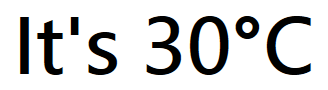
不如用Glyphs class代替?使用时,学位标志将显示:
<Glyphs FontUri="C:\WINDOWS\Fonts\SegoeUI.TTF" FontRenderingEmSize="80"
    StyleSimulations="BoldSimulation" UnicodeString="It's 30°C"
    Fill="Black" HorizontalAlignment="Center" VerticalAlignment="Center" />
页面原文内容由Stack Overflow提供。腾讯云小微IT领域专用引擎提供翻译支持
原文链接:
https://stackoverflow.com/questions/23296997
复制相关文章
相似问题
腾讯云开发者

Copyright © 2013 - 2026 Tencent Cloud. All Rights Reserved. 腾讯云 版权所有
深圳市腾讯计算机系统有限公司 ICP备案/许可证号:粤B2-20090059  粤公网安备44030502008569号
腾讯云计算(北京)有限责任公司 京ICP证150476号 | 京ICP备11018762号