
Openbravo postgres安装
我正试图在Ubuntu上获得Openbravo的副本,以供开发。我跟踪官方指南,我被一个Postgres错误卡住了。
我已经通过mercurial命令成功地下载了源代码。蚂蚁装置也对我有用。
当我运行向导时,我会写这些信息。
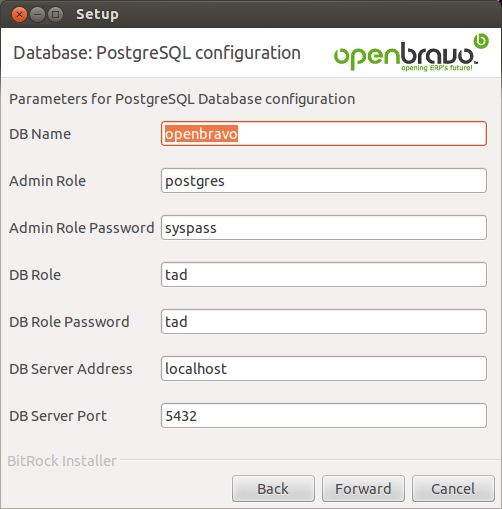
当我运行ant install.source时,问题就出现了:
BUILD FAILED
/home/User/openbravo/build.xml:734: The following error occurred while executing this line:
/home/User/openbravo/src-db/database/build-create.xml:50: The following error occurred while executing this line:
/home/marcguilera/openbravo/src-db/database/build-create.xml:77: org.postgresql.util.PSQLException: Connection refused. Check that the hostname and port are correct and that the postmaster is accepting TCP/IP connections.
    at org.postgresql.core.v3.ConnectionFactoryImpl.openConnectionImpl(ConnectionFactoryImpl.java:136)
    at org.postgresql.core.ConnectionFactory.openConnection(ConnectionFactory.java:66)
    at org.postgresql.jdbc2.AbstractJdbc2Connection.<init>(AbstractJdbc2Connection.java:125)
    at org.postgresql.jdbc3.AbstractJdbc3Connection.<init>(AbstractJdbc3Connection.java:30)
堆叠的痕迹更长。
回答 1
Stack Overflow用户
发布于 2014-08-11 03:33:01
首先,我们需要更改PostgreSQL postgres用户密码,否则我们将无法访问服务器。作为“postgres”Linux用户,我们将执行下面的psql命令。
在终端中,键入:
$ sudo -u postgres psql postgres使用以下命令为"postgres“数据库角色设置密码:
\password postgres(二)建立数据库
要创建第一个数据库,我们将称之为leo,只需键入:
sudo -u postgres createdb leo(3)为PostgreSQL9.1安装服务器设备(用于PgAdmin)
PgAdmin需要安装外接程序才能实现全部功能.所谓的"adminpack“addon是PostgreSQLcont肋骨的一部分,因此您必须安装该包。然后,要激活扩展,请将"Postgresql 9.1"+在"postgres“数据库中安装adminpack”扩展“:
$ sudo -u postgres psql然后
CREATE EXTENSION adminpack;IV)使用pgAdmin III图形用户界面
为了了解PostgreSQL可以做什么,您可以从激发一个图形客户端开始。在终端类型中:
pgadmin3您将看到pgAdmin III接口。*单击“向服务器添加连接”按钮(左上角)。
在新对话框中:
enter the address **127.0.0.1**

host is  **jdbc:postgresql://localhost:5432/postgres**

the default database ("leo" in the example above)- 你的用户名("postgres")和你的密码。
为了允许pgAdmin III连接到服务器,还需要一个步骤,即编辑pg_hba.conf文件并将身份验证方法从对等方更改为md5 (如果您没有设置密码,则不会工作):
sudo nano /etc/postgresql/9.1/main/pg_hba.conf改变路线
# Database administrative login by Unix domain socket
local   all             postgres                                peer
至
# Database administrative login by Unix domain socket
local   all             postgres                                md5
现在,您应该重新加载服务器配置更改,并将pgAdmin III连接到PostgreSQL数据库服务器。
sudo /etc/init.d/postgresql reload使用这个GUI,您可以开始创建和管理数据库,查询数据库,执行SQl等。
https://help.ubuntu.com/community/PostgreSQL
(五)使用postgres运行openbravo
只需调整db名称、用户名和密码即可。希望这能有所帮助。
https://stackoverflow.com/questions/23106241
复制相似问题
腾讯云开发者

Copyright © 2013 - 2026 Tencent Cloud. All Rights Reserved. 腾讯云 版权所有
深圳市腾讯计算机系统有限公司 ICP备案/许可证号:粤B2-20090059  粤公网安备44030502008569号
腾讯云计算(北京)有限责任公司 京ICP证150476号 | 京ICP备11018762号