
开发Internet,浏览器助手对象扩展?
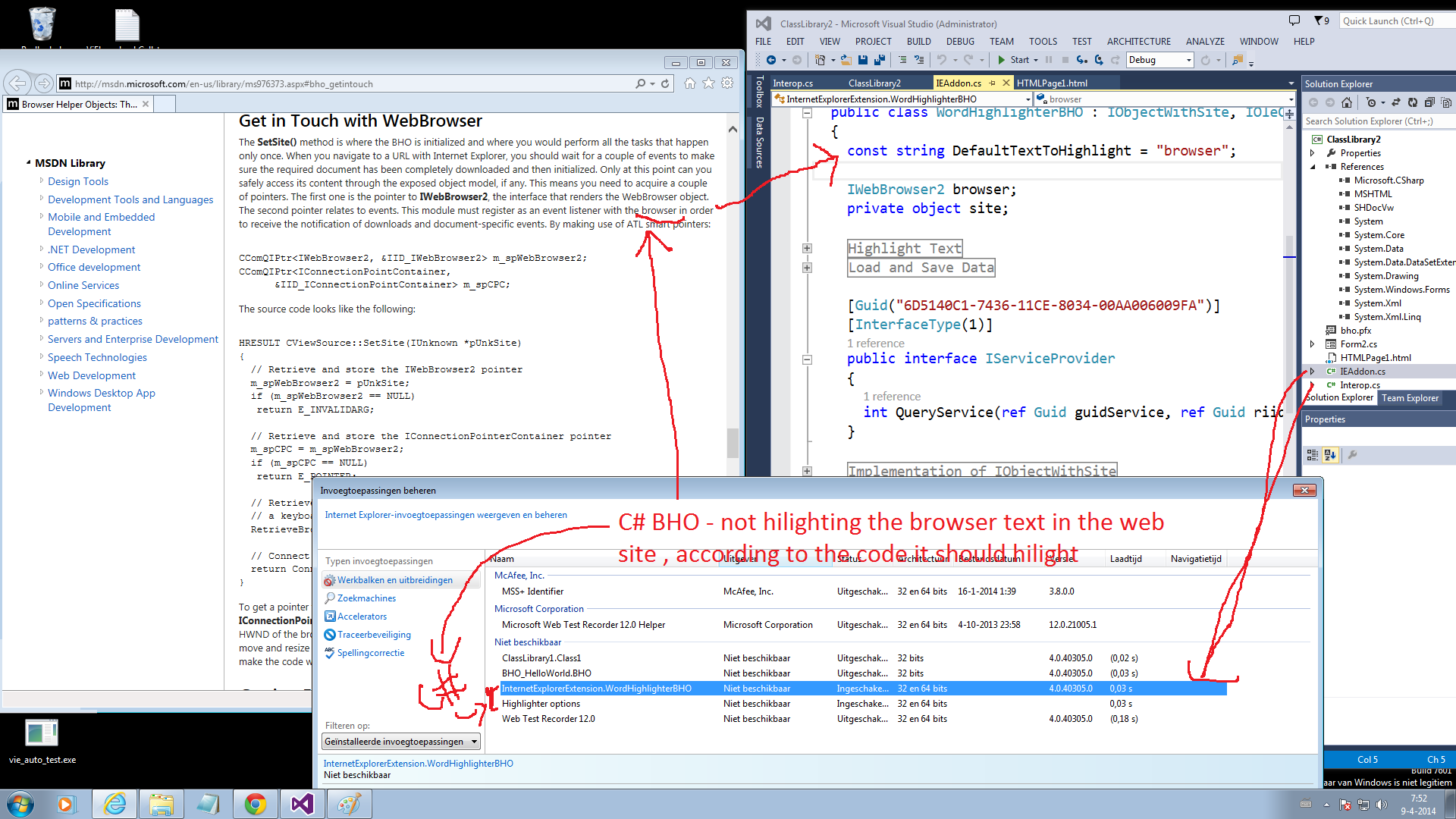
1)我试图在C#中做一个简单的BHO,就像这里已经回答过的:https://stackoverflow.com/a/5740004/285594
但不幸的是,他们都比IE11尝试得少,在那里,有些人成功了,有些人也失败了
3)在遵循了答案中提到的所有内容之后,我还购买了官方代码签名,但它在IE11 Windows 7 64位中根本不起作用。
您可以下载Visual 2013:的准备版本,其中包括IE11的所有源代码和详细信息:
https://www.dropbox.com/s/60kg212vkjb7yud/ClassLibrary2.rar
问:有谁能给我建议/建议/帮助,让我怎样才能让这个波霍人的世界变得更好呢?
我也尝试过其他的代码项目的样本,但他们中的任何一个我还没能做好工作,从4周开始,我就迷路了,请告诉我的ClassLibrary2.rar 2. was中有什么不适合使用“浏览器”的文本吗?
我完全迷路了,请告诉我。
编辑:
IEAddon.cs
using System;
using System.Collections.Generic;
using System.Runtime.InteropServices;
using System.Windows.Forms;
using Microsoft.Win32;
using mshtml;
using SHDocVw;

namespace InternetExplorerExtension
{
  [ComVisible(true)]
  [ClassInterface(ClassInterfaceType.None)]
  [Guid("D40C654D-7C51-4EB3-95B2-1E23905C2A2D")]
  [ProgId("MyBHO.WordHighlighter")]
  public class WordHighlighterBHO : IObjectWithSite, IOleCommandTarget
  {
    const string DefaultTextToHighlight = "browser";

    IWebBrowser2 browser;
    private object site;

    #region Highlight Text
    void OnDocumentComplete(object pDisp, ref object URL)
    {
      try
      {

        // This will prevent this method being executed more than once.
        if (pDisp != this.site)
          return;

        var document2 = browser.Document as IHTMLDocument2;
        var document3 = browser.Document as IHTMLDocument3;

        var window = document2.parentWindow;
        window.execScript(@"function FncAddedByAddon() { alert('Message added by addon.'); }");

        Queue<IHTMLDOMNode> queue = new Queue<IHTMLDOMNode>();
        foreach (IHTMLDOMNode eachChild in document3.childNodes)
          queue.Enqueue(eachChild);

        while (queue.Count > 0)
        {
          // replacing desired text with a highlighted version of it
          var domNode = queue.Dequeue();

          var textNode = domNode as IHTMLDOMTextNode;
          if (textNode != null)
          {
            if (textNode.data.Contains(TextToHighlight))
            {
              var newText = textNode.data.Replace(TextToHighlight, "<span style='background-color: yellow; cursor: hand;' onclick='javascript:FncAddedByAddon()' title='Click to open script based alert window.'>" + TextToHighlight + "</span>");
              var newNode = document2.createElement("span");
              newNode.innerHTML = newText;
              domNode.replaceNode((IHTMLDOMNode)newNode);
            }
          }
          else
          {
            // adding children to collection
            var x = (IHTMLDOMChildrenCollection)(domNode.childNodes);
            foreach (IHTMLDOMNode eachChild in x)
            {
              if (eachChild is mshtml.IHTMLScriptElement)
                continue;
              if (eachChild is mshtml.IHTMLStyleElement)
                continue;

              queue.Enqueue(eachChild);
            }
          }
        }
      }
      catch (Exception ex)
      {
        MessageBox.Show(ex.Message);
      }
    }
    #endregion
    #region Load and Save Data
    static string TextToHighlight = DefaultTextToHighlight;
    public static string RegData = "Software\\MyIEExtension";

    [DllImport("ieframe.dll")]
    public static extern int IEGetWriteableHKCU(ref IntPtr phKey);

    private static void SaveOptions()
    {
      // In IE 7,8,9,(desktop)10 tabs run in Protected Mode
      // which prohibits writes to HKLM, HKCU.
      // Must ask IE for "Writable" registry section pointer
      // which will be something like HKU/S-1-7***/Software/AppDataLow/
      // In "metro" IE 10 mode, tabs run in "Enhanced Protected Mode"
      // where BHOs are not allowed to run, except in edge cases.
      // see http://blogs.msdn.com/b/ieinternals/archive/2012/03/23/understanding-ie10-enhanced-protected-mode-network-security-addons-cookies-metro-desktop.aspx
      IntPtr phKey = new IntPtr();
      var answer = IEGetWriteableHKCU(ref phKey);
      RegistryKey writeable_registry = RegistryKey.FromHandle(
          new Microsoft.Win32.SafeHandles.SafeRegistryHandle(phKey, true)
      );
      RegistryKey registryKey = writeable_registry.OpenSubKey(RegData, true);

      if (registryKey == null)
        registryKey = writeable_registry.CreateSubKey(RegData);
      registryKey.SetValue("Data", TextToHighlight);

      writeable_registry.Close();
    }
    private static void LoadOptions()
    {
      // In IE 7,8,9,(desktop)10 tabs run in Protected Mode
      // which prohibits writes to HKLM, HKCU.
      // Must ask IE for "Writable" registry section pointer
      // which will be something like HKU/S-1-7***/Software/AppDataLow/
      // In "metro" IE 10 mode, tabs run in "Enhanced Protected Mode"
      // where BHOs are not allowed to run, except in edge cases.
      // see http://blogs.msdn.com/b/ieinternals/archive/2012/03/23/understanding-ie10-enhanced-protected-mode-network-security-addons-cookies-metro-desktop.aspx
      IntPtr phKey = new IntPtr();
      var answer = IEGetWriteableHKCU(ref phKey);
      RegistryKey writeable_registry = RegistryKey.FromHandle(
          new Microsoft.Win32.SafeHandles.SafeRegistryHandle(phKey, true)
      );
      RegistryKey registryKey = writeable_registry.OpenSubKey(RegData, true);

      if (registryKey == null)
        registryKey = writeable_registry.CreateSubKey(RegData);
      registryKey.SetValue("Data", TextToHighlight);

      if (registryKey == null)
      {
        TextToHighlight = DefaultTextToHighlight;
      }
      else
      {
        TextToHighlight = (string)registryKey.GetValue("Data");
      }
      writeable_registry.Close();
    }
    #endregion

    [Guid("6D5140C1-7436-11CE-8034-00AA006009FA")]
    [InterfaceType(1)]
    public interface IServiceProvider
    {
      int QueryService(ref Guid guidService, ref Guid riid, out IntPtr ppvObject);
    }

    #region Implementation of IObjectWithSite
    int IObjectWithSite.SetSite(object site)
    {
      this.site = site;

      if (site != null)
      {
        LoadOptions();

        var serviceProv = (IServiceProvider)this.site;
        var guidIWebBrowserApp = Marshal.GenerateGuidForType(typeof(IWebBrowserApp)); // new Guid("0002DF05-0000-0000-C000-000000000046");
        var guidIWebBrowser2 = Marshal.GenerateGuidForType(typeof(IWebBrowser2)); // new Guid("D30C1661-CDAF-11D0-8A3E-00C04FC9E26E");
        IntPtr intPtr;
        serviceProv.QueryService(ref guidIWebBrowserApp, ref guidIWebBrowser2, out intPtr);

        browser = (IWebBrowser2)Marshal.GetObjectForIUnknown(intPtr);

        ((DWebBrowserEvents2_Event)browser).DocumentComplete +=
            new DWebBrowserEvents2_DocumentCompleteEventHandler(this.OnDocumentComplete);
      }
      else
      {
        ((DWebBrowserEvents2_Event)browser).DocumentComplete -=
            new DWebBrowserEvents2_DocumentCompleteEventHandler(this.OnDocumentComplete);
        browser = null;
      }
      return 0;
    }
    int IObjectWithSite.GetSite(ref Guid guid, out IntPtr ppvSite)
    {
      IntPtr punk = Marshal.GetIUnknownForObject(browser);
      int hr = Marshal.QueryInterface(punk, ref guid, out ppvSite);
      Marshal.Release(punk);
      return hr;
    }
    #endregion
    #region Implementation of IOleCommandTarget
    int IOleCommandTarget.QueryStatus(IntPtr pguidCmdGroup, uint cCmds, ref OLECMD prgCmds, IntPtr pCmdText)
    {
      return 0;
    }
    int IOleCommandTarget.Exec(IntPtr pguidCmdGroup, uint nCmdID, uint nCmdexecopt, IntPtr pvaIn, IntPtr pvaOut)
    {
      try
      {
        // Accessing the document from the command-bar.
        var document = browser.Document as IHTMLDocument2;
        var window = document.parentWindow;
        var result = window.execScript(@"alert('You will now be allowed to configure the text to highlight...');");

        var form = new HighlighterOptionsForm();
        form.InputText = TextToHighlight;
        if (form.ShowDialog() != DialogResult.Cancel)
        {
          TextToHighlight = form.InputText;
          SaveOptions();
        }
      }
      catch (Exception ex)
      {
        MessageBox.Show(ex.Message);
      }

      return 0;
    }
    #endregion

    #region Registering with regasm
    public static string RegBHO = "Software\\Microsoft\\Windows\\CurrentVersion\\Explorer\\Browser Helper Objects";
    public static string RegCmd = "Software\\Microsoft\\Internet Explorer\\Extensions";

    [ComRegisterFunction]
    public static void RegisterBHO(Type type)
    {
      string guid = type.GUID.ToString("B");

      // BHO
      {
        RegistryKey registryKey = Registry.LocalMachine.OpenSubKey(RegBHO, true);
        if (registryKey == null)
          registryKey = Registry.LocalMachine.CreateSubKey(RegBHO);
        RegistryKey key = registryKey.OpenSubKey(guid);
        if (key == null)
          key = registryKey.CreateSubKey(guid);
        key.SetValue("Alright", 1);
        registryKey.Close();
        key.Close();
      }

      // Command
      {
        RegistryKey registryKey = Registry.LocalMachine.OpenSubKey(RegCmd, true);
        if (registryKey == null)
          registryKey = Registry.LocalMachine.CreateSubKey(RegCmd);
        RegistryKey key = registryKey.OpenSubKey(guid);
        if (key == null)
          key = registryKey.CreateSubKey(guid);
        key.SetValue("ButtonText", "Highlighter options");
        key.SetValue("CLSID", "{1FBA04EE-3024-11d2-8F1F-0000F87ABD16}");
        key.SetValue("ClsidExtension", guid);
        key.SetValue("Icon", "");
        key.SetValue("HotIcon", "");
        key.SetValue("Default Visible", "Yes");
        key.SetValue("MenuText", "&Highlighter options");
        key.SetValue("ToolTip", "Highlighter options");
        //key.SetValue("KeyPath", "no");
        registryKey.Close();
        key.Close();
      }
    }

    [ComUnregisterFunction]
    public static void UnregisterBHO(Type type)
    {
      string guid = type.GUID.ToString("B");
      // BHO
      {
        RegistryKey registryKey = Registry.LocalMachine.OpenSubKey(RegBHO, true);
        if (registryKey != null)
          registryKey.DeleteSubKey(guid, false);
      }
      // Command
      {
        RegistryKey registryKey = Registry.LocalMachine.OpenSubKey(RegCmd, true);
        if (registryKey != null)
          registryKey.DeleteSubKey(guid, false);
      }
    }
    #endregion
  }
}回答 3
Stack Overflow用户
发布于 2014-04-24 03:57:08
我也在尝试做同样的事情--我刚刚注意到在构建日志中有一个错误
将程序集添加到缓存中失败:尝试安装没有强名称的程序集
因此,我添加了*.snk和高亮显示工作(使用ie11 to,x64),但“突出显示选项”菜单项不起作用
Stack Overflow用户
发布于 2014-04-11 05:59:23
虽然您的IE11运行在64位Windows中,但是默认的IE实例是32位版本。需要启用增强保护模式,以便IE11在64位模式下运行。
另一个技巧是32位IE,你必须注册32位扩展,反之亦然,64位。我的建议如下:
- 确保您的IE11模式为32位或64位
- 只注册32位或64位扩展,如果两者都注册,扩展也不能工作。您必须重新检查您的注册表,以删除一个不必要的
Stack Overflow用户
发布于 2016-09-07 12:35:13
我热情地建议您,这篇帕维尔·佐尼科夫的文章发表于2002年!
http://www.codeproject.com/Articles/2219/Extending-Explorer-with-Band-Objects-using-NET-and
它基于Band对象的使用,并使用.Net 2.0编译。正如您将在文章注释中看到的那样,它在IE 11以及Windows 7和Windows 10上运行得非常好。教程源代码是提供的,并且在Visual 2013中打开和编译得很好。享受吧!
https://stackoverflow.com/questions/22953571
复制相似问题
腾讯云开发者

Copyright © 2013 - 2026 Tencent Cloud. All Rights Reserved. 腾讯云 版权所有
深圳市腾讯计算机系统有限公司 ICP备案/许可证号:粤B2-20090059  粤公网安备44030502008569号
腾讯云计算(北京)有限责任公司 京ICP证150476号 | 京ICP备11018762号