
如何使雪碧在cocos2d中呈正弦波运动?
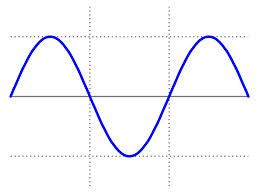
我有一个精灵(例如纸飞机)。我想让它像下面的图片那样移动。我可以使用大量的MoveTo和RotateBy操作来按点定义路径,但对我来说,这似乎是个坏主意。如何实施呢?
回答 3
Stack Overflow用户
发布于 2014-04-06 13:21:35
我认为,如果您对雪碧有明确的控制,那么发布一个说明更新将如何工作的基本知识的答案可能会更好。
我不确定您是在使用Cocos2d还是Cocos2d-X,但是这种技术在这两种情况下都适用。代码在C++中使用Cocos2d-x。
这个想法是,基于时间,你(手动)更新了精灵的位置。自动画开始以来的秒数决定了雪碧在任何时间的位置。这条线名义上遵循一条从(x0,y0)到(x1,y0)的直线。然后,你可以将这条线投射到一条以任何角度绘制的线上,使用一些三角函数。这给了沿着任何方向的正弦路径的能力。
下面是基本代码(主要工作是用UpdateAnimation()完成的):
// This assumes the frame rate is relatively constant
// at 60 fps.
const double SECONDS_PER_TICK = 1.0/60;
const double DURATION = 8.0;     // Seconds for total animation.
const double X_START = 100;      // Pixels
const double Y_START = 200;      // Pixels
const double X_STOP = 800;      // Pixels
const double X_SPEED = (X_STOP-X_START)/DURATION;
const double Y_PERIOD = 4.0;     // Seconds for y cycle.
const double Y_HEIGHT = 100;
const double LAUNCH_ANGLE = M_PI/4; // Angle for line.
const CCPoint ANCHOR(X_START,Y_START);

CCPoint RotatePointAboutAnchor(const CCPoint& pt,double theta,const CCPoint& anchor)
{
   double xPrime = cos(theta) * (pt.x-anchor.x) - sin(theta) * (pt.y-anchor.y) + anchor.x;
   double yPrime = sin(theta) * (pt.x-anchor.x) + cos(theta) * (pt.y-anchor.y) + anchor.y;

   return CCPoint(xPrime,yPrime);
}


void HelloWorld::InitAnimation()
{
   _ticks = 0;
   _ticksTotal = DURATION/SECONDS_PER_TICK;
}

void HelloWorld::UpdateAnimation()
{
   if(_ticks <= _ticksTotal)
   {
      double seconds = _ticks*SECONDS_PER_TICK;
      double xPos = X_START + seconds*X_SPEED;
      double yPos = Y_START + Y_HEIGHT*sin(seconds*2*M_PI/Y_PERIOD);
      CCPoint pos = RotatePointAboutAnchor(CCPoint(xPos,yPos), LAUNCH_ANGLE, ANCHOR);
      // Set the position of the sprite
      _sprite->setPosition(pos);

      CCLOG("Tick: %d, Seconds: %5.2f, Position: (%f,%f)",_ticks,seconds,pos.x,pos.y);
      if(_ticks%10 == 0)
      {  // Add a trail
         CCSprite* marker = CCSprite::create("Icon-72.png");
         marker->setScale(0.1);
         marker->setPosition(_sprite->getPosition());
         marker->setZOrder(50);
         addChild(marker);
      }
      // Increment the ticks count for next time.
      _ticks++;
   }
}

void HelloWorld::draw()
{
   CCLayer::draw();
   CCPoint start;
   CCPoint stop;

   start = RotatePointAboutAnchor(CCPoint(X_START,Y_START), LAUNCH_ANGLE, ANCHOR);
   stop = RotatePointAboutAnchor(CCPoint(X_STOP,Y_START), LAUNCH_ANGLE, ANCHOR);
   ccDrawLine(start,stop);

   start = RotatePointAboutAnchor(CCPoint(X_START,Y_START+Y_HEIGHT), LAUNCH_ANGLE, ANCHOR);
   stop = RotatePointAboutAnchor(CCPoint(X_STOP,Y_START+Y_HEIGHT), LAUNCH_ANGLE, ANCHOR);
   ccDrawLine(start,stop);

   start = RotatePointAboutAnchor(CCPoint(X_START,Y_START-Y_HEIGHT), LAUNCH_ANGLE, ANCHOR);
   stop = RotatePointAboutAnchor(CCPoint(X_STOP,Y_START-Y_HEIGHT), LAUNCH_ANGLE, ANCHOR);
   ccDrawLine(start,stop);
}

void HelloWorld::onEnterTransitionDidFinish()
{
   InitAnimation();
   scheduleUpdate();
}

void HelloWorld::onExitTransitionDidStart()
{
   unscheduleUpdate();
}

void HelloWorld::update(float dt)
{
   UpdateAnimation();
}
我画了一些标记来显示路径,也画了“围绕”应该遵循的路径的线。如下所示:
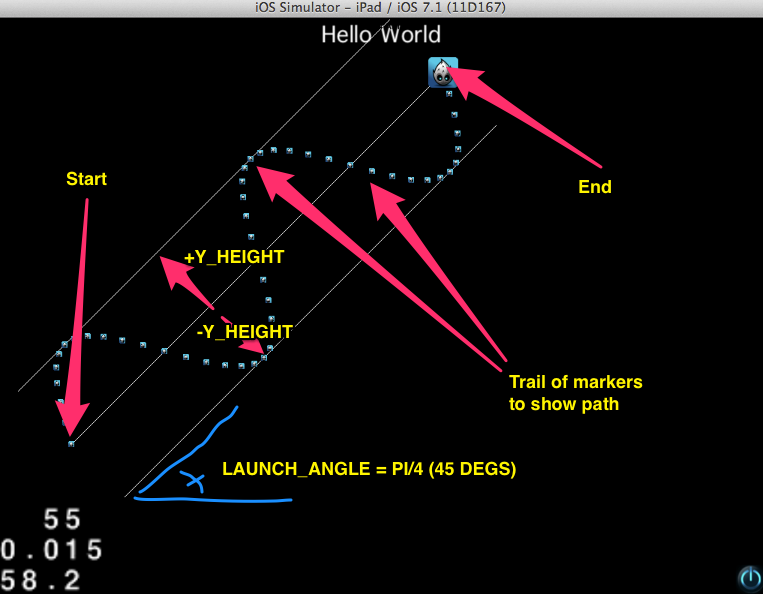
您可以根据需要更改LAUNCH_ANGLE,使其沿着不同的角度移动。
显然不是生产代码,但它确实演示了这样的思想,即您可以在任意方向上遵循正弦路径。您应该将它封装成更符合您的应用程序的内容。
整个代码库是available on git hub。
还有更多关于这个in this blog的文章。
Stack Overflow用户
发布于 2014-04-06 11:24:46
有一个行动,推动一个精灵沿着一条道路,并定向到这条道路。不是在我的电脑自动取款机,而是会设法找到它的。
给你..。ref/doc/uid/TP40013017-CH1-SW3
实际上,你可能会把重复的序列连在一起,上下移动,向前移动,这样就可以产生正弦运动。
Stack Overflow用户
发布于 2018-05-04 16:49:22
谢谢你的提问!正弦波cocos2d作用于以下:)
class NDActionSineMoveBy : public ActionInterval
{
public:
    static NDActionSineMoveBy* create(float duration, float sines, float sineSize, const Vec2& deltaPosition);

    //
    // Overrides
    //
    virtual NDActionSineMoveBy* clone() const override;
    virtual NDActionSineMoveBy* reverse() const  override;
    virtual void startWithTarget(Node *target) override;
    /**
    * @param time in seconds
    */
    virtual void update(float time) override;

CC_CONSTRUCTOR_ACCESS:
    NDActionSineMoveBy() {}
    virtual ~NDActionSineMoveBy() {}

    /** initializes the action */
    bool initWithDuration(float duration, float sines, float sineSize, const Vec2& deltaPosition);

protected:
    Vec2 rotate(const Vec2 & point, float angle, const Vec2 & anchor);

protected:
    float _sines;
    float _sineSize;
    float _baseAngle;
    Vec2  _positionDelta;
    Vec2  _startPosition;
    Vec2  _previousPosition;

    float _currentAngle;
    float _distance;

private:
    CC_DISALLOW_COPY_AND_ASSIGN(NDActionSineMoveBy);
};NDActionSineMoveBy* NDActionSineMoveBy::create(float duration, float sines, float sineSize, const Vec2& deltaPosition)
{
NDActionSineMoveBy *ret = new (std::nothrow) NDActionSineMoveBy();
if (ret && ret->initWithDuration(duration, sines, sineSize, deltaPosition))
{
ret->autorelease();
return ret;
}
delete ret;
return nullptr;
}
bool NDActionSineMoveBy::initWithDuration(float duration, float sines, float sineSize, const Vec2& deltaPosition)
{
bool ret = false;
if (ActionInterval::initWithDuration(duration))
{
_sines = sines;
_sineSize = sineSize;
_positionDelta = deltaPosition;
_baseAngle = atan2f(_positionDelta.y, _positionDelta.x);
_currentAngle = _sines * (M_PI * 2);
ret = true;
}
return ret;
}
NDActionSineMoveBy* NDActionSineMoveBy::clone() const
{
// no copy constructor
return NDActionSineMoveBy::create(_duration, _sines, _sineSize, _positionDelta);
}
void NDActionSineMoveBy::startWithTarget(Node *target)
{
ActionInterval::startWithTarget(target);
_previousPosition = _startPosition = target->getPosition();
_distance = _positionDelta.length();
}
NDActionSineMoveBy* NDActionSineMoveBy::reverse() const
{
return NDActionSineMoveBy::create(_duration, _sines, _sineSize, -_positionDelta);
}
void NDActionSineMoveBy::update(float t)
{
if (_target)
{
Vec2 newPos;
newPos.x = _distance * t;
newPos.y = sin(_currentAngle * t) * _sineSize;
newPos = rotate(newPos, _baseAngle, Vec2::ZERO);
#if CC_ENABLE_STACKABLE_ACTIONS
Vec2 currentPos = _target->getPosition();
Vec2 diff = currentPos - _previousPosition;
_startPosition = _startPosition + diff;
newPos += _startPosition;
_target->setPosition(newPos);
_previousPosition = newPos;
#else
newPos += _startPosition;
_target->setPosition(newPos);
#endif // CC_ENABLE_STACKABLE_ACTIONS
}
}
Vec2 NDActionSineMoveBy::rotate(const Vec2& point, float angle, const Vec2& anchor)
{
Vec2 res;
res.x = cos(angle) * (point.x - anchor.x) - sin(angle) * (point.y - anchor.y) + anchor.x;
res.y = sin(angle) * (point.x - anchor.x) + cos(angle) * (point.y - anchor.y) + anchor.y;
return res;
};
https://stackoverflow.com/questions/22893171
复制相似问题
腾讯云开发者

Copyright © 2013 - 2026 Tencent Cloud. All Rights Reserved. 腾讯云 版权所有
深圳市腾讯计算机系统有限公司 ICP备案/许可证号:粤B2-20090059  粤公网安备44030502008569号
腾讯云计算(北京)有限责任公司 京ICP证150476号 | 京ICP备11018762号