
谷歌地图>地点搜索不定向
谷歌地图>地点搜索不定向
提问于 2014-04-05 03:47:54
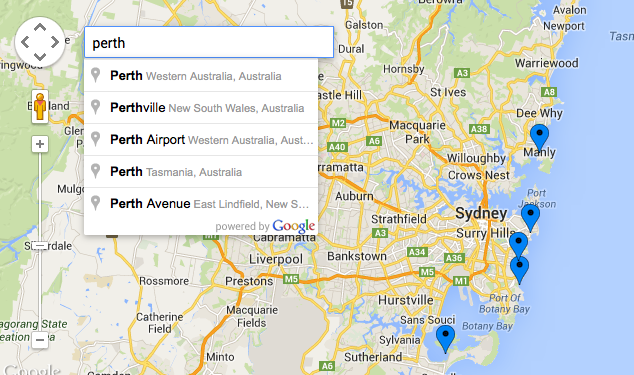
我正在使用Google (v3)创建一个光荣的位置/商店发现。除了places框的附加部分(在这里描述:https://developers.google.com/maps/documentation/javascript/examples/places-searchbox)之外,一切都很正常。
到目前为止,我已经成功地连接到搜索框(附件),但无法使地图自身定位或在所选位置上放置一个引脚。显然,这与搜索框没有绑定到地图有关.我对这一切都是新手,所以这是我最好的猜测。
任何帮助都将不胜感激。
var map;
    function initialize() {
        var mapOptions = {
            zoom: 10,
            scrollwheel: false,
            center: new google.maps.LatLng(-33.9, 151.2)
        };
        map = new google.maps.Map(document.getElementById('map-canvas'),
        mapOptions);

        setMarkers(map, beaches);

        infowindow = new google.maps.InfoWindow({
            content: "loading..."
        });


        // Create the search box and link it to the UI element.
  var input = /** @type {HTMLInputElement} */(
      document.getElementById('pac-input'));
  map.controls[google.maps.ControlPosition.TOP_LEFT].push(input);

  var searchBox = new google.maps.places.SearchBox(
    /** @type {HTMLInputElement} */(input));

  // [START region_getplaces]
  // Listen for the event fired when the user selects an item from the
  // pick list. Retrieve the matching places for that item.
  google.maps.event.addListener(searchBox, 'places_changed', function() {
    var places = searchBox.getPlaces();

    for (var i = 0, marker; marker = markers[i]; i++) {
      marker.setMap(null);
    }

    // For each place, get the icon, place name, and location.
    markers = [];
    var bounds = new google.maps.LatLngBounds();
    for (var i = 0, place; place = places[i]; i++) {
      var image = {
        url: place.icon,
        size: new google.maps.Size(71, 71),
        origin: new google.maps.Point(0, 0),
        anchor: new google.maps.Point(17, 34),
        scaledSize: new google.maps.Size(25, 25)
      };

      // Create a marker for each place.
      var marker = new google.maps.Marker({
        map: map,
        icon: image,
        title: place.name,
        position: place.geometry.location
      });

      markers.push(marker);

      bounds.extend(place.geometry.location);
    }

    map.fitBounds(bounds);
  });
  // [END region_getplaces]

  // Bias the SearchBox results towards places that are within the bounds of the
  // current map's viewport.
  google.maps.event.addListener(map, 'bounds_changed', function() {
    var bounds = map.getBounds();
    searchBox.setBounds(bounds);
  });

    }

    var beaches = [
      ['Bondi Beach', -33.890542, 151.274856, 4],
      ['Coogee Beach', -33.923036, 151.259052, 5],
      ['Cronulla Beach', -34.028249, 151.157507, 3],
      ['Manly Beach', -33.80010128657071, 151.28747820854187, 2],
      ['Maroubra Beach', -33.950198, 151.259302, 1]
    ];

    function setMarkers(map, locations) {
        var image = {
            //url: '../assets/img/icon_mapPin.png',
            url: 'https://jira.appcelerator.org/secure/attachment/35489/map-pin.png',
            // This marker is 20 pixels wide by 32 pixels tall.
            size: new google.maps.Size(20, 29),
            // The origin for this image is 0,0.
            origin: new google.maps.Point(0,0),
            // The anchor for this image is the base of the flagpole at 0,32.
            anchor: new google.maps.Point(10, 29)
        };

        var shape = {
            coord: [1, 1, 1, 20, 29, 20, 29 , 1],
            type: 'poly'
        };
        for (var i = 0; i < locations.length; i++) {
            var beach = locations[i];
            var myLatLng = new google.maps.LatLng(beach[1], beach[2]);
            var marker = new google.maps.Marker({
                position: myLatLng,
                map: map,
                icon: image,
                shape: shape,
                title: beach[0],
                zIndex: beach[3],
                html: beach[0]
            });

            var contentString = '<div class="siteNotice">'+beach[1]+'</div>';

            google.maps.event.addListener(marker, "click", function () {
                infowindow.setContent(contentString);
                infowindow.open(map, this);
            });
        }
    }
    google.maps.event.addDomListener(window, 'load', initialize);
回答 1
Stack Overflow用户
回答已采纳
发布于 2014-04-05 03:59:29
报告的错误:
Uncaught ReferenceError: markers is not defined 应该定义和正确设置markers数组,如
var map;

function initialize() {
    var markers = [];
...页面原文内容由Stack Overflow提供。腾讯云小微IT领域专用引擎提供翻译支持
原文链接:
https://stackoverflow.com/questions/22876350
复制相关文章
相似问题
腾讯云开发者

Copyright © 2013 - 2026 Tencent Cloud. All Rights Reserved. 腾讯云 版权所有
深圳市腾讯计算机系统有限公司 ICP备案/许可证号:粤B2-20090059  粤公网安备44030502008569号
腾讯云计算(北京)有限责任公司 京ICP证150476号 | 京ICP备11018762号