
安卓相机参数setPictureSize产生条纹图像
我正试着用Android相机拍张照片。我有一个要求捕捉一个1600 (w) x 1200 (h)图像(第三方供应商的要求)。我的代码在许多手机摄像头上似乎运行良好,但setPictureSize在一些手机(三星Galaxy S4,三星Galaxy )上造成崩溃,在其他手机(Nexus7平板电脑)上造成一张有条纹的图片。至少在Nexus上,我想要的大小出现在getSupportPictureSizes列表中。
我试过指定方向,但没有帮助。用默认的图片大小拍摄图片很好。
下面是裸奔的一个例子:
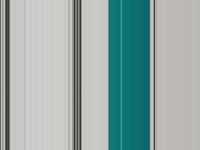
对于我的图像捕获,我有一个要求1600x1200,jpg,30%的压缩,所以我捕获一个JPG文件。
我想我有三个选择: 1)想出如何在不发生崩溃或划线的情况下捕获1600x1200大小,或者2)想出如何将默认图片大小更改为1600x1200。( 3)我目前所不知道的其他事情。
我发现其他一些帖子也有类似的问题,但并不完全相同。我正在尝试的第二天,但没有找到解决办法。这里有一个帖子是很接近的:
Camera picture to Bitmap results in messed up image (所有的建议都帮不了我)
下面是我的代码中运行良好的部分,直到我遇到S4/Note/Nexus 7。
Camera.Parameters parameters = mCamera.getParameters();
Camera.Size size = getBestPreviewSize(width, height, parameters);

if (size != null) {
    int pictureWidth = 1600;
    int pictureHeight = 1200;

    // testing
    Camera.Size test = parameters.getPictureSize();
    List<Camera.Size> testSizes = parameters.getSupportedPictureSizes();
    for ( int i = 0; i < testSizes.size(); i++ ) {
        test = testSizes.get(i);
    }

    test = testSizes.get(3);
    // get(3) is 1600 x 1200
    pictureWidth = test.width;
    pictureHeight = test.height;

    parameters.setPictureFormat(ImageFormat.JPEG);
    parameters.setPictureSize(pictureWidth, pictureHeight);
    parameters.setJpegQuality(30);
    parameters.setPreviewSize(size.width, size.height);

    // catch any exception
    try {
        // make sure the preview is stopped
        mCamera.stopPreview();

        mCamera.setParameters(parameters);
        didConfig = true;
    catch(Exception e) {
        // some error presentation was removed for brevity
        // since didConfig not set to TRUE it will fail gracefully
    }
}
下面是我的代码中保存JPG文件的部分:
PictureCallback jpegCallback = new PictureCallback() {
    public void onPictureTaken(byte[] data, Camera camera) {
        if ( data.length > 0 ) {

            String fileName = "image.jpg";

            File file = new File(getFilesDir(), fileName);
                String filePath = file.getAbsolutePath();

             boolean goodWrite = false;
             try {
                 OutputStream os = new FileOutputStream(file);
                 os.write(data);
                 os.close();

                goodWrite = true;
            } catch (IOException e) {
                 goodWrite = false;
             }

             if ( goodWrite ) {
                // go on to the Preview
             } else {
                // TODO return an error to the calling activity
             }

        }

        Log.d(TAG, "onPictureTaken - jpeg");
    }
};
任何建议,如何正确设置相机参数拍照,或如何裁剪或调整大小的结果照片将是很好的。特别是如果它将与旧相机(API级别8或更高版本)工作!根据需要的全部宽度的图片,我只能裁剪出顶部。
谢谢!
编辑:下面是我最后做的事情:
我从处理Camera.Parameters getSupportedPictureSizes开始,使用的第一个getSupportedPictureSizes的高度和宽度都大于我想要的大小,并且宽度:高度比相同。我把相机参数设置为那个图片大小。
一旦拍下了照片:
BitmapFactory.Options options = new BitmapFactory.Options();;
options.inPurgeable = true;

// convert the byte array to a bitmap, taking care to allow for garbage collection
Bitmap original = BitmapFactory.decodeByteArray(input , 0, input.length, options);
// resize the bitmap to my desired scale
Bitmap resized = Bitmap.createScaledBitmap(original, 1600, 1200, true);

// create a new byte array and output the bitmap to a compressed JPG
ByteArrayOutputStream blob = new ByteArrayOutputStream();
resized.compress(Bitmap.CompressFormat.JPEG, 30, blob);

// recycle the memory since bitmaps seem to have slightly different garbage collection
original.recycle();
resized.recycle();

byte[] desired = blob.toByteArray();
然后,我将所需的jpg写到一个文件中以供上传。
回答 1
Stack Overflow用户
发布于 2014-04-04 14:47:43
test = testSizes.get(3);
// get(3) is 1600 x 1200
不需要数组有4+元素,更不用说第四个元素是1600x1200。
1)想出如何在不发生碰撞或划线的情况下捕获1600x1200大小
不能保证每一个设备都能拍出这样精确的分辨率的照片。不能为分辨率指定任意值--它必须是受支持的图片大小之一。有些设备支持任意值,而其他设备则会给出损坏的输出(如这里的情况),或者会崩溃。
2)解决如何将默认图片大小更改为1600x1200的JPG。
我不知道有一个“默认图片大小”,除此之外,这样的大小将是不变的,因为它是默认的。改变图片大小是你上面的第一个选项。
( 3)我目前所不知道的其他事情。
对于支持两个轴上较大的分辨率的设备,请在该分辨率中拍照,然后裁剪到1600x1200。
对于所有其他设备,其中一个或两个轴都小于所需,以适合您的分辨率拍摄一张照片(最大,最接近4:3宽宽比等),然后拉伸/裁剪以达到1600x1200。
https://stackoverflow.com/questions/22865598
复制相似问题
腾讯云开发者

Copyright © 2013 - 2026 Tencent Cloud. All Rights Reserved. 腾讯云 版权所有
深圳市腾讯计算机系统有限公司 ICP备案/许可证号:粤B2-20090059  粤公网安备44030502008569号
腾讯云计算(北京)有限责任公司 京ICP证150476号 | 京ICP备11018762号