
在ios中显示iPad的侧边栏,就像facebook在景观设计中一样
在ios中显示iPad的侧边栏,就像facebook在景观设计中一样
提问于 2014-04-03 10:04:36
我有一个iPad应用程序,我想在其中实现一个边栏功能,就像我们在facebook应用程序一样。
为此,我使用了这个演示。
有了这个,我成功地实现了侧栏功能,并且它运行得很好,但是我的第一个视图并没有很好地展示给我。
下面是截图。
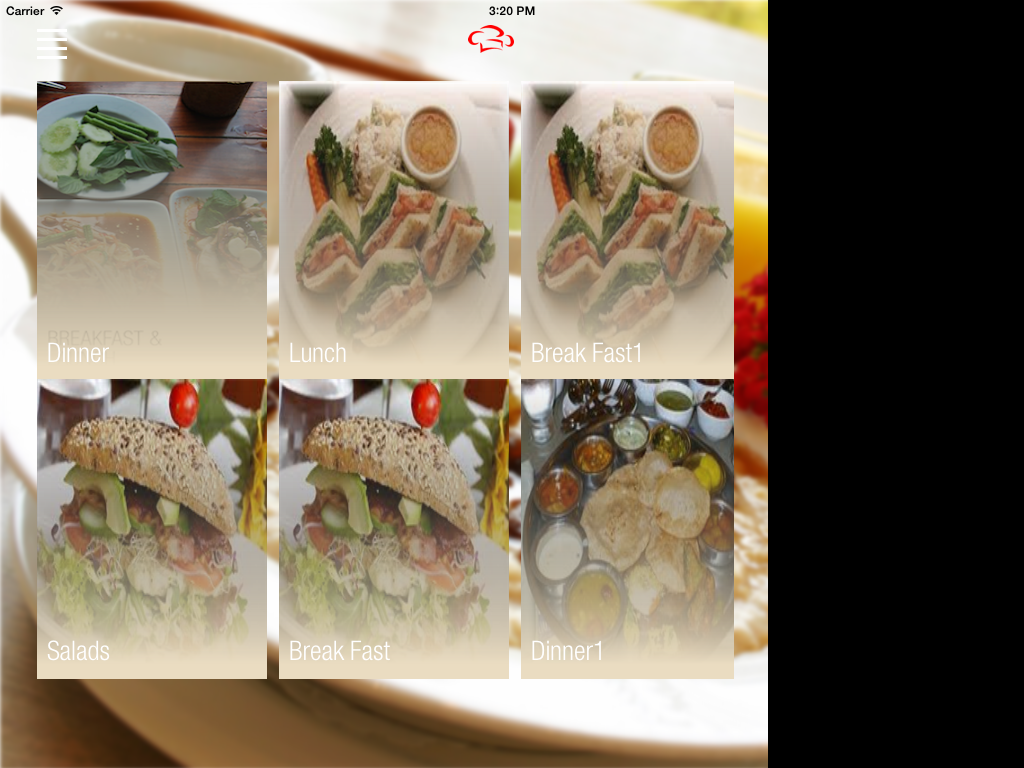
正如你可以从截图中看到的,有一个黑色的背景,当应用程序启动时,我的整个视图没有显示在全屏上。
应该是下面的样子。
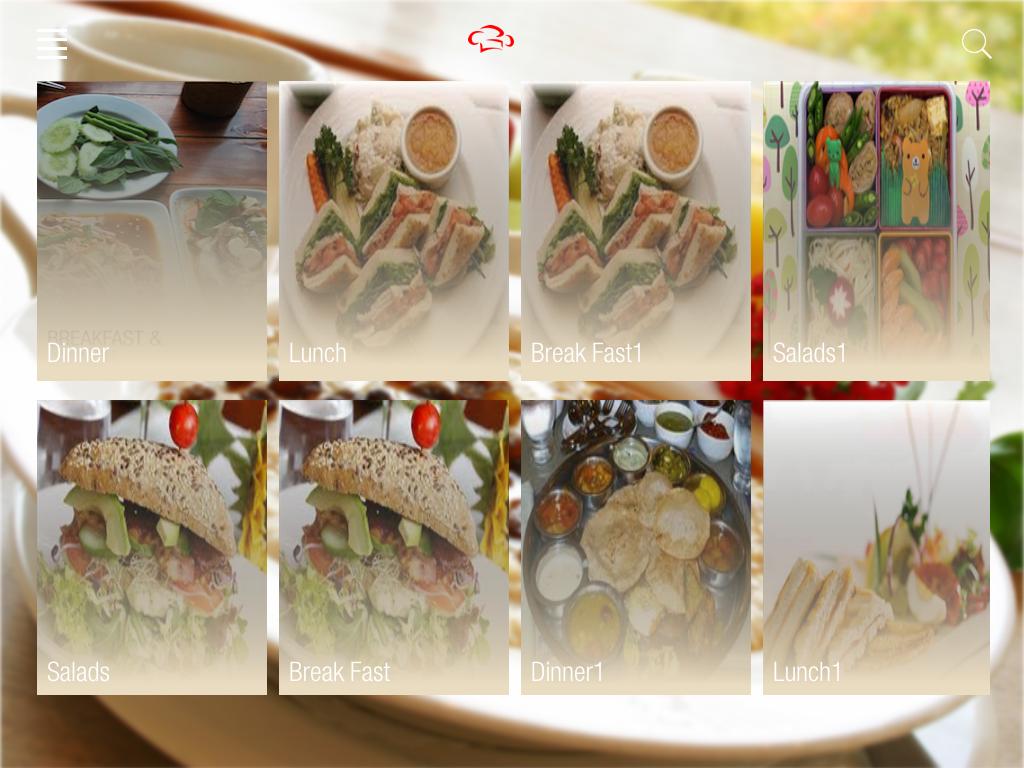
在点击按钮时,侧视显示如下所示。

它应该是小的,因为我已经采取了宽度= 300和高度= 768的视图大小。
但它显示出的比这更大。
以下是我在应用程序委托中更改的代码。
- (BOOL)application:(UIApplication *)application didFinishLaunchingWithOptions:(NSDictionary *)launchOptions
{
    self.window = [[UIWindow alloc] initWithFrame:[[UIScreen mainScreen] bounds]];

    [self createEditableCopyOfDatabaseIfNeeded];

    // Override point for customization after application launch.
    self.viewController = [[ViewController alloc] initWithNibName:@"ViewController" bundle:nil];

    UINavigationController *navController = [[UINavigationController alloc]initWithRootViewController:self.viewController];

    SlidingViewController *slidingView = [[SlidingViewController alloc]initWithNibName:@"SlidingViewController" bundle:nil];

    self.slideMenuController = [[SlideMenuController alloc] initWithCenterViewController:navController];
    self.slideMenuController.leftViewController = slidingView;

    self.window.rootViewController = navController;
    [self.window makeKeyAndVisible];
   return YES;
}

- (IBAction)sideBarPressed:(id)sender
{
    AppDelegate *appDelegate = (AppDelegate *)[[UIApplication sharedApplication] delegate];
    if (appDelegate.slideMenuController.position == TKSlidePositionCenter) {
        [appDelegate.slideMenuController presentLeftViewControllerAnimated:YES];
    } else {
        [appDelegate.slideMenuController presentCenterViewControllerAnimated:YES];
    }
}
我只想为我的iPad 景观模式这样做。
请告诉我这里出了什么问题?
我被困在这里好长一段时间。
任何帮助都将不胜感激。
提前谢谢。
回答 3
Stack Overflow用户
回答已采纳
发布于 2014-04-07 04:20:55
Stack Overflow用户
发布于 2014-04-05 04:12:05
所以更好的你需要使用UISplitViewController
 //in app delegate do like this
 //in appDelegate.h file
 #import <UIKit/UIKit.h>

 @interface AppDelegate : UIResponder <UIApplicationDelegate>

 @property (strong, nonatomic) UIWindow *window;
 @property (nonatomic, retain) UISplitViewController *splitViewCOntroller;
 @end


 //in appDelegate.m file
 #import "AppDelegate.h"
 #import "SplitMasterViewController.h"  //create a UITableviewController
 #import "SplitViewDetailController.h"  //create a UIViewController

  @implementation AppDelegate
  @synthesize splitViewCOntroller = _splitViewCOntroller;

  - (BOOL)application:(UIApplication *)application didFinishLaunchingWithOptions:(NSDictionary *)launchOptions
   {
      // Override point for customization after application launch.
      SplitMasterViewController *masterController  = [[SplitMasterViewController alloc]initWithNibName:@"SplitMasterViewController" bundle:nil]; //this is the master menu controller

     UINavigationController *masterNavController = [[UINavigationController alloc]initWithRootViewController:masterController];

     SplitViewDetailController *detailViewController = [[SplitViewDetailController alloc]initWithNibName:@"SplitViewDetailController" bundle:nil]; //this is the master detail controller


     UINavigationController *detailNavController = [[UINavigationController alloc]initWithRootViewController:detailViewController];
masterController.detailViewController = detailViewController;

    _splitViewCOntroller = [[UISplitViewController alloc]init]; //initilise split controller
    _splitViewCOntroller.delegate = detailViewController;      //set the delegate to detail controller
    _splitViewCOntroller.viewControllers = [NSArray arrayWithObjects:masterNavController,detailNavController, nil]; //set the splitview controller
     self.window.rootViewController = _splitViewCOntroller; //finally your splitviewcontroller as the root view controller
     [self.window makeKeyAndVisible];

     return YES;
 }


 //in SplitMasterViewController.h this must be a table that contains your side bar menu items
 #import "ViewController.h" //comment this if it shows any error
 #import "SplitViewDetailController.h"

 @interface SplitMasterViewController :        UITableViewController<UITableViewDataSource,UITableViewDelegate>
 @property (nonatomic, retain) SplitViewDetailController *detailViewController; //to get the detailview from masterMenu controller
 @property (nonatomic, retain) NSArray *Names;

 @end

 // in SplitMasterViewController.m file
 #import "SplitMasterViewController.h"
 #import "SplitViewDetailController.h"


 @interface SplitMasterViewController ()

 @end

 @implementation SplitMasterViewController

 @synthesize Names;
 @synthesize detailViewController;


 - (id)initWithNibName:(NSString *)nibNameOrNil bundle:(NSBundle *)nibBundleOrNil
 {
     self = [super initWithNibName:nibNameOrNil bundle:nibBundleOrNil];
     if (self) {
     // Custom initialization
      }
     return self;
  }

  - (void)viewDidLoad
  {
    [super viewDidLoad];
    //  Do any additional setup after loading the view from its nib.
    Names = [[NSArray alloc] initWithObjects:@"apple", @"banana",
             @"mango", @"grapes", nil];

    [self.tableView selectRowAtIndexPath:
    [NSIndexPath indexPathForRow:0 inSection:0]
                            animated:NO
                      scrollPosition:UITableViewScrollPositionMiddle];
   }

    - (NSInteger)numberOfSectionsInTableView:(UITableView *)tableView
    {
       return 1;
    }

    - (NSInteger)tableView:(UITableView *)tableView numberOfRowsInSection:(NSInteger)section
    {
      return [Names count];
    }

   - (UITableViewCell *)tableView:(UITableView *)tableView cellForRowAtIndexPath:(NSIndexPath *)indexPath
  {
     static NSString *CellIdentifier = @"Cell";

     UITableViewCell *cell = [tableView
                         dequeueReusableCellWithIdentifier:CellIdentifier];
     if (cell == nil) {
     cell = [[UITableViewCell alloc]
            initWithStyle:UITableViewCellStyleDefault
            reuseIdentifier:CellIdentifier];
        }

    // [self configureCell:cell atIndexPath:indexPath];

    cell.textLabel.text = [Names objectAtIndex:indexPath.row];
    return cell;
   }

   - (void)tableView:(UITableView *)tableView didSelectRowAtIndexPath:(NSIndexPath *)indexPath
 {
     SplitViewDetailController *detailController =  self.detailViewController;
     detailController.myLabel.text = [Names objectAtIndex:indexPath.row]; //set the name from the array
 }

  - (void)didReceiveMemoryWarning
  {
     [super didReceiveMemoryWarning];
     // Dispose of any resources that can be recreated.
  }

  @end


  //in SplitViewDetailController.h
  #import "ViewController.h"

  @interface SplitViewDetailController : UIViewController<UISplitViewControllerDelegate>
  @property (strong, nonatomic) id detailItem;
  @property (strong, nonatomic) IBOutlet UILabel *myLabel;
  @property (nonatomic, retain) UIBarButtonItem *leftBarButtonItem; //to show a button on left side

  @end

 //in SplitViewDetailController.m

 #import "SplitViewDetailController.h"

 @interface SplitViewDetailController ()
 {
   UIPopoverController *masterPopoverController;
 }

 @end

  @implementation SplitViewDetailController

  - (id)initWithNibName:(NSString *)nibNameOrNil bundle:(NSBundle *)nibBundleOrNil
  {
     self = [super initWithNibName:nibNameOrNil bundle:nibBundleOrNil];
     if (self) {
      // Custom initialization
     }
     return self;
  }

  - (void)viewDidLoad
  {
    [super viewDidLoad];
     // _leftBarButtonItem = [[UIBarButtonItem alloc]initWithTitle:@"Menu" style:UIBarButtonItemStyleBordered target:self action:nil];
  }

  - (void)didReceiveMemoryWarning
  {
     [super didReceiveMemoryWarning];
     // Dispose of any resources that can be recreated.
   }


  //these are the call back to detail view controller to hide or show the button
  - (void)splitViewController:(UISplitViewController *)splitController willHideViewController:(UIViewController *)viewController  withBarButtonItem:(UIBarButtonItem *)barButtonItem  forPopoverController:(UIPopoverController *)popoverController
 {
   _leftBarButtonItem = barButtonItem;
   _leftBarButtonItem.style = UIBarButtonItemStyleBordered;
   _leftBarButtonItem.title = @"Menu";
   [self.navigationItem setLeftBarButtonItem:_leftBarButtonItem animated:YES];
  }

  // Called when the view is shown again in the split view, invalidating the button
  - (void)splitViewController:(UISplitViewController *)splitController       willShowViewController:(UIViewController *)viewController invalidatingBarButtonItem:(UIBarButtonItem *)barButtonItem
   {
      [self.navigationItem setLeftBarButtonItem:nil animated:YES];
   }

@endStack Overflow用户
发布于 2014-04-03 10:24:00
页面原文内容由Stack Overflow提供。腾讯云小微IT领域专用引擎提供翻译支持
原文链接:
https://stackoverflow.com/questions/22834254
复制相关文章
相似问题
腾讯云开发者

Copyright © 2013 - 2026 Tencent Cloud. All Rights Reserved. 腾讯云 版权所有
深圳市腾讯计算机系统有限公司 ICP备案/许可证号:粤B2-20090059  粤公网安备44030502008569号
腾讯云计算(北京)有限责任公司 京ICP证150476号 | 京ICP备11018762号