
在phonegap中通过图像创建自定义弹出测试?
在phonegap中通过图像创建自定义弹出测试?
提问于 2014-04-01 10:26:58
我试图弹出一个测试信息在特定的引脚上,但无法做到。点击下面图片中的黄针点时的I've Four different Pin named Red, Blue, Green and Yellow.
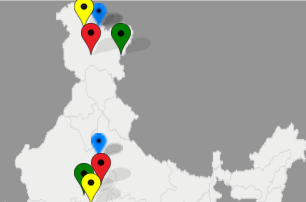
我在下面的图片中看到下面的弹出消息
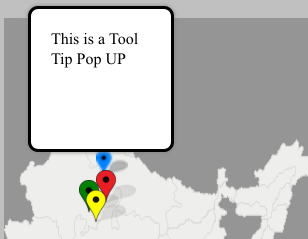
但是,我想在给定的图像样式中显示弹出。
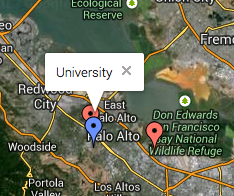
我已经尝试了下面给出的代码
<!DOCTYPE html>
<html>
<head>
    <link rel="stylesheet" type="text/css" href="css/pin.css" />
</head>
<script>
function myfunction()
{
    var div = document.createElement('div');
    div.className += 'popup';
    div.innerHTML = 'This is a Tool Tip Pop UP';
    document.body.appendChild(div);
}
</script>
<body>
  <h2>India Map</h2>
  <img border="0" src="img/indiaMap.png" alt="Pulpit rock" width="308" height="475">

    <div class ="pinArea">
        <img src="img/blue.png" id="redpin" onclick="alert('Hi, I am Blue');"/>
    </div>

    <div class ="pinArea" style=" top:64px;left:83px; position:absolute;" onclick="myfunction()">
        <img src="img/yellow.png" id="redpin" onclick="alert('Hi, I am Blue);"/>
    </div>

    <div class ="pinArea" style=" top:90px;left:90px; position:absolute;">
        <img src="img/red.png" id="redpin" onclick="alert('Hi, I am Blue);"/>
    </div>

    <div class ="pinArea" style=" top:90px;left:120px; position:absolute;">
        <img src="img/green.png" id="redpin" onclick="alert('Hi, I am Blue);"/>
    </div>

    <div class ="pinArea" style="top:200px;">
        <img src="img/blue.png" id="redpin" onclick="alert('Hi, I am Blue);"/>
    </div>

    <div class ="pinArea" style="top:220px; left 120px; position:absolute;">
        <img src="img/red.png" id="redpin" onclick="alert('Hi, I am Blue);"/>
    </div>

    <div class ="pinArea" style="top:230px; left:83px; position:absolute;">
        <img src="img/green.png" id="redpin" onclick="alert('Hi, I am Blue);"/>
    </div>

    <div class ="pinArea" style="top:240px; left:90px; position:absolute;">
        <img src="img/yellow.png" id="redpin" onclick="alert('Hi, I am Blue);"/>
    </div>

    <div class ="pinArea" style="top:300px;">
        <img src="img/blue.png" id="redpin" onclick="alert('Hi, I am Blue);"/>
    </div>

    <div class ="pinArea" style="top:400px; right:">
       <img src="img/blue.png" id="redpin" onclick="alert('Hi, I am Blue);"/>
    </div>

    <div class ="pinArea" style="top:500px;">
        <img src="img/blue.png" id="redpin" onclick="alert('Hi, I am Blue);"/>
    </div>
</body>
</html>回答 1
Stack Overflow用户
回答已采纳
发布于 2014-04-02 08:11:39
在弹出的HTML中添加以下样式:
<div class="popup" style="background: red; border-color: red;">University</div>您的CSS:
.popup {
margin: 10px;
padding: 25px;
position: relative;
width:50px;

}
.popup:after {
content: "";
position: absolute;
top: 100%;
left: 20px;
border-top: 20px solid blue;
border-top-color: inherit;
border-left: 20px solid transparent;
border-right: 20px solid transparent;
}
http://jsfiddle.net/ShinyMetilda/Fz2YF/1/
将弹出元素相对于引脚position.It的位置应提供所需的样式。
试试下面的小提琴:
http://jsfiddle.net/ShinyMetilda/8y5Aj/2/
这是为了关闭div.You,可以使用"x“图像而不是按钮来实现同样的效果。
类似地,要再次显示弹出窗口,可以使用
document.getElementById("popUpDiv").style.display =“块”;
它可能会检查链接
http://jsfiddle.net/ShinyMetilda/JTQzk/1/
页面原文内容由Stack Overflow提供。腾讯云小微IT领域专用引擎提供翻译支持
原文链接:
https://stackoverflow.com/questions/22783150
复制相关文章
相似问题
腾讯云开发者

Copyright © 2013 - 2026 Tencent Cloud. All Rights Reserved. 腾讯云 版权所有
深圳市腾讯计算机系统有限公司 ICP备案/许可证号:粤B2-20090059  粤公网安备44030502008569号
腾讯云计算(北京)有限责任公司 京ICP证150476号 | 京ICP备11018762号