
Android EditText默认样式
Android EditText默认样式
提问于 2014-03-31 19:40:21
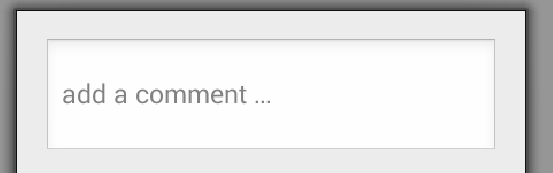
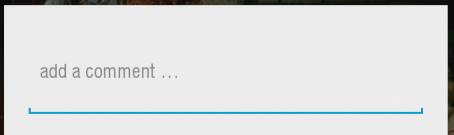
我需要显示一个EditText的经典布局显示完整的文本框,而不仅仅是底线。在布局编辑器中,我可以看到它,但在运行应用程序时,它只显示了底线。我正在使用android:Theme.Light的应用程序。我怎么能改变这个?
这就是我想要的:
我看到的是:
回答 3
Stack Overflow用户
回答已采纳
发布于 2014-03-31 20:17:55
//你可以试试这个,它对我有用
<shape xmlns:android="http://schemas.android.com/apk/res/android"
android:shape="rectangle">
<solid android:color="#00000000" />
<stroke android:width="2.5dp"
    android:color="#FFFFFF" />
<corners
android:radius="5dp"/>
</shape>
Then use this shape for the edit text widget inside an activity xml file as required:

<EditText
     android:id="@+id/searchBox"
     android:layout_width="fill_parent"
     android:layout_height="45dp"
     android:background="@drawable/textinputborder"
     android:hint="@string/Search"
     android:paddingLeft="10dp"
     android:inputType="textVisiblePassword" >

</EditText>Stack Overflow用户
发布于 2014-03-31 19:49:22
用这个解决方案尝试解决方案
<stroke
    android:width="2dp"
    android:color="#E7E7E7"
    android:height="10dp"/>

<corners
android:radius="5dp"/>Stack Overflow用户
发布于 2014-03-31 19:49:44
您可以将图像框导入为可绘制的,然后将其设置为像这样的背景。
<EditText
    android:id="@+id/textinput"
    android:layout_width="match_parent"
    android:layout_height="wrap_content"
    android:background="@drawable/imagebox"/>
这样,图像框将放置在文本框下,下划线将消失。
页面原文内容由Stack Overflow提供。腾讯云小微IT领域专用引擎提供翻译支持
原文链接:
https://stackoverflow.com/questions/22770682
复制相关文章
相似问题
腾讯云开发者

Copyright © 2013 - 2026 Tencent Cloud. All Rights Reserved. 腾讯云 版权所有
深圳市腾讯计算机系统有限公司 ICP备案/许可证号:粤B2-20090059  粤公网安备44030502008569号
腾讯云计算(北京)有限责任公司 京ICP证150476号 | 京ICP备11018762号