
改变画布绘制图像的来源
改变画布绘制图像的来源
提问于 2014-03-30 16:34:45
所以我用画布调整图像大小。WHat发生的情况是,总是从与is (0, 0)相同的点调整大小。我想要它改变它的枢轴/起源,根据它选择锚来调整大小。这意味着如果选择___:
- 左下角->
- 底部中心->顶部中心
- 右下角->
- 左上角->
- 最高中心->
- 右上角->
- 左->
- RIght
下面是现在发生的事情:http://jsfiddle.net/mareebsiddiqui/2Gtq9/3
这是我的JS:
var canvas = document.getElementById("canvas");
var ctx = canvas.getContext("2d");

//var canvasOffset = $("#canvas").offset();
var offsetX = canvas.offsetLeft;
var offsetY = canvas.offsetTop;

var startX;
var startY;
var isDown = false;


var pi2 = Math.PI * 2;
var resizerRadius = 8;
var rr = resizerRadius * resizerRadius;
var draggingResizer = {
    x: 0,
    y: 0
};
var imageX = 50;
var imageY = 50;
var imageWidth, imageHeight, imageRight, imageBottom;
var draggingImage = false;
var startX;
var startY;


var img = new Image();
img.onload = function () {
    imageWidth = img.width;
    imageHeight = img.height;
    imageRight = imageX + imageWidth;
    imageBottom = imageY + imageHeight
    draw(true, false);
}
img.src = 'img/' + localStorage["bgimgname"];


function draw(withAnchors, withBorders) {

    // clear the canvas
    ctx.clearRect(0, 0, canvas.width, canvas.height);

    // draw the image
    ctx.drawImage(img, 0, 0, img.width, img.height, imageX, imageY, imageWidth, imageHeight);

    // optionally draw the draggable anchors
    if (withAnchors) {
        drawDragAnchor(imageX, imageY); //topleft
        drawDragAnchor((imageRight+imageX)/2, imageY); //topcenter
        drawDragAnchor(imageRight, imageY); //topright

        drawDragAnchor(imageX, (imageBottom+imageY)/2); //left
        drawDragAnchor(imageRight, (imageBottom+imageY)/2); //right

        drawDragAnchor(imageX, imageBottom); //bottomleft
        drawDragAnchor((imageRight+imageX)/2, imageBottom); //bottom center
        drawDragAnchor(imageRight, imageBottom); //bottomright
    }

}

function drawDragAnchor(x, y) {
    ctx.beginPath();
    ctx.arc(x, y, resizerRadius, 0, pi2, false);
    ctx.closePath();
    ctx.fill();
}

function anchorHitTest(x, y) {

    var dx, dy;

    // top-left
    dx = x - imageX;
    dy = y - imageY;
    if (dx * dx + dy * dy <= rr) {
        return (0);
    }

    // top-center
    dx = x - (imageRight+imageX)/2
    dy = y - imageY
    if (dx/2 * dx/2 + dy * dy <= rr) {
        return (1);
    }

    // top-right
    dx = x - imageRight;
    dy = y - imageY;
    if (dx * dx + dy * dy <= rr) {
        return (2);
    }

    //left
    dx = x - imageX;
    dy = y - (imageBottom+imageY)/2
    if (dx * dx + dy/2 * dy/2 <= rr) {
        return (3);
    }

    //right
    dx = x - imageRight;
    dy = y - (imageBottom+imageY)/2
    if (dx * dx + dy/2 * dy/2 <= rr) {
        return (4);
    }

    // bottom-left
    dx = x - imageX;
    dy = y - imageBottom;
    if (dx * dx + dy * dy <= rr) {
        return (5);
    }

    // bottom-center
    dx = x - (imageRight+imageX)/2;
    dy = y - imageBottom;
    if (dx/2 * dx/2 + dy * dy <= rr) {
        return (6);
    }

    // bottom-right
    dx = x - imageRight;
    dy = y - imageBottom;
    if (dx * dx + dy * dy <= rr) {
        return (7);
    }

    return (-1);

}


function hitImage(x, y) {
    return (x > imageX && x < imageX + imageWidth && y > imageY && y < imageY + imageHeight);
}


function handleMouseDown(e) {
    startX = parseInt(e.clientX - offsetX);
    startY = parseInt(e.clientY - offsetY);
    draggingResizer = anchorHitTest(startX, startY);
    draggingImage = draggingResizer < 0 && hitImage(startX, startY);
}

function handleMouseUp(e) {
    draggingResizer = -1;
    draggingImage = false;
    draw(true, false);
}

function handleMouseOut(e) {
    handleMouseUp(e);
}

function handleMouseMove(e) {
    e = window.event;
    if (draggingResizer > -1) {

        mouseX = parseInt(e.clientX - offsetX);
        mouseY = parseInt(e.clientY - offsetY);

        // resize the image
        switch (draggingResizer) {
            case 0:
                //top-left
                console.log("topleft");
                imageHeight -= imageRight - mouseY;
                imageWidth -= imageRight - mouseY;
                break;
            case 1:
                //top-center
                console.log("topcenter");
                imageHeight -= imageBottom - mouseY;
                break;
            case 2:
                //top-right
                console.log("topright");
                imageHeight -= imageBottom - mouseY;
                imageWidth -= imageBottom - mouseY;
                break;
            case 3:
                //left
                console.log("left");
                imageWidth -= imageX - mouseX;
                break;
            case 4:
                //right
                console.log("right");
                imageWidth -= imageRight - mouseX;
                break;
            case 5:
                //bottom-left
                console.log("bottomleft");
                imageHeight -= imageRight - mouseY;
                imageWidth -= imageRight - mouseY;
                break;
            case 6:
                //center
                console.log("bottomcenter");
                imageHeight -= imageBottom - mouseY;
                break;
            case 7:
                //bottom-right
                console.log("bottomright");
                imageHeight -= imageBottom - mouseY;
                imageWidth -= imageBottom - mouseY;
                break;
        }

        if(imageWidth<25){imageWidth=25;}
        if(imageHeight<25){imageHeight=25;}
        if(imageWidth>700){imageWidth=700;}
        if(imageHeight>700){imageHeight=700;}
        // set the image right and bottom
        imageRight = imageX + imageWidth;
        imageBottom = imageY + imageHeight;

        // redraw the image with resizing anchors
        draw(true, true);

    }


}

canvas.addEventListener('mousedown', handleMouseDown);
canvas.addEventListener('mousemove', handleMouseMove);
canvas.addEventListener('mouseup', handleMouseUp);
canvas.addEventListener('mouseout', handleMouseOut);
请帮帮我。:(
回答 1
Stack Overflow用户
回答已采纳
发布于 2014-03-31 05:49:20
调整大小的一种有效方法是保持对侧的固定位置,并让选定的边与拖动边或角一起浮动。
这种方法的另一个好处是你并不真正需要锚!
这就是操作系统窗口的工作方式。
调整窗口大小时,没有可见的锚点可拖动,只需拖动窗口的侧面或角即可。
演示:http://jsfiddle.net/m1erickson/keZ82/
- 左:原始图像,
- 中间:从左下角调整大小&保持高宽比(右上角保持固定)
- 右:只从底部和图像缩放y方向调整大小(图像顶部保持固定)
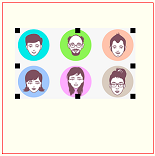
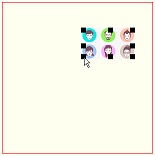
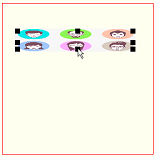
注意:这个演示和示例显示锚,但它们都是严格的化妆品。您可以关闭锚显示,并通过拖动图像的一侧或角来调整图像的大小。
示例代码:
<!doctype html>
<html>
<head>
<link rel="stylesheet" type="text/css" media="all" href="css/reset.css" /> <!-- reset css -->
<script type="text/javascript" src="http://code.jquery.com/jquery.min.js"></script>
<style>
    body{ background-color: ivory; }
    canvas{border:1px solid red;}
</style>
<script>
$(function(){

    var canvas=document.getElementById("canvas");
    var ctx=canvas.getContext("2d");
    var $canvas=$("#canvas");
    var canvasOffset=$canvas.offset();
    var offsetX=canvasOffset.left;
    var offsetY=canvasOffset.top;
    var isDown=false;

    var iW;
    var iH;
    var iLeft=50;
    var iTop=50;
    var iRight,iBottom,iOrientation;

    var img=new Image();
    img.onload=function(){
        iW=img.width;
        iH=img.height;
        iRight=iLeft+iW;
        iBottom=iTop+iH;
        iOrientation=(iW>=iH)?"Wide":"Tall";
        draw(true);
    }
    img.src="facesSmall.png";

    var border=10;
    var isLeft=false;
    var isRight=false;
    var isTop=false;
    var isBottom=false;
    var iAnchor;

    canvas.onmousedown=handleMousedown;
    canvas.onmousemove=handleMousemove;
    canvas.onmouseup=handleMouseup;
    canvas.onmouseout=handleMouseup;


    function hitResizeAnchor(x,y){

        // which borders are under the mouse
        isLeft=(x>iLeft && x<iLeft+border);
        isRight=(x<iRight && x>iRight-border);
        isTop=(y>iTop && y<iTop+border);
        isBottom=(y<iBottom && y>iBottom-border);

        // return the appropriate anchor
        if(isTop && isLeft){ return(iOrientation+"TL"); }
        if(isTop && isRight){ return(iOrientation+"TR"); }
        if(isBottom && isLeft){ return(iOrientation+"BL"); }
        if(isBottom && isRight){ return(iOrientation+"BR"); }
        if(isTop){ return("T"); }
        if(isRight){ return("R"); }
        if(isBottom){ return("B"); }
        if(isLeft){ return("L"); }
        return(null);
    }

    var resizeFunctions={

        T: function(x,y){ iTop=y; },
        R: function(x,y){ iRight=x; },
        B: function(x,y){ iBottom=y; },
        L: function(x,y){ iLeft=x; },

        WideTR: function(x,y){
            iRight=x;
            iTop=iBottom-(iH*(iRight-iLeft)/iW);
        },
        TallTR: function(x,y){
            iTop=y;
            iRight=iLeft+(iW*(iBottom-iTop)/iH);
        },

        WideBR: function(x,y){
            iRight=x;
            iBottom=iTop+(iH*(iRight-iLeft)/iW);
        },
        TallBR: function(x,y){
            iBottom=y;
            iRight=iLeft+(iW*(iBottom-iTop)/iH);
        },

        WideBL: function(x,y){
            iLeft=x;
            iBottom=iTop+(iH*(iRight-iLeft)/iW);
        },
        TallBL: function(x,y){
            iBottom=y;
            iLeft=iRight-(iW*(iBottom-iTop)/iH);
        },

        WideTL: function(x,y){
            iLeft=x;
            iTop=iBottom-(iH*(iRight-iLeft)/iW);
        },
        TallTL: function(x,y){
            iBottom=y;
            iLeft=iRight-(iW*(iBottom-iTop)/iH);
        }
    };

    function handleMousedown(e){
         // tell the browser we'll handle this mousedown
         e.preventDefault();
         e.stopPropagation();
         var mouseX=e.clientX-offsetX;
         var mouseY=e.clientY-offsetY;
         iAnchor=hitResizeAnchor(mouseX,mouseY);
         isDown=(iAnchor);
    }

    function handleMouseup(e){
         // tell the browser we'll handle this mouseup
         e.preventDefault();
         e.stopPropagation();
         isDown=false;
         draw(true);
    }

    function handleMousemove(e){
         // tell the browser we'll handle this mousemove
         e.preventDefault();
         e.stopPropagation();
         // return if we're not dragging
         if(!isDown){return;}
         // get MouseX/Y
         var mouseX=e.clientX-offsetX;
         var mouseY=e.clientY-offsetY;

         // reset iLeft,iRight,iTop,iBottom based on drag
         resizeFunctions[iAnchor](mouseX,mouseY);

         // redraw the resized image
         draw(false);
    }


    function draw(withAnchors){
        var cx=iLeft+(iRight-iLeft)/2;
        var cy=iTop+(iBottom-iTop)/2;
        ctx.clearRect(0,0,canvas.width,canvas.height);
        ctx.drawImage(img,iLeft,iTop,iRight-iLeft,iBottom-iTop);
        if(withAnchors){
            ctx.fillRect(iLeft,iTop,border,border);
            ctx.fillRect(iRight-border,iTop,border,border);
            ctx.fillRect(iRight-border,iBottom-border,border,border);
            ctx.fillRect(iLeft,iBottom-border,border,border);
            ctx.fillRect(cx,iTop,border,border);
            ctx.fillRect(cx,iBottom-border,border,border);
            ctx.fillRect(iLeft,cy,border,border);
            ctx.fillRect(iRight-border,cy,border,border);
        }
    }

}); // end $(function(){});
</script>
</head>
<body>
    <h4>Drag image anchors</h4>
    <canvas id="canvas" width=300 height=300></canvas>
</body>
</html>页面原文内容由Stack Overflow提供。腾讯云小微IT领域专用引擎提供翻译支持
原文链接:
https://stackoverflow.com/questions/22746605
复制相关文章
相似问题
腾讯云开发者

Copyright © 2013 - 2026 Tencent Cloud. All Rights Reserved. 腾讯云 版权所有
深圳市腾讯计算机系统有限公司 ICP备案/许可证号:粤B2-20090059  粤公网安备44030502008569号
腾讯云计算(北京)有限责任公司 京ICP证150476号 | 京ICP备11018762号