
SciChart列系列LabelFormatting
SciChart列系列LabelFormatting
提问于 2014-03-25 08:28:57
我有一个数据系列List<Tuple<string,double>>,我用它创建一个XyDataSeries<double, double>。我使用以下LabelFormatter。
public class SciChartCustomLabelFormatter : ILabelFormatter
{
    private readonly string[] _xLabels;
    public SciChartCustomLabelFormatter(string[] xLabels)
    {
        _xLabels = xLabels;
    }
    public void Init(IAxis parentAxis)
    {
    }
    public void OnBeginAxisDraw()
    {
    }
    public ITickLabelViewModel CreateDataContext(IComparable dataValue)
    {
        throw new NotImplementedException();
    }
    public ITickLabelViewModel UpdateDataContext(ITickLabelViewModel labelDataContext, IComparable dataValue)
    {
         throw new NotImplementedException();
    }
    public string FormatLabel(IComparable dataValue)
    {
        var index = (double)Convert.ChangeType(dataValue, typeof(double));
        if (index >= 0 && index < _xLabels.Length)
            return _xLabels[(int)index];

        return index.ToString(CultureInfo.InvariantCulture);
    }
    public string FormatCursorLabel(IComparable dataValue)
    {
        var index = (double)Convert.ChangeType(dataValue, typeof(double));
        if (index >= 0 && index < _xLabels.Length)
            return _xLabels[(int)index];

        return index.ToString(CultureInfo.InvariantCulture);
    }
}
我想创建一个FastColumnRenderableSeries
<sciChart:FastColumnRenderableSeries
        x:Name="columnSeries" DataPointWidth="1"
        SeriesColor="#A99A8A" Opacity="0.5"
        XAxisId="BottomAxisId"
        YAxisId="LeftAxisId"
        DataSeries="{Binding Series}">
</sciChart:FastColumnRenderableSeries>
将字符串用作列系列的标签。
目前,我可以用YAxis清晰地显示该系列的值。,但是如何使用标签格式化程序来显示XAxis字符串呢?--我不知道该如何处理这些方法:
public ITickLabelViewModel CreateDataContext(IComparable dataValue) 和
public ITickLabelViewModel UpdateDataContext(ITickLabelViewModel labelDataContext, IComparable dataValue) 我想在这里创建一个帕累托图。
回答 1
Stack Overflow用户
发布于 2014-05-23 09:26:58
API在SciChart v3.0中已经改变了,但是我们这里有一篇关于'标签提供程序API概述‘的最新文章。
我建议继承LabelProviderBase,因为它实现了许多您不需要担心的接口方法。
您可以使用LabelProvider指定文本标签如下:
public class CustomLabelProvider : LabelProviderBase
{
    /// <summary>Formats a label for the axis from the specified data-value passed in</summary>
    /// <param name="dataValue">The data-value to format</param>
    /// <returns>The formatted label string</returns>
    public override string FormatLabel(IComparable dataValue)
    {
        return dataValue.ToString(); // TODO: Implement as you wish
    }
    /// <summary>Formats a label for the cursor, from the specified data-value passed in</summary>
    /// <param name="dataValue">The data-value to format</param>
    /// <returns>The formatted cursor label string</returns>
    public override string FormatCursorLabel(IComparable dataValue)
    {
        return dataValue.ToString();// TODO: Implement as you wish
    }
}
XAML的使用
<!-- Assumes you have declared the CustomLabelProvider as a static resource -->
<s:NumericAxis LabelProvider="{StaticResource local:CustomLabelProvider}"/>
最后,如果您需要更多信息,可以使用可下载的示例(更新为使用API的v3.0 )对这里的屏幕截图、打印和字符串轴标签进行完整的演练。
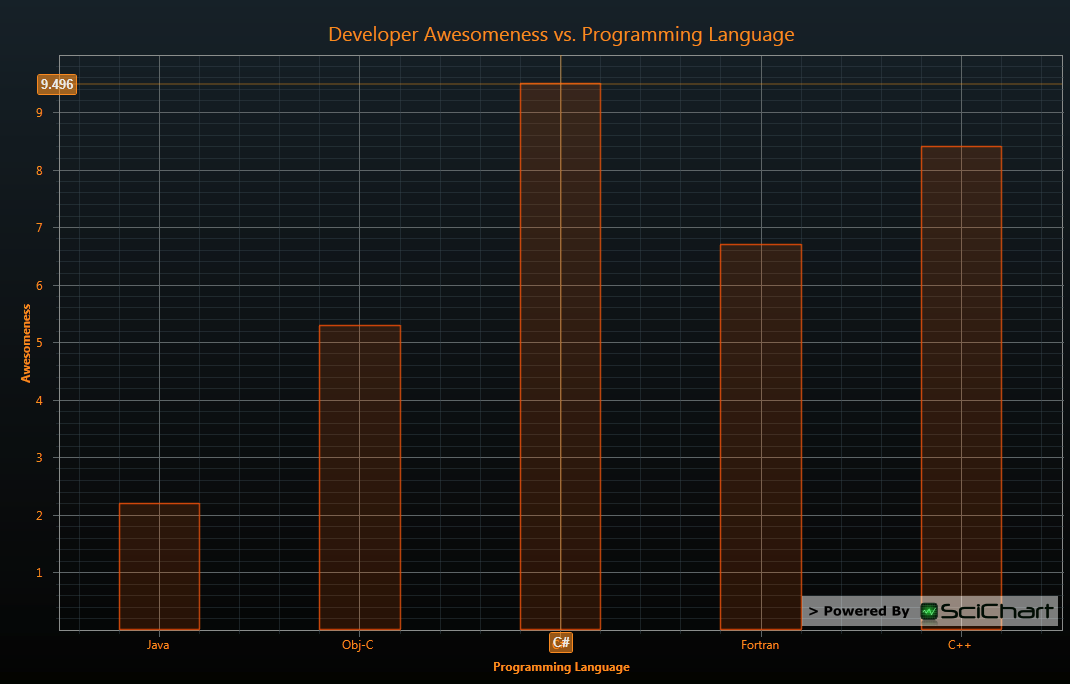
信息披露:我是MD和http://www.scichart.com/的所有者
页面原文内容由Stack Overflow提供。腾讯云小微IT领域专用引擎提供翻译支持
原文链接:
https://stackoverflow.com/questions/22629000
复制相关文章
相似问题
腾讯云开发者

Copyright © 2013 - 2026 Tencent Cloud. All Rights Reserved. 腾讯云 版权所有
深圳市腾讯计算机系统有限公司 ICP备案/许可证号:粤B2-20090059  粤公网安备44030502008569号
腾讯云计算(北京)有限责任公司 京ICP证150476号 | 京ICP备11018762号