
readerQuotas maxStringContentLength没有改变
我试过很多,但没有成功,
我已经将readerQuotas maxStringContentLength更改为2147483647的WinForms和WCF配置文件,但maxStringContentLength仍然设置为8192。
有人能告诉我如何在WinForms或WCF服务上更改它以及在哪里更改吗?
客户端Config
<?xml version="1.0" encoding="utf-8"?>
<configuration>
  <connectionStrings>
    <add name="ConnectWiseEntities" connectionString="data source=deepak;initial catalog=ConnectWise;persist security info=True;user id=sa;password=weexcel;" providerName="System.Data.EntityClient" />
  </connectionStrings>
  <system.serviceModel>
    <bindings>
      <basicHttpBinding>
        <binding name="BasicHttpBinding_IService" closeTimeout="00:01:00"
          openTimeout="00:01:00" receiveTimeout="00:10:00" sendTimeout="00:01:00"
          allowCookies="false" bypassProxyOnLocal="false" hostNameComparisonMode="StrongWildcard"
          maxBufferSize="2147483647" maxBufferPoolSize="2147483647" maxReceivedMessageSize="2147483647"
          messageEncoding="Text" textEncoding="utf-8" transferMode="Buffered"
          useDefaultWebProxy="true">
          <readerQuotas maxDepth="2147483647" maxStringContentLength="2147483647" maxArrayLength="2147483647"
            maxBytesPerRead="2147483647" maxNameTableCharCount="2147483647" />
          <security mode="None">
            <transport clientCredentialType="None" proxyCredentialType="None"
              realm="" />
            <message clientCredentialType="UserName" algorithmSuite="Default" />
          </security>
        </binding>
      </basicHttpBinding>
    </bindings>
    <client>
      <endpoint address="http://localhost:50841/SyncFile(WCF2)/Service.svc"
        binding="basicHttpBinding" bindingConfiguration="BasicHttpBinding_IService"
        contract="SynWebService.IService" name="BasicHttpBinding_IService" />
    </client>
  </system.serviceModel>
</configuration>
WCF Web.config
<?xml version="1.0"?>
<configuration>
  <system.web>
    <compilation debug="true" targetFramework="4.0"/>
  </system.web>
  <system.serviceModel>
    <bindings>
      <basicHttpBinding>
        <binding name="BasicHttpBinding_IService" closeTimeout="00:01:00"
          openTimeout="00:01:00" receiveTimeout="00:10:00" sendTimeout="00:01:00"
          allowCookies="false" bypassProxyOnLocal="false" hostNameComparisonMode="StrongWildcard"
          maxBufferSize="2147483647" maxBufferPoolSize="2147483647" maxReceivedMessageSize="2147483647"
          messageEncoding="Text" textEncoding="utf-8" transferMode="Buffered"
          useDefaultWebProxy="true">
          <readerQuotas maxDepth="2147483647" maxStringContentLength="2147483647" maxArrayLength="2147483647"
            maxBytesPerRead="2147483647" maxNameTableCharCount="2147483647" />
          <security mode="None">
            <transport clientCredentialType="None" proxyCredentialType="None"
              realm="" />
            <message clientCredentialType="UserName" algorithmSuite="Default" />
          </security>
        </binding>
      </basicHttpBinding>
    </bindings>
    <behaviors>
      <serviceBehaviors>
        <behavior>
          <!-- To avoid disclosing metadata information, set the value below to false and remove the metadata endpoint above before deployment -->
          <serviceMetadata httpGetEnabled="true"/>
          <!-- To receive exception details in faults for debugging purposes, set the value below to true.  Set to false before deployment to avoid disclosing exception information -->
          <serviceDebug includeExceptionDetailInFaults="false"/>
        </behavior>
      </serviceBehaviors>
    </behaviors>
    <serviceHostingEnvironment multipleSiteBindingsEnabled="true"/>
  </system.serviceModel>
  <system.webServer>
    <modules runAllManagedModulesForAllRequests="true"/>
  </system.webServer>
</configuration>回答 2
Stack Overflow用户
发布于 2014-03-24 05:52:18
您的客户端配置看起来不错,可以修改您的服务配置,并将相应的行为添加到服务中,如下所示。
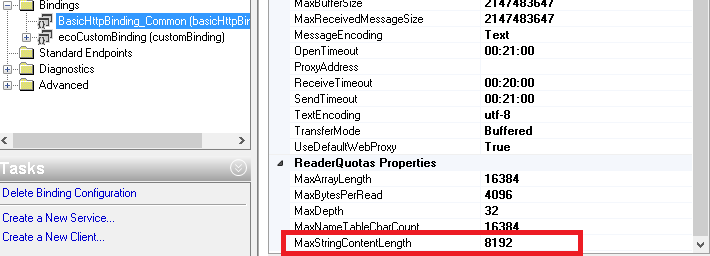
您需要正确设置绑定,behavior.Right单击web并选择。
例如,
 <bindings>
      <basicHttpBinding>
        <binding name="defaultBinding">
          <readerQuotas maxStringContentLength="1048576" />
        </binding>
      </basicHttpBinding>
    </bindings>
    <services>
      <service name="Service1">
        <endpoint address="http://localhost:56529/Service1.svc"
  binding="basicHttpBinding" bindingConfiguration="defaultBinding"
  contract="IWebExtractServiceIWebExtractService">
        </endpoint>
      </service>
</services>Stack Overflow用户
发布于 2014-03-24 06:16:53
您已经在服务的web配置中定义了绑定配置,但是您从未告诉服务使用它,因此使用了basicHttpBinding的默认值。
在WCF 4.0+中,有两种方法可以做到这一点(Sajeethran给出了一个)。
可以为绑定定义配置,并将其设置为服务的默认配置,方法是省略绑定配置上的name属性,如下所示:
<system.serviceModel>
<bindings>
  <basicHttpBinding>
    <binding closeTimeout="00:01:00" openTimeout="00:01:00"
             receiveTimeout="00:10:00" sendTimeout="00:01:00"
             allowCookies="false" bypassProxyOnLocal="false"
             hostNameComparisonMode="StrongWildcard"
             maxBufferSize="2147483647" maxBufferPoolSize="2147483647"
             maxReceivedMessageSize="2147483647" messageEncoding="Text"
             textEncoding="utf-8" transferMode="Buffered"
             useDefaultWebProxy="true">
      <readerQuotas maxDepth="2147483647" maxStringContentLength="2147483647"
                    maxArrayLength="2147483647" maxBytesPerRead="2147483647"
                    maxNameTableCharCount="2147483647" />
      <security mode="None">
        <transport clientCredentialType="None" proxyCredentialType="None"
                   realm="" />
        <message clientCredentialType="UserName" algorithmSuite="Default" />
      </security>
    </binding>
  </basicHttpBinding>
</bindings>由于name属性已被省略,任何使用此配置的服务都将对来自http协议的请求使用上述绑定配置,除非在特定端点元素的bindingCongifuration属性中被覆盖。
第二种方法是显式定义端点,并为bindingCongifuration属性分配您定义的绑定配置的名称(同样如Sajeetharan的答案中所示)。
https://stackoverflow.com/questions/22601866
复制相似问题
腾讯云开发者

Copyright © 2013 - 2026 Tencent Cloud. All Rights Reserved. 腾讯云 版权所有
深圳市腾讯计算机系统有限公司 ICP备案/许可证号:粤B2-20090059  粤公网安备44030502008569号
腾讯云计算(北京)有限责任公司 京ICP证150476号 | 京ICP备11018762号