
将文本合并与SemanticMerge配置为在Mercurial中使用P4Merge
将文本合并与SemanticMerge配置为在Mercurial中使用P4Merge
提问于 2014-03-21 14:46:45
我遵循了http://www.semanticmerge.com/sm-guides/main.shtml#HowtoconfigurewithMercurial的说明,但它们是为kdiff3配置的,我希望使用p4merge进行文本合并。我当前的mercurial.ini如下所示:
[merge-tools]
semantic.executable = C:\Users\JP\AppData\Local\PlasticSCM4\semanticmerge\semanticmergetool.exe
semantic.premerge=False
semantic.binary=False
semantic.args=-b=$base -s=$local -d=$other -r=$output -l=csharp -edt="p4merge.exe ""#sourcefile"" ""#destinationfile""" -emt="p4merge.exe -le 'win' -dl ""#basefile"" ""#sourcefile"" ""#destinationfile"" ""#output"""
semantic.gui=True
semantic.checkconflicts=True
对于当前的配置,当以.cs SemanticMerge结尾的文件中出现冲突时,将按预期运行,但当我在SemanticMerge中使用merge命令运行文本合并时,会收到一个错误警报,声明:
Error starting P4Merge
Errors: 'c:\directory\1d37-some-guid.tmp' is (or points to) an invalid file.
是否存在不兼容性,还是我上面的"semantic.args“部分配置不正确?
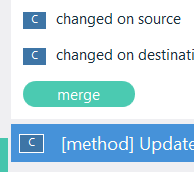
UPDATE --当我单击特定更改上的合并按钮时,会收到错误。见下面的截图。但答案是正确的,因为我应该使用“”按钮运行文本合并。
回答 1
Stack Overflow用户
回答已采纳
发布于 2014-03-21 17:19:07
我刚刚测试了语义合并-Mercurial集成(将p4merge配置为外部测试合并工具)。
这是我的mercurial.ini:
[merge-tools]
semantic.executable = C:/Users/carlos/AppData/Local/PlasticSCM4/semanticmerge/semanticmergetool.exe
semantic.premerge=False
semantic.binary=False
semantic.args=-b=$base -s=$local -d=$other -r=$output -l=csharp -edt="p4merge.exe ""#sourcefile"" ""#destinationfile""" -emt="p4merge.exe -le 'win' -dl ""#basefile"" ""#sourcefile"" ""#destinationfile"" ""#output"""
semantic.gui=True
Semantic. checkconflicts=True
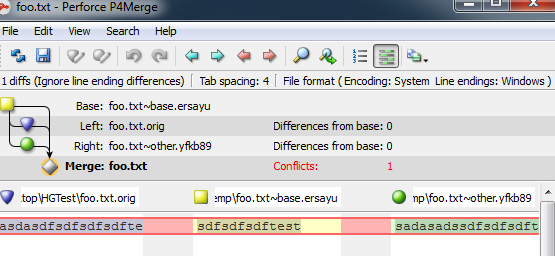
当我执行Hg合并时,就会出现语义合并工具,如果我选择“”,文本合并工具就会正常工作。您的问题似乎是在P4Merge工具安装中。您能否尝试使用命令行手动启动P4Merge工具?

页面原文内容由Stack Overflow提供。腾讯云小微IT领域专用引擎提供翻译支持
原文链接:
https://stackoverflow.com/questions/22561955
复制相关文章
相似问题
腾讯云开发者

Copyright © 2013 - 2026 Tencent Cloud. All Rights Reserved. 腾讯云 版权所有
深圳市腾讯计算机系统有限公司 ICP备案/许可证号:粤B2-20090059  粤公网安备44030502008569号
腾讯云计算(北京)有限责任公司 京ICP证150476号 | 京ICP备11018762号