
Windows代码包TaskDialog缺失图标
Windows代码包TaskDialog缺失图标
提问于 2014-03-21 14:29:38
我的TaskDialog中的图标丢失了:
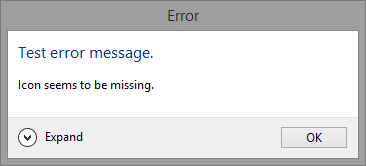
在任务栏中:

我的代码是:
using Microsoft.WindowsAPICodePack;
using Microsoft.WindowsAPICodePack.Dialogs;

...

TaskDialog taskDialog = new TaskDialog();
taskDialog.Caption = "Error";
taskDialog.InstructionText = "Test error message.";
taskDialog.Text = "Icon seems to be missing.";
taskDialog.DetailsExpandedText = "Test";
taskDialog.DetailsCollapsedLabel = "Expand";
taskDialog.StandardButtons = TaskDialogStandardButtons.Ok;
taskDialog.Icon = TaskDialogStandardIcon.Error;
taskDialog.Show();我正在使用来自这里的1.1版本。知道他们失踪的原因以及如何启用他们吗?依赖项设置如下:
  <dependency>
    <dependentAssembly>
      <assemblyIdentity
      type="win32"
      name="Microsoft.Windows.Common-Controls"
      version="6.0.0.0"
      processorArchitecture="*"
      publicKeyToken="6595b64144ccf1df"
      language="*"
/>
    </dependentAssembly>
</dependency>回答 2
Stack Overflow用户
回答已采纳
发布于 2014-03-22 11:00:12
我找到了解决办法。显然,它是API本身的一个bug。
taskDialog.Opened += new EventHandler(taskDialog_Opened);

...

public void taskDialog_Opened(object sender, EventArgs e)
{
    TaskDialog taskDialog = sender as TaskDialog;
    taskDialog.Icon = taskDialog.Icon;
    taskDialog.FooterIcon = taskDialog.FooterIcon;
    taskDialog.InstructionText = taskDialog.InstructionText;
}Stack Overflow用户
发布于 2016-08-05 15:57:33
我想补充一下这一点,但我没有足够的代表。在删除这一行代码后,标记的答案对我有效:
taskDialog.FooterIcon = taskDialog.FooterIcon;这导致了一个未处理的异常。
页面原文内容由Stack Overflow提供。腾讯云小微IT领域专用引擎提供翻译支持
原文链接:
https://stackoverflow.com/questions/22561584
复制相关文章
相似问题
腾讯云开发者

Copyright © 2013 - 2026 Tencent Cloud. All Rights Reserved. 腾讯云 版权所有
深圳市腾讯计算机系统有限公司 ICP备案/许可证号:粤B2-20090059  粤公网安备44030502008569号
腾讯云计算(北京)有限责任公司 京ICP证150476号 | 京ICP备11018762号