
使用GDI的多层图形
我使用VisualStudio 2010,用C++/CLI编写代码,并使用GDI完成所有的图形处理。我有一个小应用程序,不断绘制一个高斯曲线加上一些噪音。每个点都是实时添加的,就像我在这个post中指出的那样。
现在,我的任务是创建一个小的彩色区域,我可以缩小和增加,以选择一部分的情节,并做一些数学。这类任务由MouseMove事件管理,如下所示:
System::Void Form1::pictureBox1_MouseMove(System::Object^  sender, System::Windows::Forms::MouseEventArgs^  e) {
      //Recalculate the position of the area,
      //clean up the old one and redraw a new.
}
它实际上是有效的,但我正在经历一个有点图形的"bug“。
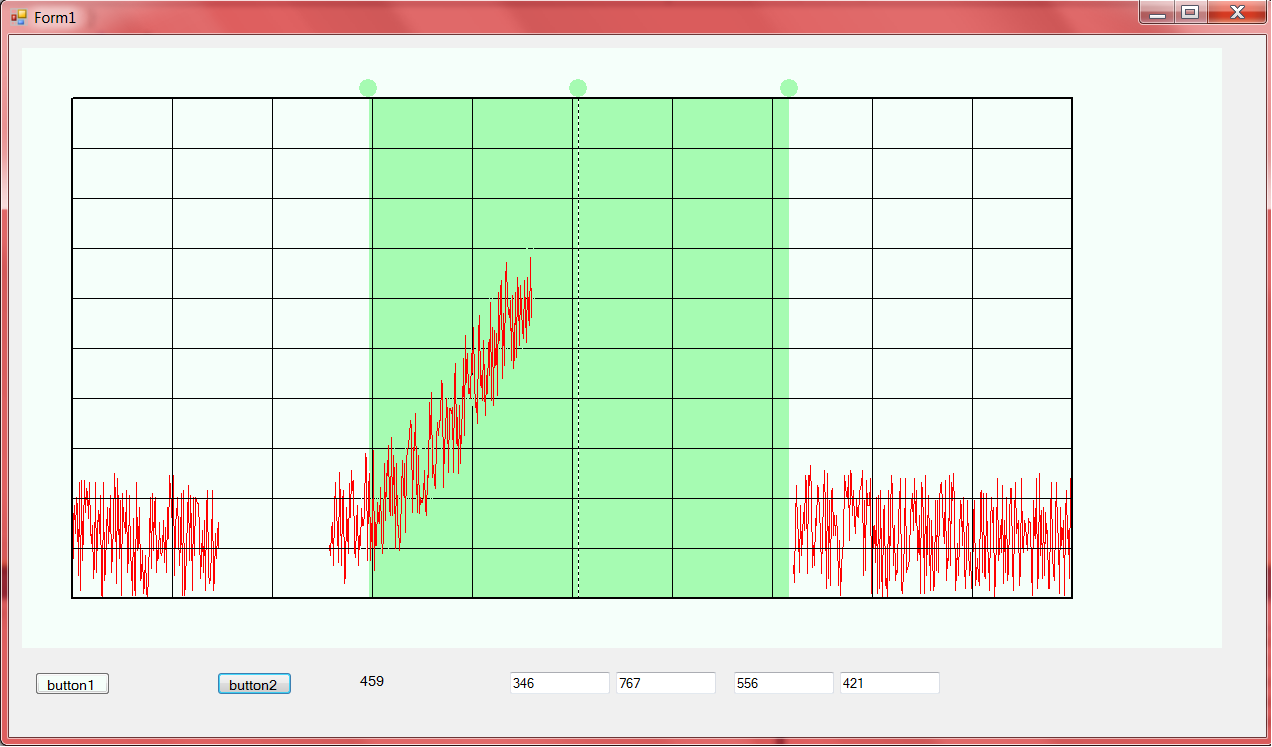
正如你所看到的,当我移动这个区域时,它下面的所有东西都被删除了。网格在这里只是因为它是静态的,我每次重新绘制绿色区域时都会刷新它。实际上,它不是一个bug,因为它肯定是这样的。对我来说,这是显而易见的。我这么说是因为这不是我所期望的。
我在问是否有一条通往绿色区域的路,就好像它在另一层上一样。这样的话,我就可以在地块运行时移动绿地,而不会被抹去。我尝试过处理2个HDC变量,并在第一个变量上绘制图形和网格,在第二个变量上绘制绿色区域,但它似乎不起作用。
你有什么好主意来克服这种坏的(对我来说)的行为--也许是用一些多层的东西或者其他一些花哨的解决方案--还是我应该放弃,等待重新策划?
谢谢大家会给我一个答复的!)
编辑:下面是我如何绘制数据序列的方法:
for(int i = 1; i<=1000; i++ ) {

          Gauss[i] = safe_cast<float>(Math::Round( a*s*Math::Exp(-Math::Pow(((0.01*1*(i))-portante), 2)/b), 2));
          Rumore[i] = safe_cast<float>(Math::Round(r*generatore->NextDouble(), 2));

          SelectObject(hdcPictureBox, LinePen);
          MoveToEx(hdcPictureBox, i-1+50, 500-convY*(Gauss[i-1]+Rumore[i-1])+50, NULL);
          LineTo(hdcPictureBox, i+50, 500-convY*(Gauss[i]+Rumore[i])+50);

          e1 = (i+k)%1000; //Buffer

          if(i>DXX-54 && i<SXX-54) {
              //ErasePen1 = CreatePen(PS_SOLID, 1, RGB(216,191,216));
              label1->Text = Convert::ToString(i);
              label1->Refresh();
              SelectObject(hdcPictureBox, ErasePen1);
          }
          else {
              SelectObject(hdcPictureBox, ErasePen);
          }

                //HPEN ErasePen1 = CreatePen(PS_SOLID, 1, RGB(216,191,216));

        MoveToEx(hdcPictureBox, e1+50, 500-convY*(Gauss[e1]+Rumore[e1])+50, NULL);
        LineTo(hdcPictureBox, e1+1+50, 500-convY*(Gauss[e1+1]+Rumore[e1+1])+50);
}其中DXX和SXX是区域的X坐标- DXX开始,SXX结束.
这就是我处理MouseMove的方式。Do_Chan和Do_Clean本质上是一样的。Do_Clean用背景色绘制一个更大的区域以擦除旧区域,并允许Do_Chan绘制一个新的区域。
System::Void Form1::pictureBox1_MouseMove(System::Object^  sender, System::Windows::Forms::MouseEventArgs^  e) {
if(e->Button == System::Windows::Forms::MouseButtons::Left) {

        double span100 = (SXX-DXX)*85/100;
        if (e->X > DXX+((SXX-DXX)/2)-15 && e->X < DXX+((SXX-DXX)/2)+15 && (e->Y >30 && e->Y <50)
            || e->X >DXX+((SXX-DXX)/2)-span100/2 && e->X < DXX+((SXX-DXX)/2)+span100/2 && (e->Y >50 && e->Y <550)) {
        HBRUSH brush = CreateSolidBrush(RGB(245,255,250));
        Do_Clean(hdcPictureBox, DXX, SXX,  brush);
        double spawn = SXX-DXX;
        DXX = e->X - spawn/2;
        SXX = e->X + spawn/2;
        if(DXX < 50) {
            DXX = 51;

        }
        if(SXX >1050 ) {
            SXX = 1049;
        }

        spawn = SXX - DXX;
        CXX = DXX + spawn/2;


        HBRUSH brush1 = CreateSolidBrush(RGB(166,251,178));
        Do_Chan(hdcPictureBox2, DXX, SXX, brush1);
        int k = 4;
        int e1 = 0;
        for(int i = 1; i<=1000; i++) {

            SelectObject(hdcPictureBox, LinePen);
            MoveToEx(hdcPictureBox, i-1+50, 500-250*(Gauss[i-1]+Rumore[i-1])+50, NULL);
            LineTo(hdcPictureBox, i+50, 500-250*(Gauss[i]+Rumore[i])+50);
             e1 = (i+k)%1000; //Buffer
            if(i>DXX-54 && i<SXX-54) {
                    //ErasePen1 = CreatePen(PS_SOLID, 1, RGB(216,191,216));

                    SelectObject(hdcPictureBox, ErasePen1);
                }
                else {
                    SelectObject(hdcPictureBox, ErasePen);
                }

                    //HPEN ErasePen1 = CreatePen(PS_SOLID, 1, RGB(216,191,216));

            MoveToEx(hdcPictureBox, e1+50, 500-250*(Gauss[e1]+Rumore[e1])+50, NULL);
            LineTo(hdcPictureBox, e1+1+50, 500-250*(Gauss[e1+1]+Rumore[e1+1])+50);

        }

    }
}
}
正如您所看到的,在绘制了新区域之后,我重新绘制了数组Gauss+Rumore的所有点。Do_Chan ( Do_Clean是相同的)就是这样工作的:
void Do_Chan(HDC hdc, int dx, int sx, HBRUSH brush) {
//i = 250, y = 50
int y = 50;
int spawn = sx - dx;
  HPEN pen = CreatePen(PS_SOLID, 1, RGB(245, 255, 250));
  HPEN penC = CreatePen(PS_DOT, 1, RGB(0, 0, 0));
  /*Fai il rettangolo */
  SelectObject(hdc, pen);
  SelectObject(hdc, brush);
  POINT punti[4];
  punti[0].x = dx;
  punti[0].y = y;
  punti[1].x = dx +spawn;
  punti[1].y = y;
  punti[2].x = dx + spawn;
  punti[2].y = y+500;
  punti[3].x = dx;
  punti[3].y = y+500;
  Polygon(hdc, punti, 4);

  Ellipse(hdc, dx-10, y-20, dx+10, y);


  SelectObject(hdc, penC);
  MoveToEx(hdc, dx+spawn/2, 50,NULL);
  LineTo(hdc, dx+spawn/2, 550);


  SelectObject(hdc, pen);
  SelectObject(hdc, brush);
  Ellipse(hdc, dx-10+spawn/2, y-20, dx+10+spawn/2, y);

  SelectObject(hdc, pen);
  SelectObject(hdc, brush);

  Ellipse(hdc, dx-10+spawn, y-20, dx+10+spawn, y);
//Plot the axis and the grid
}回答 1
Stack Overflow用户
发布于 2014-03-27 16:41:17
我想出了一种可行的办法,每一种解决办法都有缺点。例如
creating a thread. It has a drawback of drawing to picturebox dc from a different thread than the one handling the message queue. Not recomended
另一个:
using a timer and for every tick(lets say 16msec) draw. The DXX and SXX will be global variables. In picturebox move event you will only calculate these values(no drawing), also use some critical sections to protect them, and do all the drawing inside tick of timer. This works but you probable encounter some delay if your movement in picturebox is faster than 60fps.
我最终找到的解决办法是:
在无限循环中:
get the mouse position and state(down or up). In this way you know if the user is dragging the green area and calculate DXX and SXX.
draw three rectangles with FillRect(): from 0 to DXX with picturebox back color, from DXX to SXX with green color and from SXX to the end with picturebox back color to an in memory dc eg hdcMemBackground
draw the grid lines to hdcMemBackground
Use the Point array and the polyline method i told you and in every loop move all your 999 points in the array one place to the left and add one point in the end of the array. To achieve this fill the array once before the infinite loop and inside it do the previous method
BitBlt hdcMemBackground to picturebox dc
Application::DoEvents();
编辑(一些代码)
在表单加载时,只创建一次资源,并在最后释放它们。你的Do_Chan()
造成相当大的内存泄漏。在形式负载时:
HPEN hLinePenRed = NULL, hLinePenBlack = NULL, hLinePenWhite = NULL, hLinePenBlackDotted = NULL hPenOld; //Global
HBRUSH hBrushGreen = NULL, hBrushWhite = NULL, hBrushOld = NULL; //Global
HBITMAP hBitmap = NULL, hBitmapOld = NULL; //Global
HDC hdcMemBackground = NULL, hdcPicBox = NULL; //Global

//in form load event:
hLinePenRed = CreatePen(PS_SOLID, 1, RGB(255, 0, 0));
hLinePenBlack = CreatePen(PS_SOLID, 1, RGB(0, 0, 0));
hLinePenWhite = CreatePen(PS_SOLID, 1, RGB(245, 255, 250));
hLinePenBlackDotted = CreatePen(PS_DOT, 1, RGB(0, 0, 0));

hPenOld = SelectObject(hdcMemBackground, hLinePenRed);

hBrushGreen = CreateSolidBrush(RGB(166, 251, 178));
hBrushWhite = CreateSolidBrush(RGB(245, 255, 250));

hBrushOld = SelectObject(hdcMemBackground, hBrushGreen);

HDC hdc = CreateIC(TEXT("DISPLAY"), NULL, NULL, NULL);
hdcPicBox = GetWindowDC(hwndPicBox);
hdcMemBackground= CreateCompatibleDC(hdc);
hBitmap = CreateCompatibleBitmap(hdc, 1050, 550);
hBitmapOld = SelectObject(hdcMemBackground, hBitmap);
DeleteDC(hdc);
最后,当表单关闭时:
SelectObject(hdcMemBackground, hPenOld);
DeleteObject(hLinePenRed);
DeleteObject(hLinePenBlack);
DeleteObject(hLinePenBlackDotted);
DeleteObject(hLinePenWhite);
SelectObject(hdcMemBackground, hBitmapOld);
DeleteObject(hBitmap);
SelectObject(hdcMemBackground, hBrushOld);
DeleteObject(hBrushGreen);
DeleteObject(hBrushWhite);
DeleteDC(hdcMemBackground);
ReleaseDC(hwndPicBox, hdcPicBox);
如何使用FillRect和绘制椭圆:
RECT rt;
rt.left = 0; rt.top = 0; rt.right = 1050; rt.bottom = 550;
FillRect(hdcMemBackground, &rt, hBrushWhite);

rt.left = DXX; rt.top = 50; rt.right = SXX; rt.bottom = 550;
FillRect(hdcMemBackground, &rt, hBrushGreen);

SelectObject(hdcMemBackground, hBrushGreen);
SelectObject(hdcMemBackground, hLinePenWhite);

Ellipse(hdcMemBackground, dx-10, y-20, dx+10, y);
Ellipse(hdcMemBackground, dx-10+spawn/2, y-20, dx+10+spawn/2, y);
Ellipse(hdcMemBackground, dx-10+spawn, y-20, dx+10+spawn, y);

//Plot the axis and the grid first and then draw the dotted vertical line

SelectObject(hdcMemBackground, hLinePenBlackDotted);
MoveToEx(hdcMemBackground, dx+spawn/2, 50, NULL);
LineTo(hdcMemBackground, dx+spawn/2, 550);
如何找到鼠标位置和鼠标状态。此代码将在每次迭代开始时查看用户是否拖动绿色区域并计算新的DXX、SXX:
/* It is buggy. My mistake
POINT pt;

GetCursorPos(&pt);
ScreenToClient(hwndPicBox, &pt);

if( pt.x >= 0 && pt.x <= picBoxWidth && pt.y >= 0 && pt.y <= picBoxHeight && (GetAsyncKeyState(VK_LBUTTON) & 0x8000) ){ //the mouse is down and inside picturebox
    //do your staff

}
*/
改用picturebox mouse down、mouse up和mouse move事件:
int isScrollingLeft = false; //global, the left circle
int isScrollingRight = false; //global, the right circle
int isScrollingMiddle = false; //global, the middle circle

System::Void Form1::pictureBox1_MouseDown(....){
    //check if e.X and e.Y is inside in one of the three circles and set the
    //appropriate isScrolling to true
}

System::Void Form1::pictureBox1_MouseMove(....){
    if(isScrollingLeft){
        //calculate DXX
    }
    else if(isScrollingRight){
        //calculate SXX
    }
    else if(isScrollingMiddle){ //if you dont scroll this you dont need it
        //
    }
    else{;} //do nothing
}

System::Void Form1::pictureBox1_MouseUp(....){
    isScrollingLeft = false;
    isScrollingRight = false;
    isScrollingMiddle = false; //if you dont scroll this you dont need it
}
向左移动点的方法:
POINT arrayPnt[1000]; //the array of points to be drawn by Polyline()

//the movement
memmove(&arrayPnt[0], &arrayPnt[1], 999 * sizeof(POINT));

//set the last one
arrayPnt[999].x = X;
arrayPnt[999].y = Y;

//Draw the lines
Polyline(hdcMemBackground, &arrayPnt, 1000);要将数字i绘制到标签中:
HDC hdcLabel1 = NULL; //global
HFONT hFont = NULL, hFontOld = NULL; //global
RECT rtLabel = NULL; //global
char strLabel1[5]; //global
在乞讨处初始化一次,就像其他任何事情一样
hdcLabel1 = GetWindowDC(label1Hwnd);

SetBkColor(hdcLabel1, RGB(?, ?, ?)); //i believe you use the color of your form
SetTextColor(hdcLabel1, RGB(255, 255, 255));

hFont = CreateFont(21, 0, 0, 0, /* Bold or normal*/FW_NORMAL, /*italic*/0, /*underline*/0, 0, ANSI_CHARSET, OUT_DEFAULT_PRECIS,
                     CLIP_DEFAULT_PRECIS, DEFAULT_QUALITY, DEFAULT_PITCH | FF_SWISS, TEXT("Arial")); //21 is i believe the 16 size in word

hFontOld = SelectObject(hdcLabel1, hFont);

rtLabel.top = 0; rtLabel.left = 0;
rtLabel.right = label1.Width; rtLabel.bottom = label1.Height;在for循环中,将字符串绘制到label1中
sprintf(strLabel1, "%d", i); //it is toooo slow. I have to think something better
DrawTextEx(hdcLabel1, strLabel1, -1, &rtLabel, DT_VCENTER | DT_SINGLELINE | DT_LEFT, NULL);
最后,释放资源
SelectObject(hdcLabel1, hFontOld);
DeleteObject(hFont);
hFont = NULL;
ReleaseDC(label1Hwnd, hdcLabel1);
如果你有任何问题,请发表评论。
瓦尔特
https://stackoverflow.com/questions/22543041
复制相似问题
腾讯云开发者

Copyright © 2013 - 2026 Tencent Cloud. All Rights Reserved. 腾讯云 版权所有
深圳市腾讯计算机系统有限公司 ICP备案/许可证号:粤B2-20090059  粤公网安备44030502008569号
腾讯云计算(北京)有限责任公司 京ICP证150476号 | 京ICP备11018762号