
如何在安装服务之前在wix中执行自定义操作?
这是我的Product.wxs:
在自定义操作中,我希望在安装Apache2.4服务之前对httpd.conf文件进行更改,实际上Apache2.4服务从httpd.conf获取配置参数,所以对于安装服务之前应该进行更改的代码来说,它是强制性的,如果有什么想法可以帮助我吗?
<?xml version="1.0" encoding="UTF-8"?>
<Wix xmlns="http://schemas.microsoft.com/wix/2006/wi" xmlns:util='http://schemas.microsoft.com/wix/UtilExtension'>

  <Product Id="*" Name="MyExampleProject" Language="1033" Version="1.0.0.0" Manufacturer="Mq" UpgradeCode="08bd3c48-deef-4370-ab94-f8b4d49406e3">
        <Package InstallerVersion="200" Compressed="yes" InstallScope="perMachine" InstallPrivileges="elevated"/>

        <MajorUpgrade DowngradeErrorMessage="A newer version of [ProductName] is already installed." />
        <MediaTemplate />
<!--System Configuration Condition - Installation install only above Windows XP-->

    <Condition Message="This application is only supported on Windows XP, or higher.">
      <![CDATA[Installed OR (VersionNT >= 501)]]>
    </Condition>

    <Directory Id='TARGETDIR' Name='SourceDir'>
      <Directory Id='ProgramFilesFolder' Name='PFiles'>
          <Directory Id='INSTALLDIR' Name='AgentFramework'>
            <Directory Id='INSTALLBIN' Name='bin'/>
                <Directory Id='INSTALLCONF' Name='conf'/>
            <Directory Id='INSTALLMODULES' Name='modules'/>
            </Directory>
        </Directory>
      </Directory>
    <Feature
     Id = "ProductFeature1"
     Title  = "AgentFramework"
     Level  = "1"
     Absent="allow">

      <ComponentRef Id='libapr_dll'/>
      <ComponentRef Id='libapriconv_dll'/>
      <ComponentRef Id='libaprutil_dll'/>
      <ComponentRef Id='libhttpd_dll'/>
      <ComponentRef Id='Pcre_dll'/>
      <ComponentRef Id='Configurationfile'/>
      <ComponentRef Id='Authzmodule'/>
      <ComponentRef Id='Dirmodule'/>
      <ComponentRef Id='ServiceComponent'/>
    </Feature>

    <DirectoryRef Id='INSTALLCONF'>
      <Component Id='Configurationfile' Guid='2E0D2957-10EB-463A-A4FC-62B9062FE8A3'>
        <File Id='Configurationfile' Name='httpd.conf' DiskId='1' Source='$(sys.CURRENTDIR)\httpd.conf' KeyPath='yes'>
        </File>
      </Component>
    </DirectoryRef>
    <DirectoryRef Id='INSTALLMODULES'>
      <Component Id='Authzmodule' Guid='62AA97B6-7821-4CB4-9F89-B2A8FF0CC6BD'>
        <File Id='Authzmodule' Name='mod_authz_core.so' DiskId='1' Source='$(sys.CURRENTDIR)\mod_authz_core.so' KeyPath='yes'>
        </File>
      </Component>
      <Component Id='Dirmodule' Guid='9966BB3B-8296-43B9-A6DC-712561303329'>
        <File Id='Dirmodule' Name='mod_dir.so' DiskId='1' Source='$(sys.CURRENTDIR)\mod_dir.so' KeyPath='yes'>
        </File>
      </Component>
    </DirectoryRef>
    <DirectoryRef Id='INSTALLBIN'>
      <Component Id='libapr_dll' Guid='FB82D093-0B32-465B-8D8B-08B3127EB414'>
        <File Id='libapr_dll' Name='libapr-1.dll' DiskId='1' Source='$(sys.CURRENTDIR)\libapr-1.dll' KeyPath='yes'>
        </File>
      </Component>
      <Component Id='libapriconv_dll' Guid='667D6D5B-6FE4-4A6B-827F-C496239628E2'>
        <File Id='libapriconv_dll' Name='libapriconv-1.dll' DiskId='1' Source='$(sys.CURRENTDIR)\libapriconv-1.dll' KeyPath='yes'>
        </File>
      </Component>
      <Component Id='libaprutil_dll' Guid='72C688D2-8E25-49D9-9E76-F6BDBC33D394'>
        <File Id='libaprutil_dll' Name='libaprutil-1.dll' DiskId='1' Source='$(sys.CURRENTDIR)\libaprutil-1.dll' KeyPath='yes'>
        </File>
      </Component>
      <Component Id='libhttpd_dll' Guid='8946D5B1-0EA2-443E-8C20-CD8D877ACF75'>
        <File Id='libhttpd_dll' Name='libhttpd.dll' DiskId='1' Source='$(sys.CURRENTDIR)\libhttpd.dll' KeyPath='yes'>
        </File>
      </Component>
      <Component Id='Pcre_dll' Guid='0466BB2A-137C-4A95-A510-43E7A274F834'>
        <File Id='Pcre_dll' Name='pcre.dll' DiskId='1' Source='$(sys.CURRENTDIR)\pcre.dll' KeyPath='yes'>
        </File>
      </Component>
      <Component Id ="ServiceComponent" Guid="8A1BF3F0-8A84-456E-816A-5907B40B2DDB" >
        <File Id='Applicationfile' Name='httpd.exe' DiskId='1' Source='$(sys.CURRENTDIR)\httpd.exe' KeyPath='yes'>
        </File>
        <ServiceInstall Id="ServiceComponent" Type="ownProcess" Name="Apache2.4"
                        DisplayName="Apache2.4" Description="Service"
                        Arguments="-k runservice" Start="auto"  Account="LocalSystem" ErrorControl="normal"
                        Vital="yes" >
          <util:PermissionEx  User="Everyone" ServicePauseContinue="yes" ServiceQueryStatus="yes"
                              ServiceStart="yes" ServiceStop="yes" ServiceUserDefinedControl="yes" /> </ServiceInstall>


        <ServiceControl Id="ServiceComponent" Start="install" Stop="both"
                                Remove="uninstall" Name="Apache2.4" Wait="yes" />
      </Component>
    </DirectoryRef>
    <UIRef Id="CustomizeDlg" />

    <UI Id="MyWixUI_Mondo">
      <UIRef Id="WixUI_Mondo" />
      <UIRef Id="WixUI_ErrorProgressText" />

      <DialogRef Id="UserRegistrationDlg" />


      <Publish Dialog="LicenseAgreementDlg" Control="Next" Event="NewDialog" Value="UserRegistrationDlg" Order="3">LicenseAccepted = "1"</Publish>
      <Publish Dialog="SetupTypeDlg" Control="Back" Event="NewDialog" Value="UserRegistrationDlg">1</Publish>
    </UI>
    <Property Id="PIDTemplate"><![CDATA[1234<####-####-####-####>@@@@]]></Property>

    <CustomAction Id='CheckLogLevel' BinaryKey='CheckLogLevel' DllEntry='CustomAction1' />
    <Binary Id ='CheckLogLevel' SourceFile='$(sys.CURRENTDIR)\MqAgent_LogLevel.dll'/>
    <WixVariable Id="WixUIBannerBmp" Value="C:\Image\style39_banner.bmp" />
    <WixVariable Id="WixUIDialogBmp" Value="C:\Image\style39_dialog.bmp" />
    </Product>
</Wix>
这里是CustomizeDlg.wxs:
<?xml version="1.0" encoding="UTF-8"?>
<Wix xmlns="http://schemas.microsoft.com/wix/2006/wi">
<Fragment>
<UI Id ="CustomizeDlg">
<ComboBox Property="SETUPLOGLEVEL">
<ListItem Text="Debug" Value="1" />
<ListItem Text="info" Value="2" />
<ListItem Text="warn" Value="3" />
</ComboBox>
<Dialog Id="UserRegistrationDlg" Width="370" Height="270" Title="[ProductName] Setup" NoMinimize="yes">
<Control Id="NameEdit" Type="ComboBox" X="52" Y="48" Width="156" Height="10" ComboList="yes"
Property="SETUPLOGLEVEL" Sorted="no" RightToLeft="yes"/>
<Control Id="CDKeyLabel" Type="Text" X="45" Y="147" Width="50" Height="10" TabSkip="no">
<Text>CD &Key:</Text>
</Control>
<Control Id="CDKeyEdit" Type="MaskedEdit" X="45" Y="159" Width="250" Height="16" Property="PIDKEY" Text="[PIDTemplate]" />
<Control Id="Back" Type="PushButton" X="180" Y="243" Width="56" Height="17" Text="&Back">
<Publish Event="NewDialog" Value="LicenseAgreementDlg">1</Publish>
</Control>
<Control Id="Cancel" Type="PushButton" X="304" Y="243" Width="56" Height="17" Cancel="yes" Text="Cancel">
<Publish Event="SpawnDialog" Value="CancelDlg">1</Publish>
</Control>
<Control Id="BannerBitmap" Type="Bitmap" X="0" Y="0" Width="370" Height="44" TabSkip="no" Text="WixUI_Bmp_Banner" />
<Control Id="Description" Type="Text" X="25" Y="23" Width="280" Height="15" Transparent="yes" NoPrefix="yes">
<Text>Please mention the log level</Text>
</Control>
<Control Id="BottomLine" Type="Line" X="0" Y="234" Width="370" Height="0" />
<Control Id="Title" Type="Text" X="15" Y="6" Width="200" Height="15" Transparent="yes" NoPrefix="yes">
<Text>{\WixUI_Font_Title}Select Log Level</Text>
</Control>
<Control Id="BannerLine" Type="Line" X="0" Y="44" Width="370" Height="0" />
</Dialog>
</UI>
</Fragment>
</Wix>回答 2
Stack Overflow用户
发布于 2014-03-20 09:19:23
我之前所做的是将我的所有自定义操作的逻辑都放在一个可执行文件中,然后调用可执行文件,这很好。事实证明,WiX在Visual中提供了各种自定义操作项目,这些项目消除了创建独立可执行文件的需要,请参阅这里获得James的一个很好的示例。
至于控制什么时候执行自定义操作,您可以通过在InstallExecuteSequence文件的*.wxs节点中添加一个条目来控制它,如下所示.
<InstallExecuteSequence>
  <Custom Action="CheckLogLevel"  Before="InstallServices" />
</InstallExecuteSequence>..。其中CheckLogLevel是我的自定义操作,它被指示在InstallServices操作之前运行。
Stack Overflow用户
发布于 2021-07-29 03:30:19
mattyB的大拇指很大。
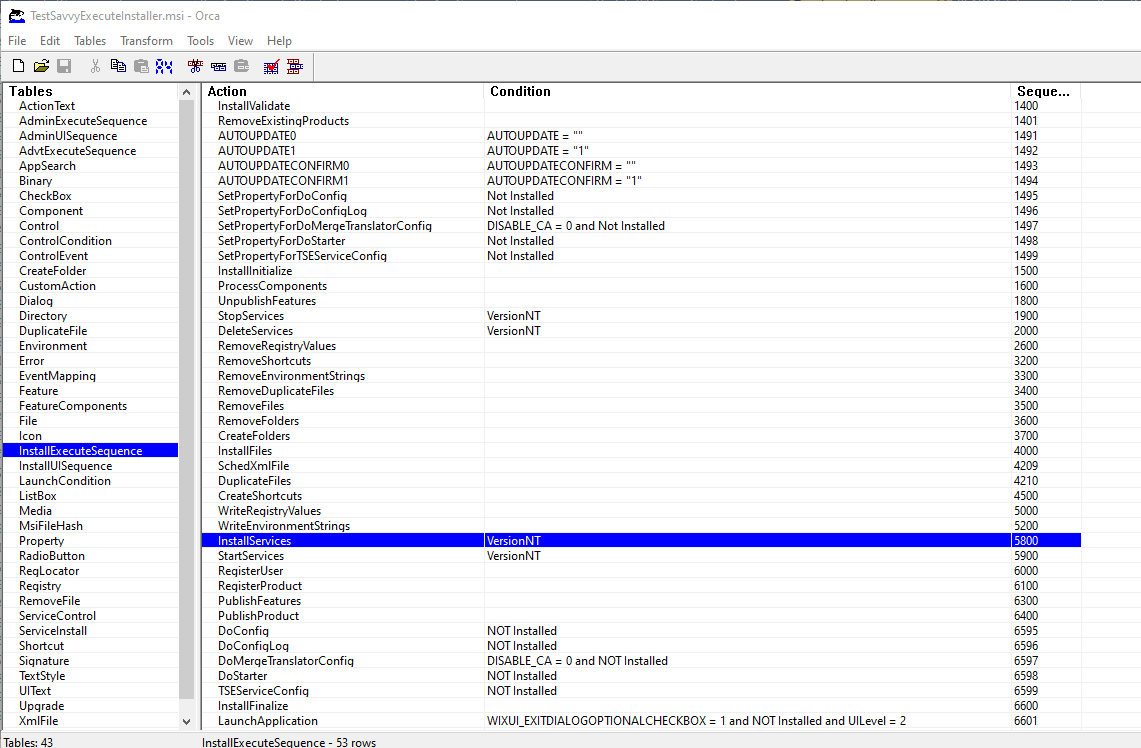
为了更好地理解这个问题,我认为在Orca查看MSI是很重要的。Orca是一个MS产品,可以查看MSI文件的生命周期。它还允许您直接编辑MSI文件。
下面是由安装程序按顺序运行的“作业”的屏幕截图。mattyB提到了"InstallServices“工作,我在下面的截图中强调了这一点。我们需要确保所有的自定义操作都发生在此作业运行之前。从这里开始,只需将"Custom“标记中的”InstallServices“属性设置为”InstallServices“值即可。
希望这有助于进一步揭开WiX的神秘面纱。
https://stackoverflow.com/questions/22524982
复制相似问题
腾讯云开发者

Copyright © 2013 - 2026 Tencent Cloud. All Rights Reserved. 腾讯云 版权所有
深圳市腾讯计算机系统有限公司 ICP备案/许可证号:粤B2-20090059  粤公网安备44030502008569号
腾讯云计算(北京)有限责任公司 京ICP证150476号 | 京ICP备11018762号