
CGRect用于选择多行文本的UITextRange调整?
我使用this answer来为特定的文本创建一个CGRect。
在这个UITextView中,我把它设为attributedText (所以我有一堆不同字形大小的样式文本)。
这对于左对齐的第一行文本非常有用,但是在使用NSTextAlignmentJustified或NSTextAlignmentCenter时,它有一些非常奇怪的结果。
它也没有正确计算这些行何时环绕,或者(有时)是否有\n换行。
我得到了这样的东西(这是中心对齐):

相反,我期望这样:

这里有一个\n换行器--前两个代码位被成功高亮显示,但最后一个more code for you to see并不是因为x,y计算中没有考虑到文本包装。
以下是我的实现:
- (void)formatMarkdownCodeBlockWithAttributes:(NSDictionary *)attributesDict
                      withHighlightProperties:(NSDictionary *)highlightProperties
                               forFontSize:(CGFloat)pointSize
{
    NSRegularExpression *regex = [NSRegularExpression regularExpressionWithPattern:@"`.+?`" options:NO error:nil];
    NSArray *matchesArray = [regex matchesInString:[self.attributedString string] options:NO range:NSMakeRange(0, self.attributedString.length)];
    for (NSTextCheckingResult *match in matchesArray)
    {
        NSRange range = [match range];
        if (range.location != NSNotFound) {

            self.textView.attributedText = self.attributedString;

            CGRect codeRect = [self frameOfTextRange:range forString:[[self.attributedString string] substringWithRange:range] forFontSize:pointSize];
            UIView *highlightView = [[UIView alloc] initWithFrame:codeRect];
            highlightView.layer.cornerRadius = 4;
            highlightView.layer.borderWidth = 1;
            highlightView.backgroundColor = [highlightProperties valueForKey:@"backgroundColor"];
            highlightView.layer.borderColor = [[highlightProperties valueForKey:@"borderColor"] CGColor];
            [self.contentView insertSubview:highlightView atIndex:0];

            [self.attributedString addAttributes:attributesDict range:range];

            //strip first and last `
            [[self.attributedString mutableString] replaceOccurrencesOfString:@"(^`|`$)" withString:@" " options:NSRegularExpressionSearch range:range];
        }
    }
}

- (CGRect)frameOfTextRange:(NSRange)range forString:(NSString *)string forFontSize:(CGFloat)pointSize
{
    self.textView.selectedRange = range;
    UITextRange *textRange = [self.textView selectedTextRange];
    CGRect rect = [self.textView firstRectForRange:textRange];
    //These three lines are a workaround for getting the correct width of the string since I'm always using the monospaced Menlo font.
    rect.size.width = ((pointSize / 1.65) * string.length) - 4;
    rect.origin.x+=2;
    rect.origin.y+=2;
    return rect;
}
哦,如果你想要的话,这是我正在演奏的弦乐:
*This* is **awesome** @mention `code` more \n `code and code` #hashtag [markdown](http://google.com) __and__ @mention2 {#FFFFFF|colored text} This**will also** work but ** will not ** **work** Also, some `more code for you to see`注意:请不要建议我使用TTTAttributedLabel或OHAttributedLabel。
回答 3
Stack Overflow用户
发布于 2014-03-22 01:20:25
我认为你所有的问题都是因为指令不正确。
你不得不
- 设置文本连接
- 查找所需的子字符串并向其添加特定属性
- 然后用子视图突出显示字符串。
此外,在这种情况下,您也不需要使用“获得字符串正确宽度的解决方案”,因为在这种情况下,我总是使用单频Menlo字体。
我已经简化了你的代码,使它更容易理解。
结果:
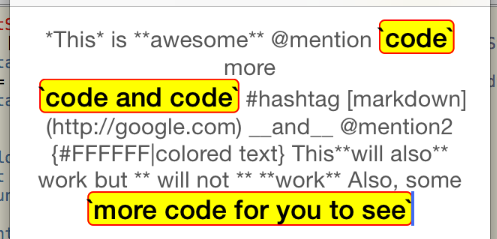
- (void)viewDidLoad
{
    [super viewDidLoad];

    NSDictionary *basicAttributes = @{ NSFontAttributeName : [UIFont boldSystemFontOfSize:18],
                                       NSForegroundColorAttributeName : [UIColor blackColor] };
    NSDictionary *attributes = @{ NSFontAttributeName : [UIFont systemFontOfSize:15],
                                  NSForegroundColorAttributeName : [UIColor darkGrayColor]};


    _textView.attributedText = [[NSAttributedString alloc] initWithString:
                                @"*This* is **awesome** @mention `code` more \n `code and code` #hashtag [markdown](http://google.com) __and__ @mention2 {#FFFFFF|colored text} This**will also** work but ** will not ** **work** Also, some `more code for you to see`" attributes:attributes];
    _textView.textAlignment = NSTextAlignmentCenter;

    [self formatMarkdownCodeBlockWithAttributes:basicAttributes];
}

- (void)formatMarkdownCodeBlockWithAttributes:(NSDictionary *)attributesDict
{
    NSMutableString *theString = [_textView.attributedText.string mutableCopy];
    NSRegularExpression *regex = [NSRegularExpression regularExpressionWithPattern:@"`.+?`" options:NO error:nil];
    NSArray *matchesArray = [regex matchesInString:theString options:NO range:NSMakeRange(0, theString.length)];

    NSMutableAttributedString *theAttributedString = [_textView.attributedText mutableCopy];
    for (NSTextCheckingResult *match in matchesArray)
    {
        NSRange range = [match range];
        if (range.location != NSNotFound) {
            [theAttributedString addAttributes:attributesDict range:range];
        }
    }

    _textView.attributedText = theAttributedString;

    for (NSTextCheckingResult *match in matchesArray)
    {
        NSRange range = [match range];
        if (range.location != NSNotFound) {

            CGRect codeRect = [self frameOfTextRange:range];
            UIView *highlightView = [[UIView alloc] initWithFrame:codeRect];
            highlightView.layer.cornerRadius = 4;
            highlightView.layer.borderWidth = 1;
            highlightView.backgroundColor = [UIColor yellowColor];
            highlightView.layer.borderColor = [[UIColor redColor] CGColor];
            [_textView insertSubview:highlightView atIndex:0];
        }
    }
}

- (CGRect)frameOfTextRange:(NSRange)range
{
    self.textView.selectedRange = range;
    UITextRange *textRange = [self.textView selectedTextRange];
    CGRect rect = [self.textView firstRectForRange:textRange];
    return rect;
}Stack Overflow用户
发布于 2014-03-21 18:37:09
我只需要做些类似的事情。假设您使用的是iOS 7:
// Build the range that you want for your text
NSRange range = NSMakeRange(location, length);

// Get the substring of the attributed text at that range
NSAttributedString *substring = [textView.attributedText attributedSubstringFromRange:range];

// Find the frame that would enclose the substring of text.
CGRect frame = [substring boundingRectWithSize:maxSize
                                           options:(NSStringDrawingUsesLineFragmentOrigin | NSStringDrawingUsesFontLeading)
                                           context:nil];
这应该使用分配给属性化字符串的NSTextAlignment。
Stack Overflow用户
发布于 2015-06-10 09:48:03
@Avt回答了https://stackoverflow.com/a/22572201/3549781这个问题。我只是在回答换线问题。这个换行符问题发生在iOS 7+上,即使您使用
[self.textView selectedTextRange] or [self.textView positionFromPosition: offset:]在调用textView之前,我们只需确保firstRectForRange的布局
[self.textView.layoutManager ensureLayoutForTextContainer:self.textView.textContainer];提供:https://stackoverflow.com/a/25983067/3549781
P.S :刚开始,我把这个作为对问题的评论。由于大多数人不看评论,所以我添加了这个作为回答。
https://stackoverflow.com/questions/22362131
复制相似问题
腾讯云开发者

Copyright © 2013 - 2026 Tencent Cloud. All Rights Reserved. 腾讯云 版权所有
深圳市腾讯计算机系统有限公司 ICP备案/许可证号:粤B2-20090059  粤公网安备44030502008569号
腾讯云计算(北京)有限责任公司 京ICP证150476号 | 京ICP备11018762号