
如何在UIVideoEditorController中的工具栏上添加/修改按钮?
如何在UIVideoEditorController中的工具栏上添加/修改按钮?
提问于 2014-03-12 10:46:29
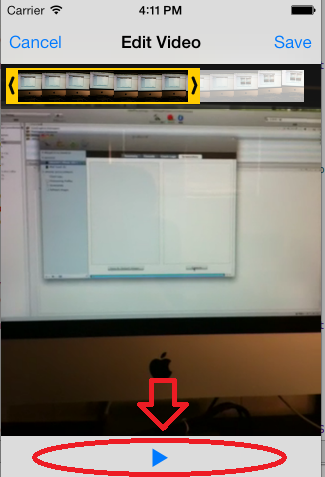
我正在尝试向UIVideoEditorController的底部工具栏添加按钮。这个是可能的吗?我可以修改/添加按钮到这个工具栏吗?
回答 2
Stack Overflow用户
回答已采纳
发布于 2014-03-12 11:07:46
苹果文档明确提到
Important: The UIVideoEditorController class supports portrait mode only. This class is intended to be used as-is and does not support subclassing. The view hierarchy for this class is private; do not modify the view hierarchy. This class does not support modifications to its appearance by use of overlay views.
所以基本上是不可能的。
Stack Overflow用户
发布于 2015-10-30 15:08:14
在这里,我留下了一个可能的解决方案,但永远记住来自苹果的警告。在本例中,我正在更改工具栏的背景色,但它应该与您想要的任何修改一起工作。
 - (void)navigationController:(UINavigationController *)navigationController didShowViewController:(UIViewController *)viewController animated:(BOOL)animated{

    [self changeBakcgroundColorOfView:navigationController.topView withColor:[UIColor redColor]];
}

- (void) changeBakcgroundColorOfView:(UIView *)view withColor:(UIColor*)color{

    for (UIView *subview in view.subviews) {

        if ([NSStringFromClass([subview class]) isEqualToString:@"UIToolbar"]) {

            UIToolbar *toolbar = (UIToolbar *)subview;
            toolbar.backgroundColor = color;
            toolbar.barTintColor = color;
        }

        [self changeBakcgroundColorOfView:subview withColor:color];
    }
}页面原文内容由Stack Overflow提供。腾讯云小微IT领域专用引擎提供翻译支持
原文链接:
https://stackoverflow.com/questions/22349043
复制相关文章
相似问题
腾讯云开发者

Copyright © 2013 - 2026 Tencent Cloud. All Rights Reserved. 腾讯云 版权所有
深圳市腾讯计算机系统有限公司 ICP备案/许可证号:粤B2-20090059  粤公网安备44030502008569号
腾讯云计算(北京)有限责任公司 京ICP证150476号 | 京ICP备11018762号