
DependencyProperty for ItemsSource
DependencyProperty for ItemsSource
提问于 2014-03-10 06:38:12
我有一个类似XAML的:
<UserControl x:Class="Book.CustomControls.HeaderedComboBox"
             xmlns="http://schemas.microsoft.com/winfx/2006/xaml/presentation"
             xmlns:x="http://schemas.microsoft.com/winfx/2006/xaml"
             DataContext="{Binding RelativeSource={RelativeSource Self}}"
             Width="200" Height="50">
    <Grid>
        <Grid.RowDefinitions>
            <RowDefinition Height="Auto"/>
            <RowDefinition/>
        </Grid.RowDefinitions>
        <TextBlock Grid.Row="0" Margin="2,2" VerticalAlignment="Center" Text="{Binding Header}" FontWeight="{Binding HeaderFontWeight}"/>
        <ComboBox Grid.Row="1" Margin="2,2" VerticalAlignment="Center" ItemsSource="{Binding ItemsSource, UpdateSourceTrigger=PropertyChanged}"
                  SelectedItem="{Binding SelectedItem, Mode=TwoWay, UpdateSourceTrigger=PropertyChanged}"/>
    </Grid>
</UserControl>
其中的cs-文件是:
public partial class HeaderedComboBox : UserControl
{
    public HeaderedComboBox()
    {
        this.InitializeComponent();
        this.HeaderFontWeight = FontWeights.Normal;
    }

    public static readonly DependencyProperty HeaderProperty = DependencyProperty.Register("Header", typeof(string), typeof(HeaderedComboBox));
    public static readonly DependencyProperty HeaderFontWeightProperty = DependencyProperty.Register("HeaderFontWeight", typeof(FontWeight), typeof(HeaderedComboBox));
    public static readonly DependencyProperty ItemsSourceProperty = DependencyProperty.Register("ItemsSource", typeof(IEnumerable), typeof(HeaderedComboBox));
    public static readonly DependencyProperty SelectedItemProperty = DependencyProperty.Register("SelectedItem", typeof(object), typeof(HeaderedComboBox));

    public string Header
    {
        get { return (string)GetValue(HeaderProperty); }
        set { SetValue(HeaderProperty, value); }
    }

    public FontWeight HeaderFontWeight
    {
        get { return (FontWeight)GetValue(HeaderFontWeightProperty); }
        set { SetValue(HeaderFontWeightProperty, value); }
    }

    public IEnumerable ItemsSource
    {
        get { return (IEnumerable)GetValue(ItemsSourceProperty); }
        set { SetValue(ItemsSourceProperty, value); }
    }

    public object SelectedItem
    {
        get { return GetValue(SelectedItemProperty); }
        set { SetValue(SelectedItemProperty, value); }
    }
}
我尝试在任何一个窗口中使用这个UserControl
<customControls:HeaderedComboBox Header="Category" ItemsSource="{Binding Categories}"/>类别只是一个ObservableCollection<string>。
不幸的是,我没有在ComboBox中看到任何项目。现在我不知道我做错了什么。有什么想法吗?
回答 1
Stack Overflow用户
回答已采纳
发布于 2014-03-10 07:07:20
System.Windows.Data Error: 40 : BindingExpression path error: 'Categories' property not found on 'object' ''HeaderedComboBox' (Name='')'. BindingExpression:Path=Categories; DataItem='HeaderedComboBox' (Name=''); target element is 'HeaderedComboBox' (Name=''); target property is 'ItemsSource' (type 'IEnumerable')您的DataContext设置为HeaderedCombobox,系统正在寻找一个类别。属性标头工作,因为您将文本放入其中而不进行绑定。可能解决办法
<Window x:Class="WpfApplication5.MainWindow"
    xmlns="http://schemas.microsoft.com/winfx/2006/xaml/presentation"
    xmlns:x="http://schemas.microsoft.com/winfx/2006/xaml"
    Title="MainWindow" Height="350" Width="525"
    xmlns:local="clr-namespace:WpfApplication5" Name="window">
<Grid>
    <local:HeaderedComboBox Header="Category" ItemsSource="{Binding ElementName=window, Path=DataContext.Categories}"/>
</Grid>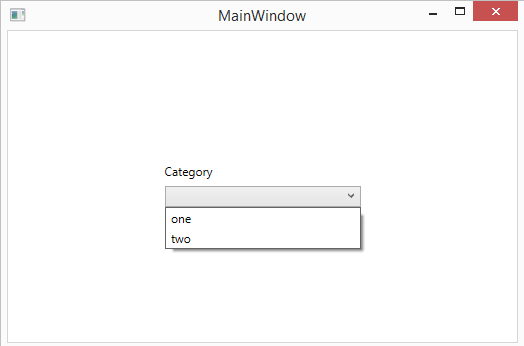
页面原文内容由Stack Overflow提供。腾讯云小微IT领域专用引擎提供翻译支持
原文链接:
https://stackoverflow.com/questions/22293574
复制相关文章
相似问题
腾讯云开发者

Copyright © 2013 - 2026 Tencent Cloud. All Rights Reserved. 腾讯云 版权所有
深圳市腾讯计算机系统有限公司 ICP备案/许可证号:粤B2-20090059  粤公网安备44030502008569号
腾讯云计算(北京)有限责任公司 京ICP证150476号 | 京ICP备11018762号