
仅显示选定对象的层次结构
仅显示选定对象的层次结构
提问于 2014-03-07 04:46:52
我正在创建用户选择对象的UI,UI将显示其所选对象的层次结构。它有点类似于出口,但我找不到任何文件/类似的结果,我试图获得。顺便说一句,我在用python编码.
即使如此,这是否可能在一开始就做到呢?
请允许我在下面提供一个简单的示例:假设我选择testCtrl,它将只显示testCtrl、loc和jnt,而不显示父(Grp 01)。
例如:Grp 01 -> testCtrl -> loc -> jnt
import maya.cmds as cmds

def customOutliner():
if cmds.ls( sl=True ):
    # Create the window/UI for the custom Oultiner
    newOutliner = cmds.window(title="Outliner (Custom)", iconName="Outliner*", widthHeight=(250,100))
    frame = cmds.frameLayout(labelVisible = False)
    customOutliner = cmds.outlinerEditor()

    # Create the selection connection network; Selects the active selection
    inputList = cmds.selectionConnection( activeList=True )
    fromEditor = cmds.selectionConnection()

    cmds.outlinerEditor( customOutliner, edit=True, mainListConnection=inputList )
    cmds.outlinerEditor( customOutliner, edit=True, selectionConnection=fromEditor )

    cmds.showWindow( newOutliner )

else:
cmds.warning('Nothing is selected. Custom Outliner will not be created.')回答 1
Stack Overflow用户
发布于 2014-03-07 06:22:47
使窗户:
您希望为此使用treeView命令(文档)。为了方便起见,我把它放在formLayout里。
from maya import cmds
from collections import defaultdict

window = cmds.window()
layout = cmds.formLayout()

control = cmds.treeView(parent=layout)

cmds.formLayout(layout, e=True, attachForm=[(control,'top', 2),
                                            (control,'left', 2),
                                            (control,'bottom', 2),
                                            (control,'right', 2)])
cmds.showWindow(window)
填充树视图:
为此,我们将使用一个递归函数,以便您可以使用嵌套的listRelatives调用(文档)构建层次结构。从老忠实的ls -sl的结果开始
def populateTreeView(control, parent, parentname, counter):
    # list all the children of the parent node
    children = cmds.listRelatives(parent, children=True, path=True) or []

    # loop over the children
    for child in children:
        # childname is the string after the last '|'
        childname = child.rsplit('|')[-1]

        # increment the number of spaces
        counter[childname] += 1
        # make a new string with counter spaces following the name
        childname = '{0} {1}'.format(childname, ' '*counter[childname])

        # create the leaf in the treeView, named childname, parent parentname
        cmds.treeView(control, e=True, addItem=(childname, parentname))

        # call this function again, with child as the parent. recursion!
        populateTreeView(control, child, childname, counter)


# find the selected object
selection = cmds.ls(sl=True)[0]

# create the root node in the treeView
cmds.treeView(control, e=True, addItem=(selection, ''), hideButtons=True)

# enter the recursive function
populateTreeView(control, selection, '', defaultdict(int))
窗口与外列的比较。
我用X替换了空格,这样你就可以看到发生了什么。但是,运行此代码将使用空格:
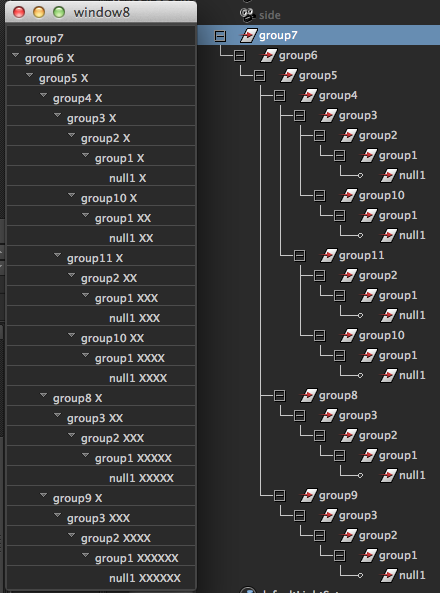
您可能希望阅读文档以改进这一点,但这应该是一个很好的起点。如果您想要一个与所选内容的实时连接,请创建一个scriptJob来跟踪它,并确保在重新填充之前清除treeView。
页面原文内容由Stack Overflow提供。腾讯云小微IT领域专用引擎提供翻译支持
原文链接:
https://stackoverflow.com/questions/22241679
复制相关文章
相似问题
腾讯云开发者

Copyright © 2013 - 2026 Tencent Cloud. All Rights Reserved. 腾讯云 版权所有
深圳市腾讯计算机系统有限公司 ICP备案/许可证号:粤B2-20090059  粤公网安备44030502008569号
腾讯云计算(北京)有限责任公司 京ICP证150476号 | 京ICP备11018762号