
Gif文件规范.框架的注释属性
我期待着在gif文件的每个帧中存储text的方法。不是打印图像中的文本,而是作为属性添加。有一个由微软制作的旧程序,它能够为每个框架设置文本。
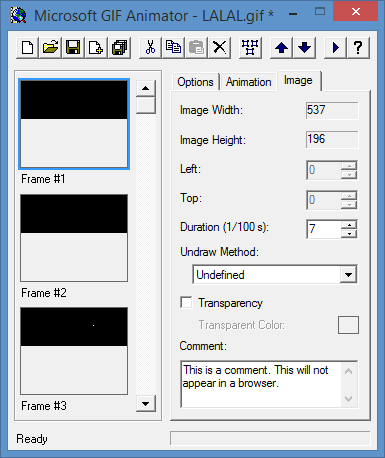
如您所见,每个帧都有一个字段“注释”。
现在,我的问题是:
这个字段是否符合GIF规范?几乎没有任何文件,可以这么说。(实际上,有)
如有,则:
在哪里?其中一种方法?
     protected void WriteGraphicCtrlExt()
     {
    fs.WriteByte(0x21); // extension introducer
    fs.WriteByte(0xf9); // GCE label
        fs.WriteByte(4); // data block size

        int transp, disp;

    if (transparent == Color.Empty)
    {
    transp = 0;
    disp = 0; // dispose = no action
    }
    else
    {
    transp = 1;
    disp = 2; // force clear if using transparent color
        }

        //If first frame, no transparency and no dispose.
        if (firstFrame)
        {
            disp = 0;
            transp = 0;
        }
        else
        {
            if (dispose >= 0)
            {
                disp = dispose & 7; // user override
            }
            disp <<= 2;
        }

        // packed fields
        fs.WriteByte( Convert.ToByte( 0 | // 1:3 reserved
            disp | // 4:6 disposal
            0 | // 7   user input - 0 = none
            transp )); // 8   transparency flag

        WriteShort(delay); // delay x 1/100 sec
        fs.WriteByte( Convert.ToByte( transIndex)); // transparent color index
        fs.WriteByte(0); // block terminator
    }


    protected void WriteImageDesc()
    {

        fs.WriteByte(0x2c); // image separator
        WriteShort(0); // image position x,y = 0,0
        WriteShort(0);
        WriteShort(width); // image size
        WriteShort(height);
        // packed fields
        if (firstFrame)
        {
            // no LCT  - GCT is used for first (or only) frame
            fs.WriteByte(0);
        }
        else
        {
            // specify normal LCT
            fs.WriteByte( Convert.ToByte( 0x80 | // 1 local color table  1=yes
                0 | // 2 interlace - 0=no
                0 | // 3 sorted - 0=no
                0 | // 4-5 reserved
                palSize ) ); // 6-8 size of color table
        }
    }
编辑:
我找到了一种方法,就像汉斯·帕桑写的那样:
protected void WriteComment(string comment)
{
        fs.WriteByte(0x21);
        fs.WriteByte(0xfe);

        byte[] lenght = StringToByteArray(comment.Length.ToString("X"));

        foreach (byte b in lenght)
        {
            fs.WriteByte(b);
        }

        WriteString(comment);
}回答 2
Stack Overflow用户
发布于 2014-03-13 09:59:33
好吧,有一个GifLib项目可以帮助您完成这个任务。具体来说,这些档案:
http://giflib.codeplex.com/SourceControl/latest#GifEncoder.cs,第87行Encode(),它在代码中指定将东西写入输出gif流的顺序。
对于注释扩展,有几个提示:
http://giflib.codeplex.com/SourceControl/latest#CommentEx.cs,第57行GetBuffer():
        internal byte[] GetBuffer()
        {
            List<byte> list = new List<byte>();
            list.Add(GifExtensions.ExtensionIntroducer); // 0x21
            list.Add(GifExtensions.CommentLabel); // 0xFE
            foreach (string coment in CommentDatas)
            {
                char[] commentCharArray = coment.ToCharArray();
                list.Add((byte)commentCharArray.Length);
                foreach (char c in commentCharArray)
                {
                    list.Add((byte)c);
                }
            }
            list.Add(GifExtensions.Terminator); // 0
            return list.ToArray();
}Stack Overflow用户
发布于 2014-03-13 13:28:07
最好只使用该工具(微软的GIFAnimator,可通过MSDN订阅获得),并查看它通过十六进制查看器产生的结果。将GIF规范放在手边,这样您就可以将所看到的内容与规范相关联。
我创建了一个非常简单的GIF文件,其中两个8x8帧,第一个输入“Frame1”,第二个输入“数字2”。产生了这个妖怪堆:
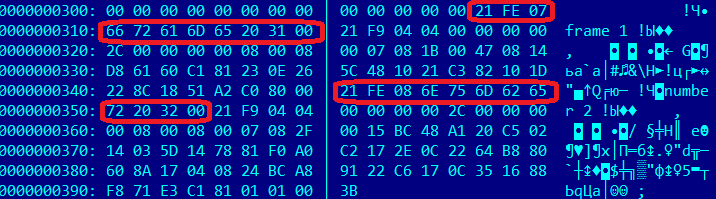
我用红色高亮显示了相关的区块。它们与规范中的第24节“注释扩展”相匹配:
注释扩展包含文本信息,这些信息不是GIF数据流中实际图形的一部分。它适用于包括关于图形,信用,描述或任何其他类型的非控制和非图形数据的评论。注释扩展可以被解码器忽略,也可以保存以供以后处理;在任何情况下,注释扩展都不应干扰或干扰数据流的处理。
请注意,在规范的第23节中,每个块后面都是一个21 F9块,即“图形控制扩展”块。它描述了图像文件中的每一帧,“延迟时间”值是至关重要的。然后是2C,一个“图像描述符”块,在规范中的第20节。它包含每个帧的图像数据。
回答你的具体问题:
这个字段是否符合GIF规范?
是的,如第24节所述。这完全取决于应用程序是否使用他们认为合适。它们只是注解,对另一个GIF实用程序或图像使用者来说并不意味着什么。
在哪里?其中一种方法?
不,这段代码没有写注释,它只发出21 F9和2C块。只需修改代码,在其前面插入21 FE块即可。就像这样:
protected void WriteGraphicCtrlExt(string comment)
{
    if (!string.IsNullOrEmpty(comment)) {
       fs.WriteByte(0x21);
       fs.WriteByte(0xfe);
       var bytes = Encoding.ASCII.GetBytes(comment);
       fs.WriteByte((byte)bytes.Length);
       fs.Write(bytes, 0, bytes.Length);
       fs.WriteByte(0);
    }
    // Rest of code
    //...
}https://stackoverflow.com/questions/22212274
复制相似问题
腾讯云开发者

Copyright © 2013 - 2026 Tencent Cloud. All Rights Reserved. 腾讯云 版权所有
深圳市腾讯计算机系统有限公司 ICP备案/许可证号:粤B2-20090059  粤公网安备44030502008569号
腾讯云计算(北京)有限责任公司 京ICP证150476号 | 京ICP备11018762号