
如何使用额外的选项(如全景)实现相机功能?
如何使用额外的选项(如全景)实现相机功能?
提问于 2014-03-05 18:01:10
我主要对全景图的选择感兴趣。有没有一种方法可以打开本机相机应用程序(增强版),这样用户就可以在普通照片和全景视图之间切换?有可能吗?还是我应该停止尝试?
下面是我现在使用的代码:
Intent i = new Intent(android.provider.MediaStore.ACTION_IMAGE_CAPTURE);
startActivityForResult(i, CAMERA_REQUEST);
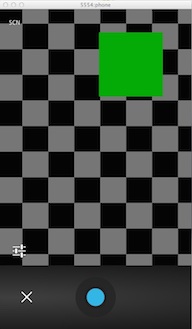
这就是目前发生的情况:

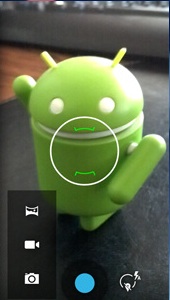
这就是我要达到的目标:
谢谢!
回答 3
Stack Overflow用户
发布于 2014-03-09 14:18:24
显然,还不可能直接从应用程序中使用全景或光球模式,因为它们依赖于Google提供的专有类。也许在下一个Android版本中,这是可能的。
见How to open camera directly in panorama/photosphere mode?或How to open photosphere camera?
Stack Overflow用户
发布于 2014-03-13 13:26:08
没有标准的方法可以做到这一点。AFAIK,Photoshere是Gallery3d (由谷歌提供)软件包com.google.android.gallery3d的专有特性。这取决于设备的固件。
在清单文件中
   <activity clearTaskOnLaunch="true" screenOrientation="0"
   name="com.google.android.apps.lightcycle.ProtectedPanoramaCaptureActivity"
   theme="resource_id:0x1030007"
   configChanges="1184"
   label="resource_id:0x7f0a00b2"
   windowSoftInputMode="35"
   taskAffinity="com.google.android.camera">

<intent-filter>
<action name="android.intent.action.MAIN">
</action>
</intent-filter>
</activity>
在你的活动中
 Intent res = new Intent();
 String mPackage = "com.google.android.gallery3d";
 String mClass = "com.google.android.apps.lightcycle.ProtectedPanoramaCaptureActivity";
res.setComponent(new ComponentName(mPackage,mClass));
startActivity(res);Stack Overflow用户
发布于 2017-08-17 13:11:29
您可以使用以下代码打开偏执模式
 Intent intent = new Intent(MediaStore.INTENT_ACTION_STILL_IMAGE_CAMERA);
startActivity(intent);页面原文内容由Stack Overflow提供。腾讯云小微IT领域专用引擎提供翻译支持
原文链接:
https://stackoverflow.com/questions/22205548
复制相关文章
相似问题
腾讯云开发者

Copyright © 2013 - 2026 Tencent Cloud. All Rights Reserved. 腾讯云 版权所有
深圳市腾讯计算机系统有限公司 ICP备案/许可证号:粤B2-20090059  粤公网安备44030502008569号
腾讯云计算(北京)有限责任公司 京ICP证150476号 | 京ICP备11018762号