
自定义listfield的部分
我一直在做一个小的应用程序,其中的这一部分使我感到困惑。我有一个listField (如屏幕截图中的按钮上面所示)、一些按钮和一些静态editFields在这个页面上,而且我在滚动方面遇到了问题。
我希望listField仅限于显示5行(它在屏幕截图中显示2),如果listField中有超过5项,则可以滚动它们(不是滚动整个页面,只滚动列表视图)。
我对editFields还有另一个问题,如果它们由于大量的文本而变得太大,它们就会从屏幕上消失,因为我的屏幕不会在没有调用super(Manager.NO_VERTICAL_SCROLL);的情况下运行,这显然是listField工作所需要的。
是实现完整的listField自定义类的唯一解决方案吗?还是有更简单的选择?
(因为我没有足够的代表发布图片,所以屏幕截图) http://imgur.com/RcfspQP
谢谢,奎恩
编辑:
public class TestScreen extends MainScreen{
public TestScreen(){
    //Without this call to super (which turns off vertical scrolling) the program throws an IllegalStateException and won't open the screen
    super(Manager.NO_VERTICAL_SCROLL);

    //Create some managers to organize the different Fields
    VerticalFieldManager verticalAllManager = new VerticalFieldManager();
    VerticalFieldManager verticalInfoManager = new VerticalFieldManager();
    //Going to use this to limit the number of rows the list will display
    VerticalFieldManager verticalListManager = new VerticalFieldManager()
    {
        protected void sublayout(int width, int height) {
            //Just test numbers
            super.sublayout(width, 100);
        }
    };
    HorizontalFieldManager horizontalButtonManager = new HorizontalFieldManager();

    //Add a title bar
    add(new LabelField("Choose the call you want to view", LabelField.FIELD_HCENTER));
    add(new SeparatorField());

    //Creates the SimpleList ListField
    Manager mainManager = getMainManager();
    final SimpleList listField = new SimpleList(mainManager);

    //Add items to the listField
    listField.add("Time: 12:30 | Date: 3:10:2014");
    listField.add("Time: 03:13 | Date: 1:25:2013");

    //Creates a button to use for selecting the desired call
    final ButtonField selectCall = new ButtonField("Select Call", ButtonField.CONSUME_CLICK);

    //Creates fields for all the required information (blank to start)
    final BasicEditField timeField, dateField, numberField, nameField;
    timeField = new BasicEditField("Call Time: ", "");
    dateField = new BasicEditField("Call Date: ", "");
    numberField = new BasicEditField("Call Number: ", "");
    nameField = new BasicEditField("Caller Name: ", "");

    //Creates a button that can be used to save changes
    final ButtonField saveChanges = new ButtonField("Save Changes", ButtonField.CONSUME_CLICK);
    final ButtonField deleteRow = new ButtonField("Delete Call", ButtonField.CONSUME_CLICK);

    //Adds all the info fields into a vertical manager to organize them
    verticalInfoManager.add(timeField);
    verticalInfoManager.add(dateField);
    verticalInfoManager.add(numberField);
    verticalInfoManager.add(nameField);

    //Adds the 3 buttons to a horizontal manager to lay them out in a row
    horizontalButtonManager.add(selectCall);
    horizontalButtonManager.add(saveChanges);
    horizontalButtonManager.add(deleteRow);

    //Add the horizontal button manager to the vertical page manager
    verticalAllManager.add(horizontalButtonManager);

    //Add the vertical info manager to the vertical page manager
    verticalAllManager.add(verticalInfoManager);

    //Add all the managers, under the page manager, to the page
    add(verticalAllManager);

}
}
下面是我添加的示例页面,以及运行时的另一个屏幕截图:
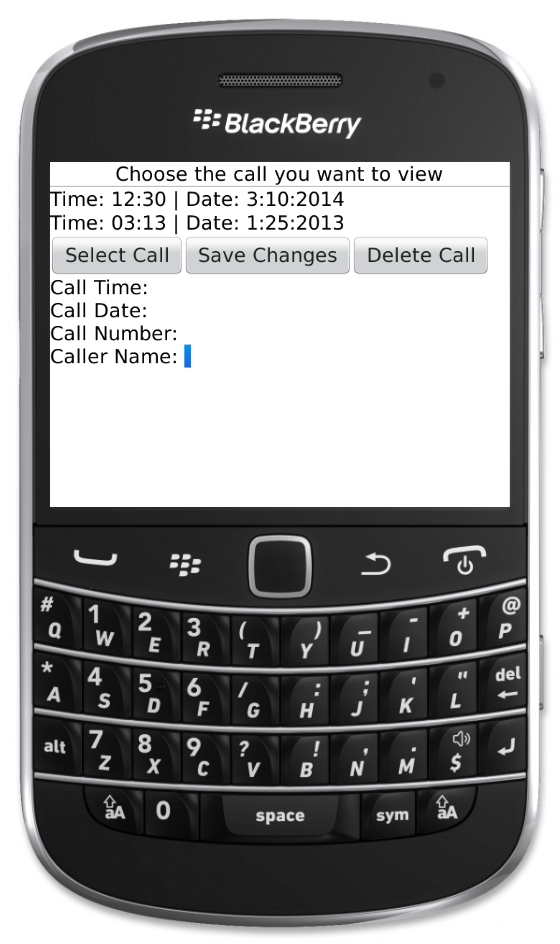
现在最大的问题是对带有NO_VERTICAL_SCROLL的超级()的调用关闭了整个页面的滚动。如果没有该调用,则信息字段将滚动,我只需将verticalListManager和horizontalButtonManager添加到横幅中,以防止它们滚动。
回答 1
Stack Overflow用户
发布于 2014-02-28 02:10:50
抱歉,已经过了我睡觉的时间了.
ListField不需要NO_VERTICAL_SCROLL,尽管一些较新的UI控件似乎需要。我避开这些..。
限制ListField仅显示5‘行的方法是将其放入滚动VerticalFieldManager中,然后将VFM的大小限制为显示5行所需的大小。
为了限制大小,您应该覆盖VFM的子布局,我最近还没有这样做,但我认为它就像调用super.sublayout一样简单,只要使用传入的宽度和高度限制即可。
要理解这是在做什么,请查看这两篇KB文章:
自定义布局管理器
扩展经理
如果这不起作用,请粘贴示例代码,然后我们可以“修复”,以显示此工作。基本上创建一个简单而独立的MainScreen,其中包含一个ListField和按钮,以及演示您已经发现的问题的EditFields,将其与另一个屏幕快照一起粘贴进来,我相信这里的人会为您创建一个经过修正的代码版本。
更新
啊,我看到您使用了一个较新的UI类,SimpleList,在我看来,其中一些类没有正确编码,因为正如您已经发现的那样,它们确实需要NO_VERTICAL_SCROLL。我怀疑如果您实际上将它们添加到具有固定高度的非滚动VFM中,那么处理可能会以您想要的方式工作。但对我来说,这里没有选择,我会编写一个普通的ListField,新的UI控件似乎也有其他限制,对我来说,它们提供的简化只是隐藏我喜欢使用的功能。
无论如何,我认为您有三个选项: 1)将您的编辑字段添加到状态区域(setStatus(.)--然后它们将停留在屏幕底部。将标题标签添加到标题区域(setTitle(.))。然后让你的电话在中间滚动。2)尝试将你的SimpleList放入一个无滚动但高度受限的调频中。3)将SimpleList更改为普通ListField。
也就是说,在我看来,你选择的Ui对于非触摸屏手机来说是有问题的。仅在触控板上的用户如何选择呼叫?我会考虑使用菜单为选定的行提供“按钮”。若要编辑一行,请使用带有详细信息的弹出屏幕。
因此,虽然我很高兴尝试帮助上面的选项之一,如果你决定你想尝试哪一个,我首先提醒你测试这个设计更多,以确保它的工作。
https://stackoverflow.com/questions/22084089
复制相似问题
腾讯云开发者

Copyright © 2013 - 2026 Tencent Cloud. All Rights Reserved. 腾讯云 版权所有
深圳市腾讯计算机系统有限公司 ICP备案/许可证号:粤B2-20090059  粤公网安备44030502008569号
腾讯云计算(北京)有限责任公司 京ICP证150476号 | 京ICP备11018762号