
OpenCV -从图像网格中拼接图像
我已经找到了一些基本的工作例子,通过OpenCV拼接全景图像。我还在API docs中找到了一些有用的文档,但我无法通过提供更多的信息来了解如何加快处理速度。
在我的例子中,我在一个20x20个单独的框架网格中生成一组图像,总共有400幅图像要拼接成一个大的。这在现代PC上花费了大量的时间,因此开发人员可能要花上几个小时。
有没有任何方法告诉OpenCV实例有关图像的信息,比如我预先知道所有图像的相对位置,因为它们会出现在网格上?到目前为止,我看到的唯一API调用就是通过vImg.push_back()将所有图像不加区别地添加到队列中。
参考资料
- 缝纫。图像拼接- OpenCV API文档,访问2014-02-26,
- OpenCV拼接示例(缝合器类,全景),访问2014-02-26,
- 全景- OpenCV中的图像拼接,2014-02-26,
回答 4
Stack Overflow用户
发布于 2014-03-11 15:32:24
据我所知,除了给它一个图像列表之外,没有办法向OpenCV引擎提供额外的数据。不过,它自己做得很好。我将检查一些示例代码,并测试每个缝纫操作所需的时间。从我使用4x6、4x8、.、4x20全景重建的实验来看,CPU所需的时间似乎随着重叠图像的数量而增加。我可以想象你的情况至少需要一分钟才能在现代机器上计算。
来源:https://code.ros.org/trac/opencv/browser/trunk/opencv/samples/cpp/stitching.cpp?rev=6682
1   /*M///////////////////////////////////////////////////////////////////////////////////////
2   //
3   //  IMPORTANT: READ BEFORE DOWNLOADING, COPYING, INSTALLING OR USING.
4   //
5   //  By downloading, copying, installing or using the software you agree to this license.
6   //  If you do not agree to this license, do not download, install,
7   //  copy or use the software.
8   //
9   //
10  //                          License Agreement
11  //                For Open Source Computer Vision Library
12  //
13  // Copyright (C) 2000-2008, Intel Corporation, all rights reserved.
14  // Copyright (C) 2009, Willow Garage Inc., all rights reserved.
15  // Third party copyrights are property of their respective owners.
16  //
17  // Redistribution and use in source and binary forms, with or without modification,
18  // are permitted provided that the following conditions are met:
19  //
20  //   * Redistribution's of source code must retain the above copyright notice,
21  //     this list of conditions and the following disclaimer.
22  //
23  //   * Redistribution's in binary form must reproduce the above copyright notice,
24  //     this list of conditions and the following disclaimer in the documentation
25  //     and/or other materials provided with the distribution.
26  //
27  //   * The name of the copyright holders may not be used to endorse or promote products
28  //     derived from this software without specific prior written permission.
29  //
30  // This software is provided by the copyright holders and contributors "as is" and
31  // any express or implied warranties, including, but not limited to, the implied
32  // warranties of merchantability and fitness for a particular purpose are disclaimed.
33  // In no event shall the Intel Corporation or contributors be liable for any direct,
34  // indirect, incidental, special, exemplary, or consequential damages
35  // (including, but not limited to, procurement of substitute goods or services;
36  // loss of use, data, or profits; or business interruption) however caused
37  // and on any theory of liability, whether in contract, strict liability,
38  // or tort (including negligence or otherwise) arising in any way out of
39  // the use of this software, even if advised of the possibility of such damage.
40  //
41  //M*/
42
43  // We follow to these papers:
44  // 1) Construction of panoramic mosaics with global and local alignment.
45  //    Heung-Yeung Shum and Richard Szeliski. 2000.
46  // 2) Eliminating Ghosting and Exposure Artifacts in Image Mosaics.
47  //    Matthew Uyttendaele, Ashley Eden and Richard Szeliski. 2001.
48  // 3) Automatic Panoramic Image Stitching using Invariant Features.
49  //    Matthew Brown and David G. Lowe. 2007.
50
51  #include <iostream>
52  #include <fstream>
53  #include "opencv2/highgui/highgui.hpp"
54  #include "opencv2/stitching/stitcher.hpp"
55
56  using namespace std;
57  using namespace cv;
58
59  void printUsage()
60  {
61      cout <<
62          "Rotation model images stitcher.\n\n"
63          "stitching img1 img2 [...imgN]\n\n"
64          "Flags:\n"
65          "  --try_use_gpu (yes|no)\n"
66          "      Try to use GPU. The default value is 'no'. All default values\n"
67          "      are for CPU mode.\n"
68          "  --output <result_img>\n"
69          "      The default is 'result.jpg'.\n";
70  }
71
72  bool try_use_gpu = false;
73  vector<Mat> imgs;
74  string result_name = "result.jpg";
75
76  int parseCmdArgs(int argc, char** argv)
77  {
78      if (argc == 1)
79      {
80          printUsage();
81          return -1;
82      }
83      for (int i = 1; i < argc; ++i)
84      {
85          if (string(argv[i]) == "--help" || string(argv[i]) == "/?")
86          {
87              printUsage();
88              return -1;
89          }
90          else if (string(argv[i]) == "--try_gpu")
91          {
92              if (string(argv[i + 1]) == "no")
93                  try_use_gpu = false;
94              else if (string(argv[i + 1]) == "yes")
95                  try_use_gpu = true;
96              else
97              {
98                  cout << "Bad --try_use_gpu flag value\n";
99                  return -1;
100             }
101             i++;
102         }
103         else if (string(argv[i]) == "--output")
104         {
105             result_name = argv[i + 1];
106             i++;
107         }
108         else
109         {
110             Mat img = imread(argv[i]);
111             if (img.empty())
112             {
113                 cout << "Can't read image '" << argv[i] << "'\n";
114                 return -1;
115             }
116             imgs.push_back(img);
117         }
118     }
119     return 0;
120 }
121
122
123 int main(int argc, char* argv[])
124 {
125     int retval = parseCmdArgs(argc, argv);
126     if (retval) return -1;
127
128     Mat pano;
129     Stitcher stitcher = Stitcher::createDefault(try_use_gpu);
130     Stitcher::Status status = stitcher.stitch(imgs, pano);
131
132     if (status != Stitcher::OK)
133     {
134         cout << "Can't stitch images, error code = " << status << endl;
135         return -1;
136     }
137
138     imwrite(result_name, pano);
139     return 0;
140 }
141
142 Stack Overflow用户
发布于 2015-04-06 10:02:35
我做了一些工作,缝纫流水线,虽然我不认为自己是一个领域的专家,我确实获得了更好的性能(以及更好的结果)调整每一步的流水线分别。正如您在图片中所看到的,缝纫类只不过是这个管道的包装:
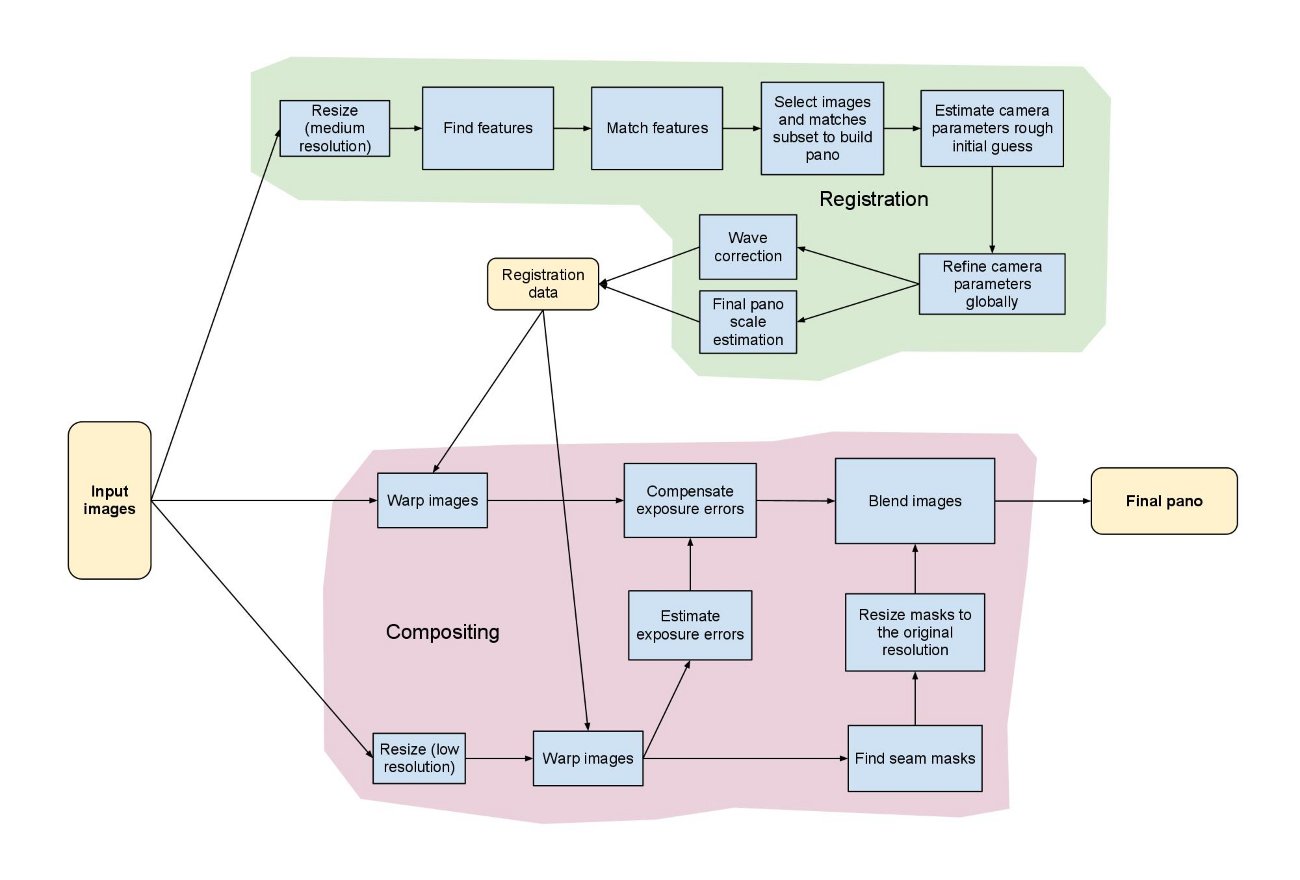
一些有趣的部分,你可以调整的是调整步骤(有一点是更高的分辨率,只是意味着更多的计算时间和更不准确的特征),匹配过程和(尽管这只是猜测)给出一个好的相机参数,而不是执行估计。这涉及到获取相机参数之前,进行缝纫,但这并不是真正的困难。这里有一些参考资料:OpenCV Camera Calibration and 3D Reconstruction。
再说一遍:我不是专家,这只是基于我在图书馆做一些实验的实习经验!
Stack Overflow用户
发布于 2014-07-13 14:10:22
https://stackoverflow.com/questions/22056737
复制相似问题
腾讯云开发者

Copyright © 2013 - 2026 Tencent Cloud. All Rights Reserved. 腾讯云 版权所有
深圳市腾讯计算机系统有限公司 ICP备案/许可证号:粤B2-20090059  粤公网安备44030502008569号
腾讯云计算(北京)有限责任公司 京ICP证150476号 | 京ICP备11018762号