
Openframeworks全球照明
Openframeworks全球照明
提问于 2014-02-26 18:37:13
我正在做一个openframeworks项目,它有一系列的立方体,每个立方体内都有一个点灯照明。降低了立方体的透明度,使光线通过。我已经验证了光线被设置为0,0,0 (这是立方体的中心)。
从理论上讲,点光应该同样照亮立方体的每一面。然而,立方体在一边明显更暗,而在另一边则更轻。
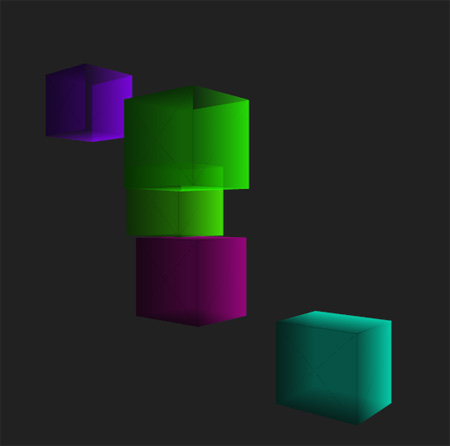
所以,我想知道是否有一个全局光参数,我不知道它是否需要以某种方式关闭。我的代码如下:
cube.cpp
#include "cube.h"

cube::cube(float _w, float _h, float _d, float _cubeHue)
{
    w = _w;
    h = _h;
    d = _d;
    cubeHue = _cubeHue;

    GLfloat vdata[8][3] = {
        {-w, -h, -d}, {-w, h, -d},
        {w, h, -d}, {w, -h, -d},
        {-w, -h, d}, {w, -h, d},
        {-w, h, d}, {w, h, d}
    };

    GLint indices[6][4] = {
        {3, 2, 1, 0},
        {3, 5, 4, 0},
        {3, 5, 7, 2},
        {0, 4, 6, 1},
        {1, 2, 7, 6},
        {5, 4, 6, 7}
    };

    cubeColor = ofColor();
    cubeColor.setHsb(cubeHue,ofRandom(500,255),ofRandom(100,255), 150);

    for (int i=0; i<8; ++i)
    {
        mesh.addVertex(ofVec3f( vdata[i][0], vdata[i][1], vdata[i][2] ));
        mesh.addColor(cubeColor);

        for (int i=0; i<6; ++i)
        {
            mesh.addIndex(indices[i][0]);
            mesh.addIndex(indices[i][1]);
            mesh.addIndex(indices[i][2]);
            mesh.addIndex(indices[i][3]);
        }
    }

    ofEnableLighting();

    pointLight.setPointLight();
    pointLight.setAttenuation(0.5f);
    pointLight.setPosition(ofVec3f(0,0,0));

    myVbo.setMesh(mesh, GL_STATIC_DRAW);
}

void cube::draw()
{
    pointLight.enable();

    myVbo.drawElements(GL_QUADS, 24);
    mesh.drawWireframe();

    pointLight.disable();
}

void cube::update()
{

}

void cube::setLocation(float _x, float _y, float _z)
{
    x = _x;
    y = _y;
    z = _z;
}
testApp.cpp
#include "testApp.h"

//--------------------------------------------------------------
void testApp::setup()
{
    glEnable(GL_DEPTH_TEST);
    glEnable(GL_LIGHTING);

    ofBackground(33, 33, 33);
    ofSetFrameRate(24);

    camera.setNearClip(0.1);
    camera.setFarClip(1900);
    camera.setPosition(ofVec3f(0,0,0));
    camAngle = 0;
    camX = 400;
    camY = 0;
    camZ = 400;

    cube1 = new cube(50,50,50,75);
    cube2 = new cube(50,50,50,220);
    cube3 = new cube(50,50,50,80);
    cube4 = new cube(50,50,50,190);
    cube5 = new cube(50,50,50,120);

    rotateAngle[0] = 0.0f;
    rotateAngle[1] = 0.0f;
    rotateAngle[2] = 0.0f;
    rotateAngle[3] = 0.0f;

    ofFloatColor diffuseColor;
    diffuseColor.set(1.0,1.0,1.0);
}

//--------------------------------------------------------------
void testApp::update()
{
    camAngle += 0.02f;

    if (camAngle >= 360)
    {
        camAngle = 0;
    }

    camX = 800 * sin(camAngle);
    camZ = 800 * cos(camAngle);
camera.lookAt(ofVec3f(0, 0, 0));
}

//--------------------------------------------------------------
void testApp::draw()
{
    camera.begin();

    camera.setPosition(ofVec3f(camX, camY, camZ));

    rotateAngle[0] += 1.0f;
    rotateAngle[1] += 0.5f;
    rotateAngle[2] += 0.75f;
    rotateAngle[3] += 1.5f;

    if (rotateAngle[0] > 359)
    {
        rotateAngle[0] = 0.0f;
    }

    if (rotateAngle[1] > 359)
    {
        rotateAngle[1] = 0.0f;
    }

    if (rotateAngle[2] > 359)
    {
        rotateAngle[2] = 0.0f;
    }

    if (rotateAngle[3] > 359)
    {
        rotateAngle[3] = 0.0f;
    }

    ofPushMatrix();
    ofTranslate(20,20,-30);
    cube1->draw();
    ofPopMatrix();

    ofPushMatrix();
    ofTranslate(100,-80,30);
    cube2->draw();
    ofPopMatrix();

    ofPushMatrix();
    ofTranslate(150,80,100);
    cube3->draw();
    ofPopMatrix();

    ofPushMatrix();
    ofTranslate(-150,180,-10);
    cube4->draw();
    ofPopMatrix();

    ofPushMatrix();
    ofTranslate(250,-180,-60);
    cube5->draw();
    ofPopMatrix();
}回答 2
Stack Overflow用户
回答已采纳
发布于 2014-02-26 19:12:45
我相信这是因为你所有的灯光都是在原点产生的。
当你的ofTranslate,这些灯不再在立方体内,当你渲染他们(他们在“原始的起源”)。
你为什么不使用立方体的位置成员并将翻译移到立方体中,这样你就可以相应地翻译光源了?
Stack Overflow用户
发布于 2015-06-09 22:18:40
我也有同样的问题,在画物体之前,用光在平移和旋转后的位置来解决。
// ofLight light
float la = ofGetElapsedTimef()*.1 * RAD_TO_DEG;
light_pos.set( 0,0,0 );
light_pos.x += sin( la ) * rad;
ofPushMatrix();
    ofTranslate( ofGetWidth() * 0.5f, ofgetHeight() * 0.5f, 0 );
    ofRotate( ofGetElapsedTimef()*.06 * RAD_TO_DEG, 0, 1, 0 );

    // when applied here and not before the pushMatrix
    // the light position is influence by
    // the current transformation matrix
    light.setPosition( light_pos );

    glColor4f( 1,1,1,1 );
    ofFill();
    ofDrawBox( -300,0,0, 50,50,200 );
    ofDrawBox( 0,-300,0, 50,50,200 );
    ofDrawBox( 300,0,0, 50,50,200 );
    ofDrawBox( 0,300,0, 50,50,200 );
    ofDrawBox( 0,0,0, 200,200,200 );
    glColor4f( 0,0,0,1 );
ofPopMatrix();
结果是光在立方体空间中水平移动的一点。
页面原文内容由Stack Overflow提供。腾讯云小微IT领域专用引擎提供翻译支持
原文链接:
https://stackoverflow.com/questions/22050234
复制相关文章
相似问题
腾讯云开发者

Copyright © 2013 - 2026 Tencent Cloud. All Rights Reserved. 腾讯云 版权所有
深圳市腾讯计算机系统有限公司 ICP备案/许可证号:粤B2-20090059  粤公网安备44030502008569号
腾讯云计算(北京)有限责任公司 京ICP证150476号 | 京ICP备11018762号