
如何分割叶子图像中感兴趣的区域
目的:I要检测叶子图像的某些区域。我已经发现了与我相关的问题,接近它的是这个segment object(leaf) which is on the white paper using image processing (从白色背景中移除叶子),但我的问题超出了它的范围,它的目的是提取/分割叶的病区。
问题:如何准确地分割和提取图像中的叶病区域。
我的尝试:
- inRange() OpenCV函数-Threshold绿色,这样我就不会为非绿色区域(棕色、灰色等)生成几个inRange值,并且我将满怀希望地去除绿色;在分割之前,我使用了高斯模糊,从RGB到HSV。
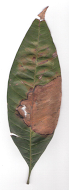
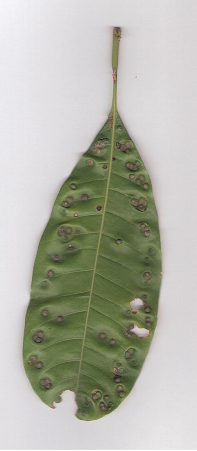
链接到文件 of image1,image2输入和结果:
Image1: 结果: Green被分割(认为不太准确),但我仍然不知道如何提取非绿色区域(作为下一步)。
Image2: 结果:暗小圆圈被包括/被认为是绿色的,应该是不应该的
我是OpenCV(也是C++)的新手,我读过几种用于分割的技术(比如聚类方法、模糊-c和k-均值等),但我无法决定对我的图像使用哪种分割技术。我还从我读到的文章中了解到,没有一种通用的分割技术可以应用于所有图像。
因此,我想知道哪种技术(聚类法)?以区域为基础?直方图?等)或处理是最好的申请类型的图像,我有,以准确地分割所述图像。
非常感谢。
回答 1
Stack Overflow用户
发布于 2014-02-22 11:40:59
只需尝试以下步骤
创建面具图像:-首先您需要为叶子创建一个面具图像,您需要进行阈值处理,找到轮廓(最大),绘制轮廓(与填充) etc...also,以消除您需要的边缘效果,以侵蚀您的面具,这将带来更好的效果。

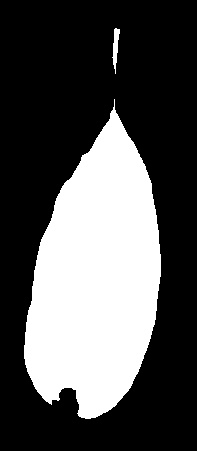
下面的代码片段将执行上述操作
Mat thr;
Mat src=imread("image2.png",1); //Your processed  image
cvtColor(src,thr,CV_BGR2GRAY);
threshold(thr,thr,180,255,THRESH_BINARY_INV);

vector< vector <Point> > contours; // Vector for storing contour
vector< Vec4i > hierarchy;
int largest_contour_index=0;
int largest_area=0;
Mat mask(src.rows,src.cols,CV_8UC1,Scalar::all(0)); //create destination image
findContours( thr.clone(), contours, hierarchy,CV_RETR_EXTERNAL, CV_CHAIN_APPROX_SIMPLE ); // Find the contours in the image
 for( int i = 0; i< contours.size(); i++ ) // iterate through each contour.
  {
   double a=contourArea( contours[i],false);  //  Find the area of contour
   if(a>largest_area){
   largest_area=a;
   largest_contour_index=i;                //Store the index of largest contour
   }
  }
 drawContours( mask,contours, largest_contour_index, Scalar(255,255,255),CV_FILLED, 8, hierarchy ); // Draw the largest contour using previously stored index.
 int dilation_size = 2;
 Mat element = getStructuringElement( MORPH_RECT,
                                      Size( 2*dilation_size + 1, 2*dilation_size+1 ),
                                      Point( dilation_size, dilation_size ) );
erode( mask, mask, element );提取绿色区域:-在这里您应该使用hsv颜色空间,inrange等。正如你在问题中提到的。
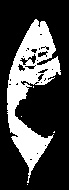
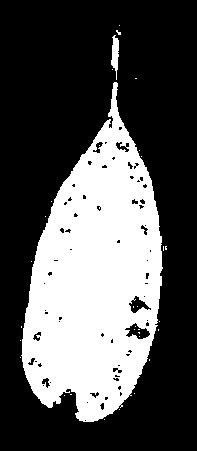
Mat HSV,hsv_thr,dst;
cvtColor(src,HSV,CV_BGR2HSV);
inRange(HSV,Scalar(20,10,10),Scalar(90,255,255),hsv_thr);上面的图片是bitwise_not:-,您应该使用上面创建的掩码。

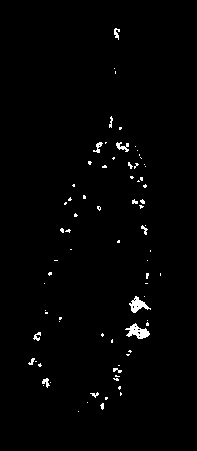
bitwise_not(hsv_thr, dst, mask);绘制病区:-这里,您需要做的是找到等高线,绘制等高线等。
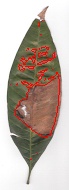
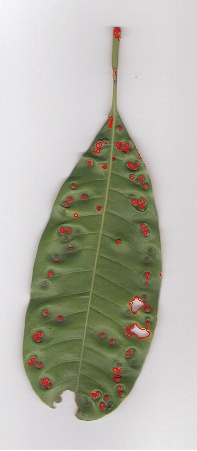
findContours( dst.clone(), contours, hierarchy,CV_RETR_EXTERNAL, CV_CHAIN_APPROX_SIMPLE ); // Find the contours in the image
     for( int i = 0; i< contours.size(); i++ ) // iterate through each contour.
      drawContours( src,contours, i, Scalar(0,0,255),1, 8, hierarchy );
通过适当的滤波、阈值处理、适当的hsv范围等措施,可以提高检测效果。另外,上面的算法考虑到背景总是白色的,而对于其他背景,则需要更改创建掩码图像的步骤。
希望这些有用的..。
https://stackoverflow.com/questions/21950352
复制相似问题
腾讯云开发者

Copyright © 2013 - 2026 Tencent Cloud. All Rights Reserved. 腾讯云 版权所有
深圳市腾讯计算机系统有限公司 ICP备案/许可证号:粤B2-20090059  粤公网安备44030502008569号
腾讯云计算(北京)有限责任公司 京ICP证150476号 | 京ICP备11018762号