
AWS EC2 EC2地址
我成功地登录到ubuntu,做了一些安装和ftp一些映像文件(只是为了测试网络是否工作)。如何从浏览器中使用公共IP或弹性IP查看它?我还不想传输DNS,因为我现在正在测试Node.js。
回答 4
Stack Overflow用户
发布于 2014-02-25 07:27:42
在EC2上启动ubuntu实例并不会自动使其成为服务器。您需要实际运行一个web服务器,以便在浏览器上查看该计算机上的文件。
对于静态文件,可以使用简单的web服务器,如python的SimpleHTTPServer或网络服务d。
如果您计划使用node.js,您可能更喜欢用node.js编写一个小的Hello World:
// Load the http module to create an http server.
var http = require('http');

// Configure our HTTP server to respond with Hello World to all requests.
var server = http.createServer(function (request, response) {
  response.writeHead(200, {"Content-Type": "text/plain"});
  response.end("Hello World\n");
});

// Listen on port 8000, IP defaults to 127.0.0.1
server.listen(8000);

// Put a friendly message on the terminal
console.log("Server running at http://127.0.0.1:8000/");Stack Overflow用户
发布于 2014-02-22 10:27:03
我猜这与NodeJS服务器定义有关
示例中给出的默认server.listen
server.listen(1337,"127.0.0.1");
NodeJS只会监听127.0.0.1中的连接。
要使它响应所有请求,请尝试以下设置--主机部分是可选的)
server.listen(1337);
Stack Overflow用户
发布于 2014-02-22 05:50:42
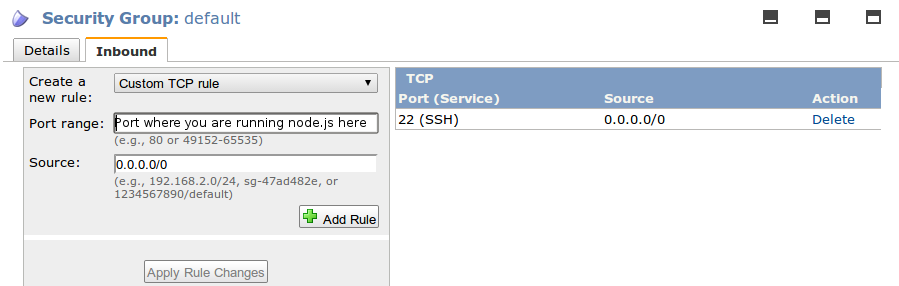
您需要允许在您的node.js实例使用的安全组上运行EC2的端口。然后您可以在http://<public ip of your server>:<port where node.js is running on>访问您的站点。
https://stackoverflow.com/questions/21948145
复制相似问题
腾讯云开发者

Copyright © 2013 - 2026 Tencent Cloud. All Rights Reserved. 腾讯云 版权所有
深圳市腾讯计算机系统有限公司 ICP备案/许可证号:粤B2-20090059  粤公网安备44030502008569号
腾讯云计算(北京)有限责任公司 京ICP证150476号 | 京ICP备11018762号