
如何在ListBox中处理SAPUI5中的拖放操作?
我可以发现在SAPUI5中支持拖放。但我无法在我的应用程序中实现同样的功能。我试图绑定到dragstart和dragleave事件,它们不起作用。
我甚至尝试在其他线程(http://jsbin.com/qova/2/edit?html,output)中提供示例。此示例也不起作用。我可以选择列表项,但是当我试图拖动时,选择只会扩展,什么也不会发生。
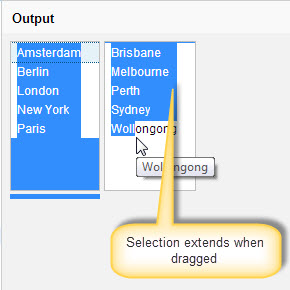
如果我做错了什么,请告诉我。
这里是HTML快照
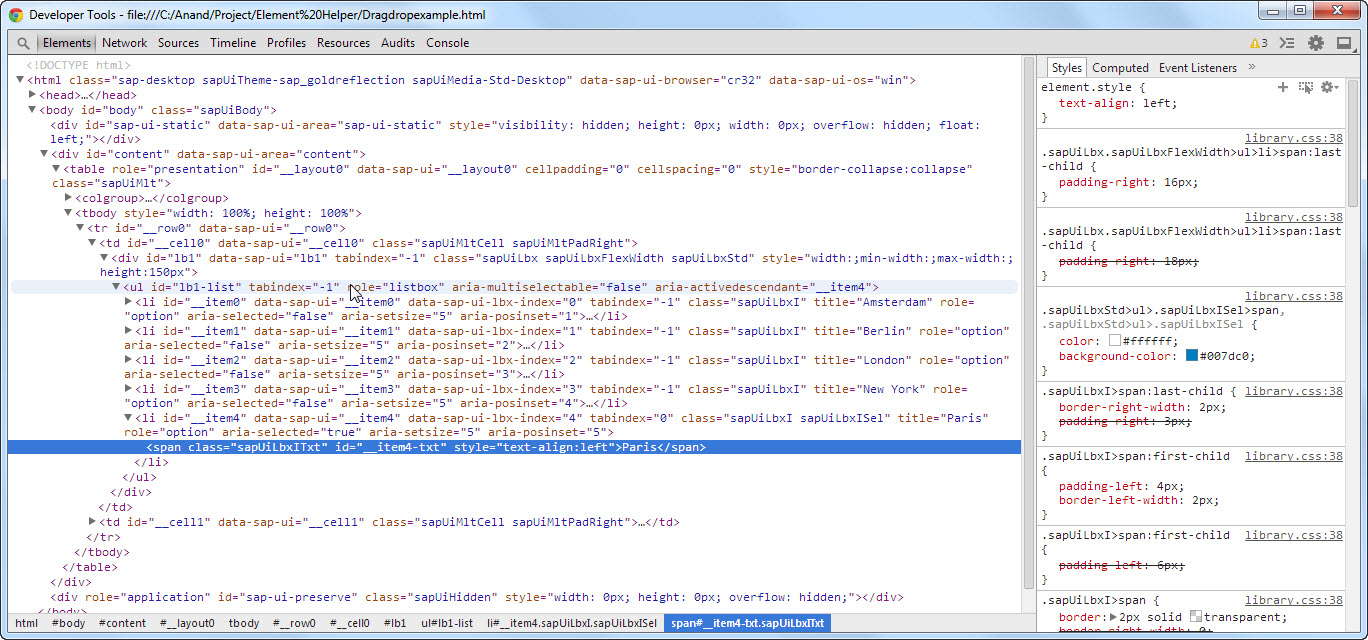
源代码
    <!DOCTYPE html>
<html>
<head>
<meta name="description" content="OpenUI5 Listbox Drop and Drag" />
<meta http-equiv='X-UA-Compatible' content='IE=edge' />
<meta http-equiv="Content-Type" content="text/html; charset=ISO-8859-1">
<title>Drag and Drop List Test</title>
<script id='sap-ui-bootstrap'
    src='https://openui5.hana.ondemand.com/resources/sap-ui-core.js'
    data-sap-ui-theme="sap_goldreflection"
    data-sap-ui-libs="sap.ui.commons">
</script>

<script type="text/javascript">
    $.sap.require('sap.ui.thirdparty.jqueryui.jquery-ui-core');
    $.sap.require('sap.ui.thirdparty.jqueryui.jquery-ui-widget');
    $.sap.require('sap.ui.thirdparty.jqueryui.jquery-ui-mouse');
    $.sap.require('sap.ui.thirdparty.jqueryui.jquery-ui-draggable');
    $.sap.require('sap.ui.thirdparty.jqueryui.jquery-ui-sortable');

    $(function() {
        $("#lb1-list, #lb2-list").sortable({
            connectWith : ".ui-sortable"
        }).disableSelection();
    });

    var city1 = "Berlin|London|New York|Paris|Amsterdam",
        city2 = "Sydney|Melbourne|Brisbane|Perth|Wollongong";

    var oListBox1 = new sap.ui.commons.ListBox( "lb1", {
        items : $.map(city1.split("|").sort(), function(v, i) {
            return new sap.ui.core.ListItem({ text : v  });
        }), height : "150px"
    });

    var oListBox2 = new sap.ui.commons.ListBox("lb2", {
        items : $.map(city2.split("|").sort(), function(v, i) {
            return new sap.ui.core.ListItem({text : v });
        }), height : "150px"
    });

    var oLayout = new sap.ui.commons.layout.MatrixLayout({layoutFixed : false})
    oLayout.createRow(oListBox1, oListBox2).placeAt("content");
</script>

</head>
<body id="body" class="sapUiBody">
    <div id="content"></div>
</body>
</html>
更新:如果列表是静态的,解决方案可以正常工作。但是对于动态列表,我们通过代码添加行,SAPUI5重新呈现列表并调用remove属性。remove属性调用jQuery属性,并删除Class属性。一旦我使列表项是静态的,拖放就会正常工作。
当列表是动态的时,是否有拖放的解决方案?
找到了一个解决方案----请注意,此解决方案适用于使用不同视图和控制器创建的UI5应用程序。
对于动态列表,jquery拖放必须在onAfterRendering中调用。否则,jquery添加的类将在列表重新呈现后被删除。
对于我发布的内联UI5应用程序,我们可以尝试在列表控件中添加"onAfterRendering“事件委托。
回答 3
Stack Overflow用户
发布于 2014-09-10 08:27:48
找到了一个解决方案:
请注意,此解决方案适用于使用单独的视图和控制器创建的UI5应用程序。
对于动态列表,jquery可拖放必须在控制器的onAfterRendering中调用。否则,jquery添加的类将在列表重新呈现后被删除。
对于类似我发布的问题中的内联UI5应用程序,我们可以尝试在列表控件中添加"onAfterRendering“事件委托。
Stack Overflow用户
发布于 2014-08-29 11:53:34
这是可能的。
请参阅http://jsbin.com/zikuj/1/edit?html,js,output,以获得使框架保持同步的工作实现(并请原谅火腿代码.我只做了几个月的js )。也就是说,这似乎太脆弱,无法在生产代码中使用。
<!DOCTYPE html>
<html>
<head>
<meta name="description" content="OpenUI5 Listbox Drop and Drag" />
<meta http-equiv='X-UA-Compatible' content='IE=edge' />
<meta http-equiv="Content-Type" content="text/html; charset=ISO-8859-1">
<title>Drag and Drop List Test</title>
<script id='sap-ui-bootstrap'
    src='https://openui5.hana.ondemand.com/resources/sap-ui-core.js'
    data-sap-ui-theme="sap_goldreflection"
    data-sap-ui-libs="sap.ui.commons">
</script>

<script type="text/javascript" src="dnd.js">
</script>

</head>
<body id="body" class="sapUiBody">
    <div id="content" draggable="true" ondragstart="drag(event)" ondrop="drop(event)" ondragover="allowDrop(event)" ></div>

</body>
</html>
对于dnd.js:
var newItemCount = 30;

function allowDrop(ev) {
    'use strict';
    ev.preventDefault();
}

function drag(ev) {
    'use strict';
    //hack to get from text element to the list item...should do a smarter walk up but...
    var element = document.elementFromPoint(ev.x, ev.y).parentElement;
    console.log("Text data for source object to drag: " + element.id);
    ev.dataTransfer.setData("Text", element.id);
}

function drop(ev) {
    'use strict';
    ev.preventDefault();
    var foundIt = false,
        sourceID = ev.dataTransfer.getData("Text"),
        target = ev.target;

    //hacky way to identify if this is the container element to drop on...
    while (target && (target.id.indexOf("dndList") !== 0 || (target.id.indexOf("-") > -1))) {
        target = target.parentElement;
    }

    if (target) {
        console.log("target id is " + target.id);
        var targetWidget = sap.ui.getCore().byId(target.id),
            potentialSource = sap.ui.getCore().byId("dndList1"),
            psItems = potentialSource.getItems();

        psItems.forEach(function (c) {
            if (c.sId === sourceID) {
                potentialSource.removeItem(sourceID);
                targetWidget.addItem(new sap.ui.core.ListItem({id: "xxlb" + newItemCount, text : c.mProperties.text}));
                newItemCount++;
                foundIt = true;
            }
        });

        if (!foundIt) {
            potentialSource = sap.ui.getCore().byId("dndList2");
            psItems = potentialSource.getItems();
            psItems.forEach(function (c) {
                if (c.sId === sourceID) {
                    potentialSource.removeItem(sourceID);
                    targetWidget.addItem(new sap.ui.core.ListItem({id: "xxlb" + newItemCount, text : c.mProperties.text}));
                    newItemCount++;
                }
            });
        }//!foundIt
    } //target identified
}//drop


(function () {
    'use strict';

    var city1 = "Berlin|London|New York|Paris|Amsterdam",
        city2 = "Sydney|Melbourne|Brisbane|Perth|Wollongong",

        oListBox1 = new sap.ui.commons.ListBox("dndList1", {
            items : $.map(city1.split("|").sort(), function (v, i) {
                return new sap.ui.core.ListItem({ id: "xxlb1" + i, text : v });
            }),
            height : "150px"
        }),

        oListBox2 = new sap.ui.commons.ListBox("dndList2", {
            items : $.map(city2.split("|").sort(), function (v, i) {
                return new sap.ui.core.ListItem({id: "xxlb2" + i, text : v });
            }),
            height : "150px"
        }),

        oButton = new sap.ui.commons.Button({text: "Add an item",
            press: function () {
                oListBox1.addItem(new sap.ui.core.ListItem({id: "xxlb" + newItemCount, text : "newthing" + newItemCount }));
                newItemCount++;
            }
            }),

        oLayout = new sap.ui.commons.layout.MatrixLayout({layoutFixed : false});

    oLayout.createRow(oListBox1, oListBox2).createRow(oButton).placeAt("content");

}());Stack Overflow用户
发布于 2014-08-30 01:19:31
我这里有个例子,也许是有用的
示例
<!DOCTYPE HTML>
<html>
<head>

<meta http-equiv="X-UA-Compatible" content="IE=edge" />

<script id="sap-ui-bootstrap"
    type="text/javascript"
    data-sap-ui-libs="sap.m"
    data-sap-ui-theme="sap_bluecrystal"
    src="https://sapui5.hana.ondemand.com/resources/sap-ui-core.js">
</script>

<style>
    .sapMList {
        border: 1px solid #ccc;
    }

    .ui-sortable {
        min-height: 40px;
    }

    .ui-sortable>li{
        cursor: pointer;
    }
</style>
<script>
jQuery(function() {
    $.sap.require('sap.ui.thirdparty.jqueryui.jquery-ui-core');
    $.sap.require('sap.ui.thirdparty.jqueryui.jquery-ui-widget');
    $.sap.require('sap.ui.thirdparty.jqueryui.jquery-ui-mouse');
    $.sap.require('sap.ui.thirdparty.jqueryui.jquery-ui-draggable');
    $.sap.require('sap.ui.thirdparty.jqueryui.jquery-ui-sortable');

    var city1 = "Berlin|London|New York|Paris|Amsterdam";
    var city2 = "Sydney|Melbourne|Brisbane|Perth|Wollongong";

    var oListBox1 = new sap.m.List("lb1", {
        items : $.map(city1.split("|").sort(), function(v, i) {
            return new sap.m.StandardListItem({ title : v });
        }),
        height : "150px",
        width: "200px"
    }).addStyleClass('sapUiSizeCompact ');

    var oListBox2 = new sap.m.List("lb2", {
        items : $.map(city2.split("|").sort(), function(v, i) {
            return new sap.m.StandardListItem({title : v });
        }), height : "150px",
        width: "200px"
    }).addStyleClass('sapUiSizeCompact ');

    var oLayout = new sap.m.HBox({
        items : [oListBox1, oListBox2]
    }).placeAt("content");

    oLayout.onAfterRendering = function() {
        if (sap.m.HBox.prototype.onAfterRendering) {
            sap.m.HBox.prototype.onAfterRendering.apply(this);
        }

        $("#lb1-listUl").addClass('ui-sortable');
        $("#lb2-listUl").addClass('ui-sortable');

        $("#lb1-listUl").sortable({
            connectWith : ".ui-sortable"
        }).disableSelection();

        $("#lb2-listUl").sortable({
            connectWith : ".ui-sortable"
        }).disableSelection();
    }
});
</script>

</head>
<body class="sapUiBody">
  <div id="content"></div>
</body>
</html>
我们使用已经捆绑在SAPUI5中的jqueryui来实现这一点。
-D
https://stackoverflow.com/questions/21889762
复制相似问题
腾讯云开发者

Copyright © 2013 - 2026 Tencent Cloud. All Rights Reserved. 腾讯云 版权所有
深圳市腾讯计算机系统有限公司 ICP备案/许可证号:粤B2-20090059  粤公网安备44030502008569号
腾讯云计算(北京)有限责任公司 京ICP证150476号 | 京ICP备11018762号