
使用Server而不是LocalDB的Web和LocalDB标识
- 如何将ASP.Net标识设置为使用Server数据库而不是LocalDB?
- 如何自定义ASP.Net标识以使用自定义数据层?
在Web Microsoft.AspNet.Identity.Core 4.5中使用EntityFramework 1.0.0和EntityFramework 6.0.0
Web.config更改:
<connectionStrings>
<add name="myAppDB"
     connectionString="data source=.;Initial Catalog=mydb1;Integrated Security=SSPI;"
     providerName="System.Data.SqlClient" />
</connectionStrings>
调用api/帐户/寄存器时出错
{"Message":"An error has occurred.","ExceptionMessage":"An error occurred while getting provider information from the database. This can be caused by Entity Framework using an incorrect connection string. Check the inner exceptions for details and ensure that the connection string is correct.","ExceptionType":"System.Data.Entity.Core.ProviderIncompatibleException","StackTrace":"   at System.Web.Http.ApiController.<InvokeActionWithExceptionFilters>d__1.MoveNext()
--- End of stack trace from previous location where exception was thrown ---
   at System.Runtime.CompilerSeres.TaskAwaiter.ThrowForNonSuccess(Task task)
   at System.Runtime.CompilerServices.TaskAwaiter.HandleNonSuccessAndDebuggerNotification(Task task)
   at System.Web.Http.Dispatcher.HttpControllerDispatcher.<SendAsync>d__0.MoveNext()","InnerException":{"Message":"An error has occurred.","ExceptionMessage":"The provider did not return a ProviderManifestToken string.","ExceptionType":"System.Data.Entity.Core.ProviderIncompatibleException","StackTrace":"   at System.Data.Entity.Core.Common.DbProviderServices.GetProviderManifestToken(DbConnection connection)
   at System.Data.Entity.Utilities.DbProviderServicesExtensions.GetProviderManifestTokenChecked(DbProviderServices providerServices, DbConnection connection)","InnerException":{"Message":"An error has occurred.","ExceptionMessage":"A network-related or instance-specific error occurred while establishing a connection to SQL Server. The server was not found or was not accessible. Verify that the instance name is correct and that SQL Server is configured to allow remote connections. (provider: SQL Network Interfaces, error: 50 - Local Database Runtime error occurred. Cannot create an automatic instance. See the Windows Application event log for error details.
)","ExceptionType":"System.Data.SqlClient.SqlException","StackTrace":"   .....
和Windows应用程序事件日志
Cannot get a local application data path. Most probably a user profile is not loaded. If LocalDB is executed under IIS, make sure that profile loading is enabled for the current user.回答 1
Stack Overflow用户
发布于 2014-02-18 13:45:40
如果您没有更改MVC 5 Internet模板使用的基本配置,则用于ASP.NET标识的连接字符串的名称为"DefaultConnection“。尝试创建一个具有此名称的连接字符串,并将其配置为指向sql server。
如果使用Web模板,则默认设置为“无身份验证”,如下图所示。
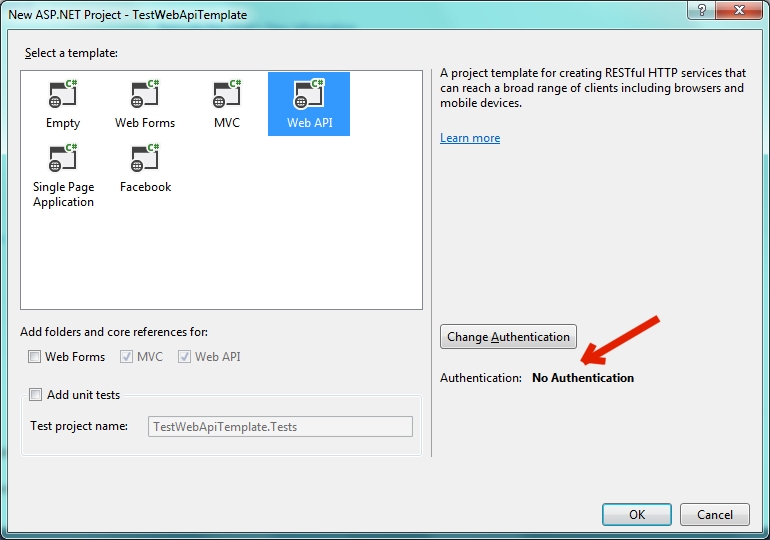
如果选择“无身份验证”,则不会安装用于ASP.NET标识的适当程序集,也不会创建帐户控制器,也不会用连接字符串更新web.config。注意,MVC仍然包含在模板中。
如果要使用ASP.NET标识,请选择“更改身份验证”并选择“个人帐户”
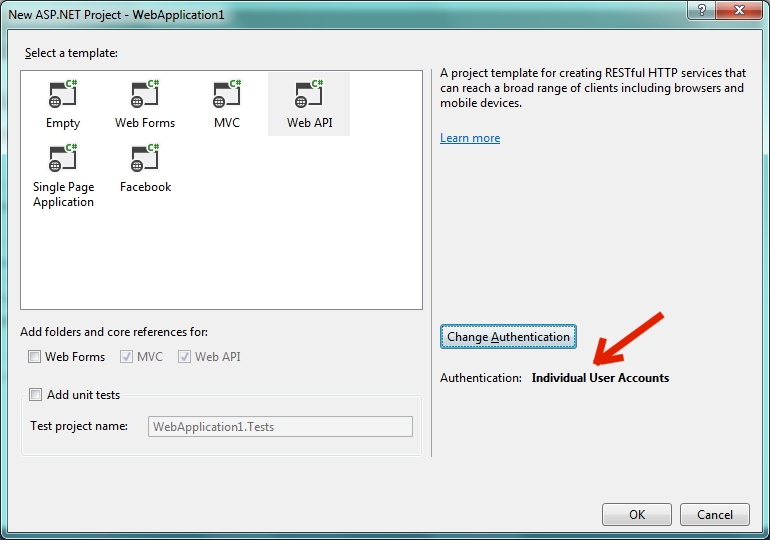
现在您有了所有必需的程序集,ASP.NET标识在启动配置中连接,默认连接字符串在web.config中。
  <configSections>
    <!-- For more information on Entity Framework configuration, visit http://go.microsoft.com/fwlink/?LinkID=237468 -->
    <section name="entityFramework" type="System.Data.Entity.Internal.ConfigFile.EntityFrameworkSection, EntityFramework, Version=6.0.0.0, Culture=neutral, PublicKeyToken=b77a5c561934e089" requirePermission="false" />
  </configSections>
  <connectionStrings>
    <add name="DefaultConnection" connectionString="Data Source=  (LocalDb)\v11.0;AttachDbFilename=|DataDirectory|\aspnet-TestWebApiTemplateWithAuth20140218082219.mdf;Initial Catalog=aspnet-TestWebApiTemplateWithAuth- 20140218082219;Integrated Security=True"
      providerName="System.Data.SqlClient" />
  </connectionStrings>
注意,您也是为实体框架配置的,并且有正确的程序集。默认情况下,ASP.NET标识使用EF代码-首先用于数据存储。默认设置为使用本地DB。只需将此连接字符串更改为使用Server数据库即可。
如果要将基础数据存储更改为Server以外的其他内容,则存在您可以在这里学习一个教程。本教程演示如何将其更改为MySql。
https://stackoverflow.com/questions/21816388
复制相似问题
腾讯云开发者

Copyright © 2013 - 2026 Tencent Cloud. All Rights Reserved. 腾讯云 版权所有
深圳市腾讯计算机系统有限公司 ICP备案/许可证号:粤B2-20090059  粤公网安备44030502008569号
腾讯云计算(北京)有限责任公司 京ICP证150476号 | 京ICP备11018762号