
为什么TrayIcon不出现?
为什么TrayIcon不出现?
提问于 2014-02-13 11:43:31
我正在尝试在一个已经出现的托盘中添加一个TrayIcon。我是Java新手,所以我可能会调用错误的方法。有人能帮帮我吗?我使用的代码是:
if (!SystemTray.isSupported()) {
    System.out.println("SystemTray is not supported");
    return;
}

final SystemTray tray = SystemTray.getSystemTray();
Image image = Toolkit.getDefaultToolkit().getImage("systemtray.png");
PopupMenu popup = new PopupMenu();
final TrayIcon trayIcon = new TrayIcon(image, "The Tip Text", popup);
trayIcon.setImageAutoSize(true);
try {
    tray.add(trayIcon);
} catch (AWTException e) {
    // TODO Auto-generated catch block
    e.printStackTrace();
}
ps.:图像在相同的代码包中。
回答 3
Stack Overflow用户
回答已采纳
发布于 2014-02-13 12:26:13
下面是一个例子。看看你可能出了什么问题。
- 获取图像

图像ImageIO.read(getClass().getResource("/resources/stackoverflow1.png"));image=
- 文件结构
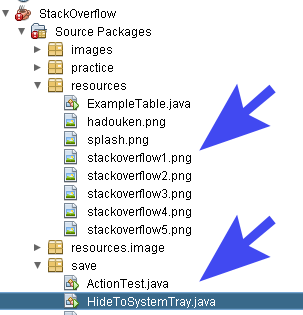
- 完整运行程序
这里
import java.awt.*;
import java.awt.event.*;
import java.io.IOException;
import javax.imageio.ImageIO;
import javax.swing.JFrame;
import javax.swing.UIManager;

public class HideToSystemTray extends JFrame {

    TrayIcon trayIcon;
    SystemTray tray;

    HideToSystemTray() throws IOException {
        super("SystemTray test");
        System.out.println("creating instance");
        try {
            System.out.println("setting look and feel");
            UIManager.setLookAndFeel(UIManager.getSystemLookAndFeelClassName());
        } catch (Exception e) {
            System.out.println("Unable to set LookAndFeel");
        }
        if (SystemTray.isSupported()) {
            System.out.println("system tray supported");
            tray = SystemTray.getSystemTray();

            Image image = ImageIO.read(getClass().getResource("/resources/stackoverflow1.png"));
            ActionListener exitListener = new ActionListener() {
                public void actionPerformed(ActionEvent e) {
                    System.out.println("Exiting....");
                    System.exit(0);
                }
            };
            PopupMenu popup = new PopupMenu();
            MenuItem defaultItem = new MenuItem("Exit");
            defaultItem.addActionListener(exitListener);
            popup.add(defaultItem);
            defaultItem = new MenuItem("Open");
            defaultItem.addActionListener(new ActionListener() {
                public void actionPerformed(ActionEvent e) {
                    setVisible(true);
                    setExtendedState(JFrame.NORMAL);
                }
            });
            popup.add(defaultItem);
            trayIcon = new TrayIcon(image, "SystemTray Demo", popup);
            trayIcon.setImageAutoSize(true);
        } else {
            System.out.println("system tray not supported");
        }
        addWindowStateListener(new WindowStateListener() {
            public void windowStateChanged(WindowEvent e) {
                if (e.getNewState() == ICONIFIED) {
                    try {
                        tray.add(trayIcon);
                        setVisible(false);
                        System.out.println("added to SystemTray");
                    } catch (AWTException ex) {
                        System.out.println("unable to add to tray");
                    }
                }
                if (e.getNewState() == 7) {
                    try {
                        tray.add(trayIcon);
                        setVisible(false);
                        System.out.println("added to SystemTray");
                    } catch (AWTException ex) {
                        System.out.println("unable to add to system tray");
                    }
                }
                if (e.getNewState() == MAXIMIZED_BOTH) {
                    tray.remove(trayIcon);
                    setVisible(true);
                    System.out.println("Tray icon removed");
                }
                if (e.getNewState() == NORMAL) {
                    tray.remove(trayIcon);
                    setVisible(true);
                    System.out.println("Tray icon removed");
                }
            }
        });
        setIconImage(ImageIO.read(getClass().getResource("/resources/stackoverflow1.png")));

        setVisible(true);
        setSize(300, 200);
        setDefaultCloseOperation(JFrame.EXIT_ON_CLOSE);
    }

    public static void main(String[] args) throws IOException {
        new HideToSystemTray();
    }
}- 结果
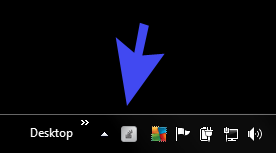
Stack Overflow用户
发布于 2014-02-13 11:54:19
您的代码非常好,可能无法找到您的图像。如果您正在使用eclipse,那么它应该位于您的项目文件夹中。
Stack Overflow用户
发布于 2014-02-13 12:02:42
如果找不到图像( @Leo注意到您的代码似乎很好),那么试试我一直在使用的这个小技巧:
// place this class in the same directory as your image
public class Resources {
    private Resources() {}
}

// then to obtain Image
Image image = javax.imageio.ImageIO.read(
Resources.class.getResourceAsStream("systemtray.png"));它将确保systemtray.png将在与Resources.java (Resoures.class)文件完全相同的目录中搜索。
我怀疑Toolkit在自己的目录中搜索它,而您将图像放置在与代码相同的目录中,因此出现了问题。
页面原文内容由Stack Overflow提供。腾讯云小微IT领域专用引擎提供翻译支持
原文链接:
https://stackoverflow.com/questions/21753252
复制相关文章
相似问题
腾讯云开发者

Copyright © 2013 - 2026 Tencent Cloud. All Rights Reserved. 腾讯云 版权所有
深圳市腾讯计算机系统有限公司 ICP备案/许可证号:粤B2-20090059  粤公网安备44030502008569号
腾讯云计算(北京)有限责任公司 京ICP证150476号 | 京ICP备11018762号