
自动化5 Firefox标签
我希望我们的报告自动化。目前,我们在Firefox中有5个用于报告的Tabs。每个Tab都有一个独特的url,每天早上都会改变。然后,我们每天早上都要更新这些URL(从excel说明书)。我想把这个自动化。不过,我在这方面确实有一些限制。我不能为每个新的url打开一个新的选项卡(因此它基本上需要在每个选项卡中是一个url替换)。我研究过硒,但不能让它开始工作。
http://www.makeuseof.com/tag/using-vba-to-automate-internet-explorer-sessions-from-an-excel-spreadsheet/
和
http://www.makeuseof.com/tag/how-to-automate-firefox-or-chrome-with-vba-and-selenium/
所以,我想知道是否可以用其他方式使用纯VBA或批处理文件?
回答 1
Stack Overflow用户
发布于 2014-02-10 12:55:38
您需要添加对Microsoft Internet Controls和Microsoft Shell Controls and Automation的引用。见下面的截图。
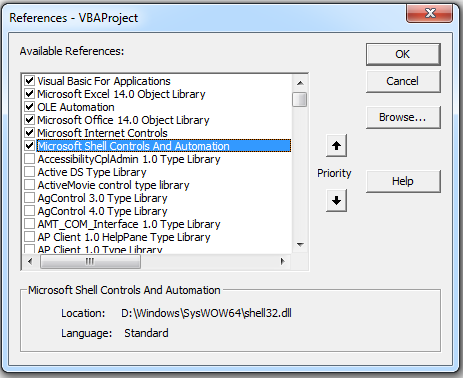
代码:
Sub Work_With_Open_IE_Instance()
    Dim objShell As Shell
    Dim objIE As InternetExplorer
    Dim objWin As Object

    Set objShell = New Shell

    For Each objWin In objShell.Windows
        If TypeName(objWin.Document) = "HTMLDocument" Then
            Set objIE = objWin

            '~~> This will display the URL of the IE which we will use to bind
            Debug.Print objIE.LocationURL

            '~~> Example to bind
            '~~> Change URL to your existing URL
            Select Case objIE.LocationURL
                Case "https://www.google.com"
                    With objIE
                        .Refresh
                        '
                        '~~> Rest of the code
                        '
                    End With
                Case "http://in.msn.com"
                    With objIE
                        .Refresh
                        '
                        '~~> Rest of the code
                        '
                    End With
                End Select
            End If
        End If
    Next objWin
End Sub
Select Case只是为了演示的目的。如果您想一个接一个地使用它们,那么就不要使用Select Case。一个接一个地使用If/EndIf。
https://stackoverflow.com/questions/21674748
复制相似问题
腾讯云开发者

Copyright © 2013 - 2026 Tencent Cloud. All Rights Reserved. 腾讯云 版权所有
深圳市腾讯计算机系统有限公司 ICP备案/许可证号:粤B2-20090059  粤公网安备44030502008569号
腾讯云计算(北京)有限责任公司 京ICP证150476号 | 京ICP备11018762号