
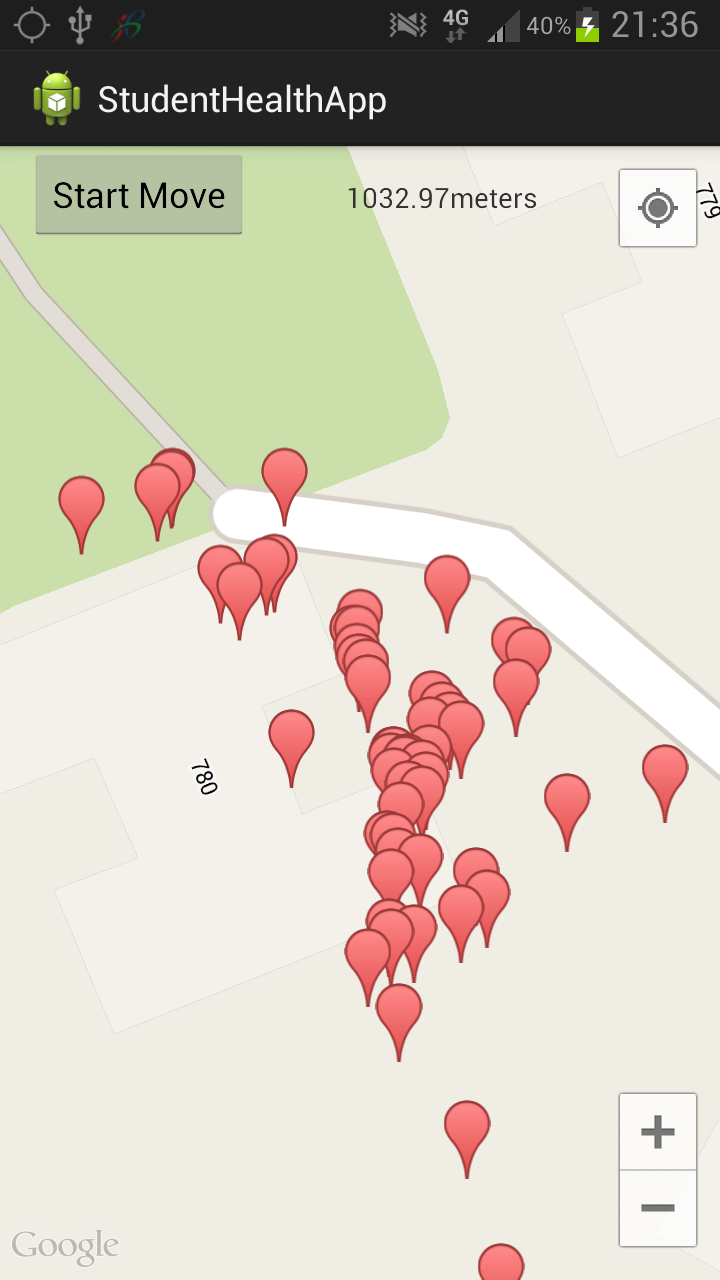
谷歌地图上的错误位置。无法检索到下一个活动的正确距离。
我的android应用程序是跟踪用户在地图上的位置,并计算他步行或跑步的距离和持续时间。然后当我按“停止”键时,把它传递到下一页。我的距离和持续时间的计算应该是正确的,但位置是错误的。无论我在房子里不移动或移动几米,它有时都不会改变或改变很多,导致距离不准确。当我走路的时候,即使是几米,我如何保证准确性,因为当我出现的时候,我将步行一段短距离。第二,我可以将我的持续时间数据传递到下一页,但是当我传递我的距离时,它是0.0,但是所显示的值根本不是0.0 (虽然不准确)。我按下停止按钮时传递我的信息。
我的MainActivity Java代码,显示地图,距离,持续时间。
 protected LocationManager locationManager;
    private GoogleMap googleMap;
    Button btnStartMove,btnPause,btnResume,btnStop;
    static double n=0;
    Long s1,r1;
    double dis=0.0;
    Thread t1;
    EditText userNumberInput;
    boolean bool=false;
    int count=0;

    double speed = 1.6;
    double lat1,lon1,lat2,lon2,lat3,lon3,lat4,lon4;
    double dist = 0.0;
    double time = 0.0;
    TextView distance;
    Button btnDuration;
    float[] result;
    private static final long MINIMUM_DISTANCE_CHANGE_FOR_UPDATES =1; // in Meters
    private static final long MINIMUM_TIME_BETWEEN_UPDATES = 4000; //in milliseconds
    boolean startDistance = false;
    boolean startButtonClicked = false;

    MyCount counter;
    int timer = 0;
    @Override
    protected void onCreate(Bundle savedInstanceState) {

        super.onCreate(savedInstanceState);
        setContentView(R.layout.activity_main);

        locationManager = (LocationManager) getSystemService(LOCATION_SERVICE);
        locationManager.requestLocationUpdates(LocationManager.GPS_PROVIDER,MINIMUM_TIME_BETWEEN_UPDATES,MINIMUM_DISTANCE_CHANGE_FOR_UPDATES, this);
        if(isGooglePlay())
        {
            setUpMapIfNeeded();
        }
        distance=(TextView)findViewById(R.id.Distance);
        btnDuration=(Button)findViewById(R.id.Duration);
        btnStartMove=(Button)findViewById(R.id.Start);//start moving
        btnStop=(Button)findViewById(R.id.Stop);

        //prepare distance...........
        Log.d("GPS Enabled", "GPS Enabled");
        Criteria criteria = new Criteria();
        criteria.setAccuracy(Criteria.ACCURACY_FINE);
        String provider = locationManager.getBestProvider(criteria, true);
        Location location=locationManager.getLastKnownLocation(provider);

        btnStartMove.setOnClickListener(new OnClickListener()
        {
            @Override
            public void onClick(View v) {

                Log.d("GPS Enabled", "GPS Enabled");
                Criteria criteria = new Criteria();
                criteria.setAccuracy(Criteria.ACCURACY_FINE);
                String provider = locationManager.getBestProvider(criteria, true);
                Location location=locationManager.getLastKnownLocation(provider);
                lat3 = location.getLatitude();
                lon3 = location.getLongitude();
                startButtonClicked=true;
                startDistance=true;
                counter= new MyCount(30000,1000);
                counter.start();
                Toast.makeText(MainActivity.this,
                          "Pressed Start",
                          Toast.LENGTH_LONG).show();
            }
        });
        btnStop.setOnClickListener(new OnClickListener()
        {
            @Override
            public void onClick(View v) {
                startButtonClicked=false;
                startDistance=false;
                //Double.valueOf(distance.getText().toString()
                Double value=dist;
                Double durationValue=time;
                Intent intent = new Intent(MainActivity.this, FinishActivity.class);

                intent.putExtra("dist", "value");
                intent.putExtra("time",durationValue);
                startActivity(intent);
                finish();
            }
        });

        btnDuration.setOnClickListener(new OnClickListener()
        {
            @Override
            public void onClick(View v) {
                if(startButtonClicked=true)
                {
                    time=n*30+r1;
                    Toast.makeText(MainActivity.this,"Duration :"+String.valueOf(time),Toast.LENGTH_LONG).show();
                }
            }
        });

        if(location!= null)
        {
            //Display current location in Toast
            String message = String.format(
                    "Current Location \n Longitude: %1$s \n Latitude: %2$s",
                    location.getLongitude(), location.getLatitude()
            );
            Toast.makeText(MainActivity.this, message,
                    Toast.LENGTH_LONG).show();
        }
        else if(location == null)
        {
            Toast.makeText(MainActivity.this,
                    "Location is null",
                    Toast.LENGTH_LONG).show();
        }


    }
    private void setUpMapIfNeeded() {

        if(googleMap == null)
        {
            Toast.makeText(MainActivity.this, "Getting map",
                    Toast.LENGTH_LONG).show();
            googleMap =((SupportMapFragment)getSupportFragmentManager().findFragmentById(R.id.displayMap)).getMap();

            if(googleMap != null)
            {
                setUpMap();
            }
        }

    }

    private void setUpMap()
    {
        //Enable MyLocation Layer of Google Map
        googleMap.setMyLocationEnabled(true);

        //Get locationManager object from System Service LOCATION_SERVICE
        //LocationManager locationManager = (LocationManager) getSystemService(LOCATION_SERVICE);

        //Create a criteria object to retrieve provider
        Criteria criteria = new Criteria();
        criteria.setAccuracy(Criteria.ACCURACY_FINE);
        //Get the name of the best provider
        String provider = locationManager.getBestProvider(criteria, true);
        if(provider == null)
        {
            onProviderDisabled(provider);
        }
        //set map type
        googleMap.setMapType(GoogleMap.MAP_TYPE_NORMAL);
        //Get current location
        Location myLocation = locationManager.getLastKnownLocation(provider);
        if(myLocation != null)
        {
            onLocationChanged(myLocation);
        }
        locationManager.requestLocationUpdates(provider, 0, 0, this);
    }

    private boolean isGooglePlay()
    {
        int status = GooglePlayServicesUtil.isGooglePlayServicesAvailable(this);

        if (status == ConnectionResult.SUCCESS)
        {

            Toast.makeText(MainActivity.this, "Google Play Services is available",
                    Toast.LENGTH_LONG).show();
            return(true);
        }
        else
        {
                GooglePlayServicesUtil.getErrorDialog(status, this, 10).show();

        }
        return (false);

     }

    @Override
    public void onLocationChanged(Location myLocation) {
        System.out.println("speed " + myLocation.getSpeed());

            //show location on map.................
            //Get latitude of the current location
            double latitude = myLocation.getLatitude();
            //Get longitude of the current location
            double longitude = myLocation.getLongitude();
            //Create a LatLng object for the current location
            LatLng latLng = new LatLng(latitude, longitude);
            //Show the current location in Google Map
            googleMap.moveCamera(CameraUpdateFactory.newLatLng(latLng));
            //Zoom in the Google Map
            googleMap.animateCamera(CameraUpdateFactory.zoomTo(20));
            googleMap.addMarker(new MarkerOptions().position(new LatLng(latitude, longitude)).title("You are here!"));
            //show distance............................

            if(startDistance == true)
            {

                Toast.makeText(MainActivity.this,
                          "Location has changed",
                          Toast.LENGTH_LONG).show();
                    if(myLocation != null)
                    {
                        //latitude.setText("Current Latitude: " + String.valueOf(loc2.getLatitude()));
                        //longitude.setText("Current Longitude: " + String.valueOf(loc2.getLongitude()));
                        float[] results = new float[1];
                        Location.distanceBetween(lat3, lon3, myLocation.getLatitude(), myLocation.getLongitude(), results);
                        System.out.println("Distance is: " + results[0]);

                        dist += results[0];
                        DecimalFormat df = new DecimalFormat("#.##"); // adjust this as appropriate
                    if(count==1)
                    {
                        distance.setText(df.format(dist) + "meters");
                    }
                        lat3=myLocation.getLatitude();
                        lon3=myLocation.getLongitude();
                        count=1;
                  }

            }
            if(startButtonClicked == true)
            {
                startDistance=true;
            }
    }

    @Override
    public void onProviderDisabled(String provider) {
        Toast.makeText(MainActivity.this,
                "Provider disabled by the user. GPS turned off",
                Toast.LENGTH_LONG).show();
    }

    @Override
    public void onProviderEnabled(String provider) {
        Toast.makeText(MainActivity.this,
                "Provider enabled by the user. GPS turned on",
                Toast.LENGTH_LONG).show();
    }

    @Override
    public void onStatusChanged(String provider, int status, Bundle extras) {
        Toast.makeText(MainActivity.this, "Provider status changed",
                Toast.LENGTH_LONG).show();
    }
    @Override
    protected void onPause() {
    super.onPause();
    locationManager.removeUpdates(this);
    }
    @Override
    protected void onResume() {
        super.onResume();
        locationManager.requestLocationUpdates(LocationManager.GPS_PROVIDER,MINIMUM_TIME_BETWEEN_UPDATES,MINIMUM_DISTANCE_CHANGE_FOR_UPDATES, this);
    }
    public class MyCount extends CountDownTimer{
        public MyCount(long millisInFuture, long countDownInterval) {
        super(millisInFuture, countDownInterval);
        }
        @Override
        public void onFinish() {
            counter= new MyCount(30000,1000);
         counter.start();
         n=n+1;
        }
        @Override
        public void onTick(long millisUntilFinished) {
            s1=millisUntilFinished;
            r1=(30000-s1)/1000;
        }
    }}
将信息传递到此页面,距离0.0(不准确)持续时间可以。
public class FinishActivity extends Activity {
TextView displayDistance;
TextView displayDuration;
TextView displaySports;
TextView userID;
TextView sportID;
TextView caloriesBurned;


Button back;

@Override
protected void onCreate(Bundle savedInstanceState) {
    super.onCreate(savedInstanceState);
    setContentView(R.layout.activity_finish);
    Bundle extras = getIntent().getExtras();
    if (extras != null)
    {
        Double value = extras.getDouble("dist");
        Double durationValue = extras.getDouble("time");
        displayDistance=(TextView)findViewById(R.id.finishDistance);
        displayDistance.setText("Distance: " + value);

        displayDuration=(TextView)findViewById(R.id.finishDuration);
        displayDuration.setText("Duration: " + durationValue + " seconds");

    }

    back=(Button)findViewById(R.id.Back);
    back.setOnClickListener(new OnClickListener()
    {
        @Override
        public void onClick(View v) {

            Intent intent = new Intent(FinishActivity.this, MainActivity.class);
            startActivity(intent);
            finish();
        }
    });}
我的地图输出,位置不准确。我寻找了很长时间,但似乎没有解决方案的this..please help..thanks。开始的位置,速度,它改变的位置,似乎都是不同的,每次我跑。这似乎超出了我的控制范围(或者我可以,但我不知道.我是全球定位系统的初学者.大多数情况下,它需要等待一段时间才能显示距离。
回答 1
Stack Overflow用户
发布于 2014-02-08 07:26:51
全球定位系统在屋檐下可能不能正常工作。所以在屋外试试吧。
你也有
intent.putExtra("dist", "value")键是dist
值是字符串,而不是双值。
所以你是在传递字符串
但当你得到你的双倍
Double value = extras.getDouble("dist"); // wrong如果您传递一个双值,那么您可以在下一个活动中获得该双值。但是您传递字符串,然后尝试获得双值,这是错误的。
你所需要的
public Intent putExtra (String name, double value)和
public double getDoubleExtra (String name, double defaultValue)https://stackoverflow.com/questions/21643232
复制相似问题
腾讯云开发者

Copyright © 2013 - 2026 Tencent Cloud. All Rights Reserved. 腾讯云 版权所有
深圳市腾讯计算机系统有限公司 ICP备案/许可证号:粤B2-20090059  粤公网安备44030502008569号
腾讯云计算(北京)有限责任公司 京ICP证150476号 | 京ICP备11018762号