
iOS 6 UISegmentedControl与iOS 7设计
iOS 6 UISegmentedControl与iOS 7设计
提问于 2014-02-06 13:04:10
我正在开发一个在iOS 6和iOS 7上都能工作的应用程序,并且为两者都设计了相同的平面设计。
我试图定制我的UISegmentedControl,使其具有边框、拐角半径等等,但我不知道如何做到这一点。到目前为止,我只想有一个平坦的背景。
有没有人建议让iOS 6 UISegmentedControl看起来像iOS 7?
编辑:
我想要
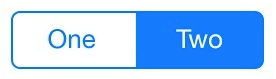
而不是
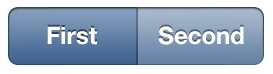
回答 3
Stack Overflow用户
回答已采纳
发布于 2014-02-06 13:20:48
您可以使用以下代码:
 // To set colour of text
        NSDictionary *attributes = [NSDictionary dictionaryWithObject:[UIColor whiteColor] forKey:UITextAttributeTextColor];
        [segmentedControl setTitleTextAttributes:attributes forState:UIControlStateNormal];
        NSDictionary *highlightedAttributes = [NSDictionary dictionaryWithObject:[UIColor whiteColor] forKey:UITextAttributeTextColor];
        [segmentedControl setTitleTextAttributes:highlightedAttributes forState:UIControlStateHighlighted];

        // Change color of selected segment

        segmentedControl.segmentedControlStyle = UISegmentedControlStyleBar;

        UIColor *newTintColor = [UIColor colorWithRed: 255/255.0 green:100/255.0 blue:100/255.0 alpha:1.0];
        segmentedControl.tintColor = newTintColor;

        UIColor *newSelectedTintColor = [UIColor clearColor];
        [[[segmentedControl subviews] objectAtIndex:0] setTintColor:newSelectedTintColor];
对于设置圆角,您可以使用下面的代码:
// Add rounded yellow corner to segmented controll view
[segmentedControl.layer setCornerRadius:4.0f];
[segmentedControl.layer setBorderColor:[UIColor colorWithRed:1.0 green:0.7 blue:0.14 alpha:1.0].CGColor];
[segmentedControl.layer setBorderWidth:1.5f];
[segmentedControl.layer setShadowColor:[UIColor blackColor].CGColor];
[segmentedControl.layer setShadowOpacity:0.8];
[segmentedControl.layer setShadowRadius:3.0];
[segmentedControl.layer setShadowOffset:CGSizeMake(2.0, 2.0)];Stack Overflow用户
发布于 2014-02-06 13:19:27
您可以查看一个示例这里或自定义控制,并更改其图像以满足您的需要。
下面是一个如何子类UISegmentedControl的示例
@implementation CustomSegmentedControl
-(id)initWithItems:(NSArray *)items
{
    self = [super initWithItems:items];
    if (self) {

        [self setDividerImage:[UIImage imageNamed:@"segmented-control-divider-none-selected"]
          forLeftSegmentState:UIControlStateNormal
            rightSegmentState:UIControlStateNormal
                   barMetrics:UIBarMetricsDefault];
        [self setDividerImage:[UIImage imageNamed:@"segmented-control-divider-left-selected"]
          forLeftSegmentState:UIControlStateSelected
            rightSegmentState:UIControlStateNormal
                   barMetrics:UIBarMetricsDefault];
        [self setDividerImage:[UIImage imageNamed:@"segmented-control-divider-right-selected"]
          forLeftSegmentState:UIControlStateNormal
            rightSegmentState:UIControlStateSelected
                   barMetrics:UIBarMetricsDefault];

    // Set background images
    UIImage *normalBackgroundImage = [UIImage imageNamed:@"segmented-control-normal"];
    [self setBackgroundImage:normalBackgroundImage
                    forState:UIControlStateNormal
                  barMetrics:UIBarMetricsDefault];
    UIImage *selectedBackgroundImage = [UIImage imageNamed:@"segmented-control-selected"];
    [self setBackgroundImage:selectedBackgroundImage
                    forState:UIControlStateSelected
                  barMetrics:UIBarMetricsDefault];

    [self setBackgroundImage:selectedBackgroundImage
                    forState:UIControlStateHighlighted
                  barMetrics:UIBarMetricsDefault];

    double dividerImageWidth = [self dividerImageForLeftSegmentState:UIControlStateHighlighted rightSegmentState:UIControlStateNormal barMetrics:UIBarMetricsDefault].size.width;
        [self setContentPositionAdjustment:UIOffsetMake(dividerImageWidth / 2, 0)
                            forSegmentType:UISegmentedControlSegmentLeft
                                barMetrics:UIBarMetricsDefault];
        [self setContentPositionAdjustment:UIOffsetMake(- dividerImageWidth / 2, 0)
                            forSegmentType:UISegmentedControlSegmentRight
                                barMetrics:UIBarMetricsDefault];
return self;
}Stack Overflow用户
发布于 2014-02-06 15:31:42
我终于使用了这个子模块。它所做的工作:
页面原文内容由Stack Overflow提供。腾讯云小微IT领域专用引擎提供翻译支持
原文链接:
https://stackoverflow.com/questions/21603822
复制相关文章
相似问题
腾讯云开发者

Copyright © 2013 - 2026 Tencent Cloud. All Rights Reserved. 腾讯云 版权所有
深圳市腾讯计算机系统有限公司 ICP备案/许可证号:粤B2-20090059  粤公网安备44030502008569号
腾讯云计算(北京)有限责任公司 京ICP证150476号 | 京ICP备11018762号