
咖啡馆墙错觉
咖啡馆墙错觉
提问于 2014-02-04 03:45:45
下面是我的代码的预期输出:
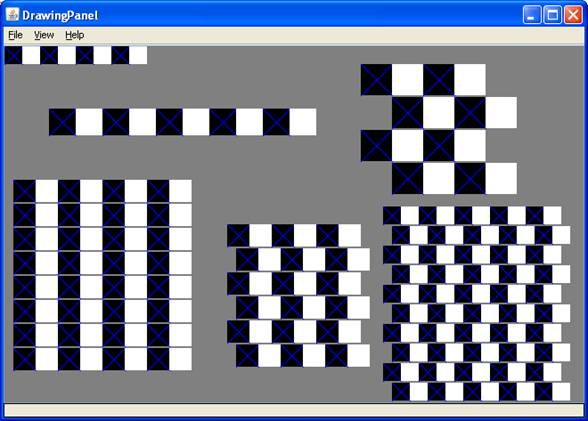
这是我的密码:
import java.awt.*;

public class CafeWall
{
    final static int MORTAR = 2;
    final static int WIDTH  = 650;
    final static int HEIGHT = 400;

    public static void main( String[] args )
    {
        StdDraw.setCanvasSize(WIDTH, HEIGHT);
        StdDraw.setXscale(0, WIDTH);
        StdDraw.setYscale(0, HEIGHT);

 // Change from Color.GRAY to change background color.
        StdDraw.setPenColor( Color.GRAY );
        StdDraw.filledRectangle(WIDTH/2, HEIGHT/2, WIDTH/2, HEIGHT/2);

 drawRow(    0, 378, 4, 20 );
 drawRow(   50, 300, 5, 30 );

 drawGrid(  10, 36, 4, 25, 0 );

 drawGrid( 250, 40,  3, 25, 10 );

 drawGrid( 425, 2, 5, 20, 10 );

 drawGrid( 400, 234,  2, 35, 35 );
    }

    // Draw a row of squares, the total number of squares is pairs * 2
    // (x, y) is the lower left corner of the first box
    public static void drawRow( int x, int y, int pairs, int size )
    {
      StdDraw.setPenColor(Color.BLACK);
      StdDraw.filledRectangle(x, y, size, size);
      StdDraw.setPenColor(Color.BLUE);
      StdDraw.line(x, y, x+size, y+size);
      StdDraw.line(x, y+size, x+size, y);
      StdDraw.setPenColor(Color.WHITE);
      StdDraw.filledRectangle(x+size, y, size, size);
    }

    // Draw a grid of 2 * pairs rows
    public static void drawGrid( int x, int y, int pairs, int size,
     int offset )
    {
      int startingX = x;
      for(int line = 1; line <= pairs; line++) {
        if(line % 2 ==1) { //if line is odd
          x = startingX;
        } else { //else line is even and must be shifted by offset specified
          x = startingX + offset;
        }
        for(int i = 1; i <= pairs; i++) {
          drawRow(x, y, pairs, size);
          x = x + 2*size;
        }

        y = y + size + MORTAR;
      }
    }


}
问题:
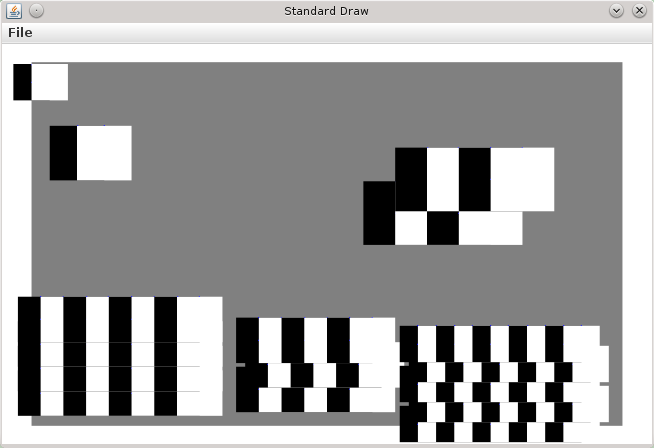
- 我的行没有正确地偏移。
- 我的蓝色“x”没有出现。
我已经盯着这个看了好几个小时了。我似乎找不出我哪里出了问题。有人能提供一些指导吗?
(补充说明)这是这段代码的实际输出,对于那些想知道的人:
回答 1
Stack Overflow用户
回答已采纳
发布于 2014-02-04 05:02:09
您的drawRow()有两个重要问题
- 没有正确地对drawRow中的矩形进行对齐。
- 您没有在drawRow中正确地重复这些对。
这个方法应该是这样的:
public static void drawRow( int x, int y, int pairs, int size ) {
    // loop for each pair.
    for (int i = 0; i < pairs; i++) {
        StdDraw.setPenColor(Color.BLACK);
        // Note the correct centering of the rectangles
        StdDraw.filledRectangle(x + size/2, y + size/2, size / 2, size/2);
        StdDraw.setPenColor(Color.BLUE);
        StdDraw.line(x, y, x+size, y+size);
        StdDraw.line(x, y+size, x+size, y);
        StdDraw.setPenColor(Color.WHITE);
        // Note the correct centering of the rectangles
        StdDraw.filledRectangle(x+size+size/2, y + size/2, size / 2, size/2);
        // advance to the next pair.
        x += size * 2;
    }
}在drawGrid()方法中,应该有一个额外的rows参数,该参数指示要绘制多少行。我修改了该方法,使其看起来如下:
public static void drawGrid( int x, int y, int rows, int pairs, int size,
        int offset )
{
    int startingX = x;
    for(int line = 0; line < rows; line++) {
        x = startingX + (line % 2) * offset;
        drawRow(x, y, pairs, size);

        y = y + size + MORTAR;
    }
}注意(line % 2) * offset的“聪明”用法。想出一个办法。
将它放在一起,并更改一些行的大小,我有主要的方法调用:
    drawRow(    0, 378, 4, 20 );
    drawRow(   50, 300, 5, 30 );

    // Bottom left
    drawGrid(  10, 36, 4, 4, 20, 0 );

    // bottom mid
    drawGrid( 250, 40, 6, 3, 25, 10 );

    // bottom right
    drawGrid( 425, 2, 10, 5, 16, 8 );

    // top right
    drawGrid( 400, 234, 4, 2, 35, 35 );
我的结果是:
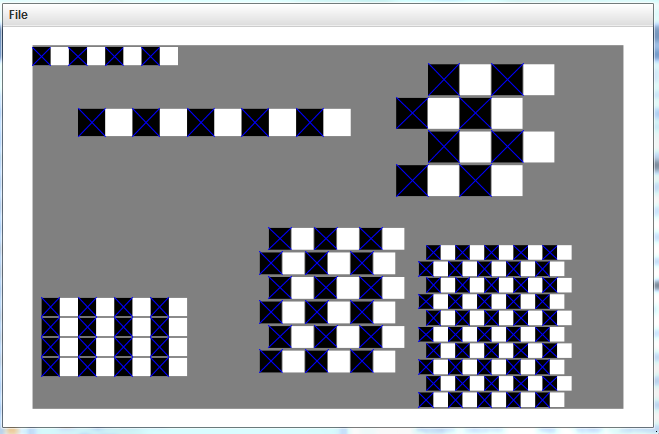
这些都不是你所经历的巨大变化..。这里和那里都有点逻辑。
页面原文内容由Stack Overflow提供。腾讯云小微IT领域专用引擎提供翻译支持
原文链接:
https://stackoverflow.com/questions/21542554
复制相关文章
相似问题
腾讯云开发者

Copyright © 2013 - 2026 Tencent Cloud. All Rights Reserved. 腾讯云 版权所有
深圳市腾讯计算机系统有限公司 ICP备案/许可证号:粤B2-20090059  粤公网安备44030502008569号
腾讯云计算(北京)有限责任公司 京ICP证150476号 | 京ICP备11018762号