
在HTML中将两个按钮放在同一行上
在HTML中将两个按钮放在同一行上
提问于 2014-01-30 09:22:02
这是我的登录表格:
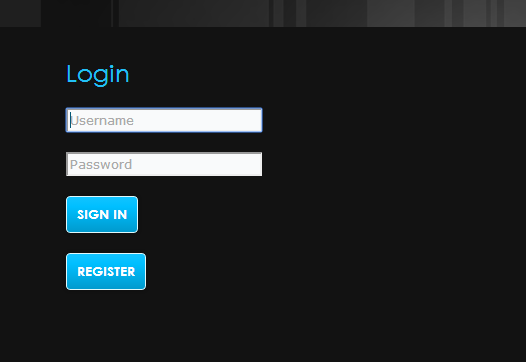
如您所见,登录和注册按钮位于的单独行上。我要他们在同一条线上。
我将寄存器按钮代码放置在与登录相同的段落元素中。毫无疑问,它出现在同一行,但当我单击“注册”时,它要求我填写用户名和密码。我该怎么解决这个问题?
这是我的密码:
<form method="post" >
    <p><input id="username" type="text" placeholder="Username" style="margin:10px" autofocus required></p>
    <p><input id="password" type="password" placeholder="Password" style="margin:10px" required></p>
    <p><input class="swd-button" type="submit" value="Sign In"></p>
</form>
<a href="register.html"><button class="swd-button">Register</button></a>回答 8
Stack Overflow用户
回答已采纳
发布于 2014-01-30 09:27:08
只需按以下方式重新排列,并在按钮中添加类型:
<form method="post" >

    <p>
        <input id="username" type="text" placeholder="Username" style="margin:10px" autofocus required>
    </p>
    <p>
        <input id="password" type="password" placeholder="Password" style="margin:10px" required>
    </p>
    <p>
       <input class="swd-button" type="submit" value="Sign In">
       <a href="register.html"><button type="button" class="swd-button">Register</button></a>
    </p>

</form>通常,如果在表单中添加一个button,它将把它作为提交按钮来触发提交表单。因此,您需要将其指定为type="button"。
演示:http://jsbin.com/EjEbihUDu/2/
Stack Overflow用户
发布于 2014-01-30 10:01:04
真正的问题是链接中的按钮正在拦截单击事件。这就是为什么当你把第二个按钮作为兄弟姐妹放在第一个按钮时,它不能工作的原因。
要解决这个问题,我建议您从链接中删除该按钮,将该链接样式设置为看起来像一个按钮,并将其移回与“登录”按钮相同的段落,并将两者都设置为display: inline-block。
这是jsFiddle演示.
HTML:
<form method="post" >
    <p><input id="username" type="text" placeholder="Username" style="margin:10px" autofocus required></p>
    <p><input id="password" type="password" placeholder="Password" style="margin:10px" required></p>
    <p>
        <button class="swd-button" type="submit">Sign In</button>
        <a class="swd-button" href="register.html">Register</a>
    </p>
</form>
CSS:
.swd-button {
    background: #11c3ff linear-gradient(to bottom, transparent, #009bcf);
    border: 1px solid white;
    border-radius: 5px;
    color: white;
    display: inline-block;
    font: bold 12px Arial, Helvetica, sans-serif;
    padding: 10px 15px;
    text-decoration: none;
    text-transform: uppercase;
}Stack Overflow用户
发布于 2014-01-30 09:23:29
添加:
.swd-button {
    float:left;
}
http://jsfiddle.net/2es59/
页面原文内容由Stack Overflow提供。腾讯云小微IT领域专用引擎提供翻译支持
原文链接:
https://stackoverflow.com/questions/21452259
复制相关文章
相似问题
腾讯云开发者

Copyright © 2013 - 2026 Tencent Cloud. All Rights Reserved. 腾讯云 版权所有
深圳市腾讯计算机系统有限公司 ICP备案/许可证号:粤B2-20090059  粤公网安备44030502008569号
腾讯云计算(北京)有限责任公司 京ICP证150476号 | 京ICP备11018762号