
用Avisynth创建多个视频
我有一堆单独的文件,我想每个文件都要运行在Avisynth中。但是,AVS文件只能创建一个视频。据我所知,无法从命令行声明变量的值。
我知道您可能会创建一个脚本来生成一堆AVS文件,然后以某种方式将每个AVS文件转换为一个视频。但是,由于Avisynth是一个脚本系统,这似乎有点复杂。一定有办法通过脚本运行不同的视频,对吗?
做这件事最好的方法是什么?提前谢谢。
回答 3
Stack Overflow用户
发布于 2014-01-29 22:37:53
我从未找到将命令行参数直接传递给AVS脚本的方法。动态生成脚本是我能够让它工作的唯一方法。
我知道这不是您想要的答案--尽管如此,有两种生成脚本的方法:
模板脚本
当我有一个AVS脚本时,我使用这个脚本,其中唯一改变的参数是源程序输入文件。
我有一个脚本template.avs,它期望一个变量(v)包含源视频的完整路径。然后,一个批处理脚本简单地为每个视频文件在行前加上变量,如下所示:
@echo off
if "%1" == "" (
    echo No input video found
    pause
    GOTO :EOF
)
set pth=%~dp0

:loop
IF "%1"=="" GOTO :EOF

echo v="%1">"%pth%_tmp.avs"
type "%pth%template.avs">>"%pth%_tmp.avs"

:: Do whatever you want with the script
:: I use virtualdub...
"%vdub%" /i "%pth%Template.vdscript" "%pth%_tmp.avs"

del "%pth%_tmp"

SHIFT
GOTO loop
这允许我简单地拖放几个源视频到批次上。
导入
使用导入指令,可以将所有变量声明外部化到自己的脚本中。
Import("variables.avs")当模板AVS脚本需要多个变量时,这很有用。
Stack Overflow用户
发布于 2018-07-20 20:08:36
这个问题的另一个答案是让AviSynth脚本获得自己的名称来指向要处理的文件。如果希望脚本在movie.mp4上工作,可以将其重命名为movie.mp4.avs。脚本应该是这样的:
function GetVideoName()
{
    Try
    {
        assert(false)
    }
    Catch(err_msg)
    {
        err_msg = MidStr(err_msg, FindStr(err_msg, "(") + 1)
        filename = LeftStr(err_msg, StrLen(err_msg) - FindStr(RevStr(err_msg), "."))
        return filename
    }
}

video_to_process=GetVideoName()
#return BlankClip(color=$000000, pixel_type="RGB24").Subtitle("You would process the video [" + video_to_process + "]")
DirectShowSource(video_to_process, convertfps=true)您可以对不同的视频执行相同的操作,只需重命名脚本(只要视频和.avs位于同一个文件夹中)。去掉最后一行的注释,看看我的意思。
Stack Overflow用户
发布于 2019-09-24 10:19:52
似乎每个AviSynth脚本都代表一个视频。
为了解决这个问题(类似于marapet的回答),我还开发了一个.BAT文件,您可以在其上拖放视频文件,并为每个文件创建一个AVS文件,并自动插入视频路径。
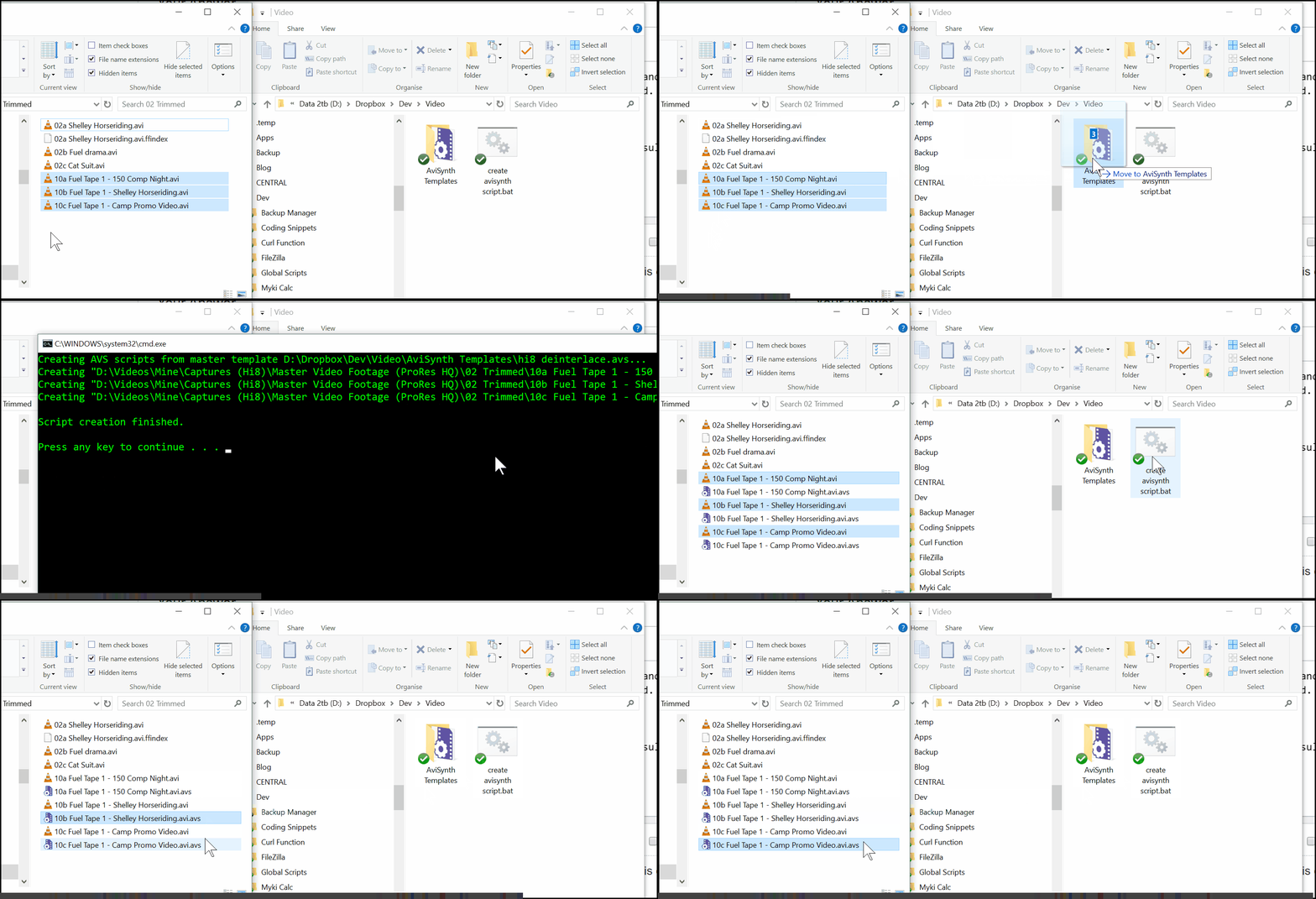
我认为这有点灵活,因为它在脚本中使用占位符。它还可以选择在每个命令上运行ffmpeg (或任意命令)来呈现和编码最终结果。
设置指令
- 将以下脚本保存为
.BAT文件 - 在
.BAT下创建一个名为AviSynth Templates的子文件夹 - 在此子文件夹中创建主AVS脚本(例如
master.avs),并在任何您想要注入视频路径的地方使用占位符[CLIP]。(如果您有与视频相关的额外资产,也可以使用[CLIP-NO-EXTENSION]排除文件扩展名。) AviSource(“剪辑”)# ...do更多任务在这里..。 - 拖放视频文件到您的蝙蝠,以创建一个定制的AVS文件为每一个。如果您再次将相同的视频文件拖到蝙蝠上,AVS将被一个新版本覆盖。
Create AVS files.bat
@ECHO OFF

:: INSTRUCTIONS:
:: 1. Create an AviSynth script
:: 2. Use [CLIP] and/or [CLIP-NO-EXTENSION] as placeholders in the script.
::    [CLIP-NO-EXTENSION] will exclude the file-extension in case you want to use it for including subtitles or other files that use the same base name.
::    e.g. AviSource("[CLIP]")
:: 3. Place the master .avs script in a folder called "AviSynth Templates", immediately beneath the folder containing this .BAT
:: 4. Drag and drop video files onto this BAT and each will be given an AVS file with the same name (video1.avi.avs will be created for video1.avi)
::    The placeholders will be filled in with the full absolute path of the dropped files.

SET TemplateName=master.avs
SET TemplatePath=%~dp0AviSynth Templates\%TemplateName%

echo Creating AVS scripts from master template %TemplatePath%...

:: Loop through every file dropped onto the .BAT
FOR %%A IN (%*) DO (

    REM :: Here we create a .AVS file for each video dropped onto the bat
    REM :: We read in the master script, replace the placeholders and then write the output to a text file using the video's filename and .avs extension
    REM ::
    REM ::    %%A - this contains the full path to the video file, including surrounding double-quotes
    REM ::    %%~A - this contains the full path to the video file, without surrounding double-quotes
    REM ::    %%~dpnA - this contains the full path to the video file, with drive, path and name (dpn) but no file extension (without quotes)
    echo Creating "%%~A.avs"
    powershell -Command "(Get-Content '%TemplatePath%').replace('[CLIP]', '%%~A').replace('[CLIP-NO-EXTENSION]', '%%~dpnA') | Out-File -encoding ASCII '%%~A.avs'"

    REM :: If you want to then run ffmpeg to render and transcode the AVS file you could run it here
    REM :: e.g. ffmpeg -i "%%~A.avs" "%%~dpnA.h264.mp4"

)

ECHO.
ECHO Script creation finished.
ECHO.

PAUSEhttps://stackoverflow.com/questions/21439934
复制相似问题
腾讯云开发者

Copyright © 2013 - 2026 Tencent Cloud. All Rights Reserved. 腾讯云 版权所有
深圳市腾讯计算机系统有限公司 ICP备案/许可证号:粤B2-20090059  粤公网安备44030502008569号
腾讯云计算(北京)有限责任公司 京ICP证150476号 | 京ICP备11018762号