
从servlet访问WebContent中的文件
从servlet访问WebContent中的文件
提问于 2014-01-28 19:50:44
我试图使用servlet中的相对路径访问WebContent/警报文件夹中的html文件。但我不能用它的相对路径来访问它,
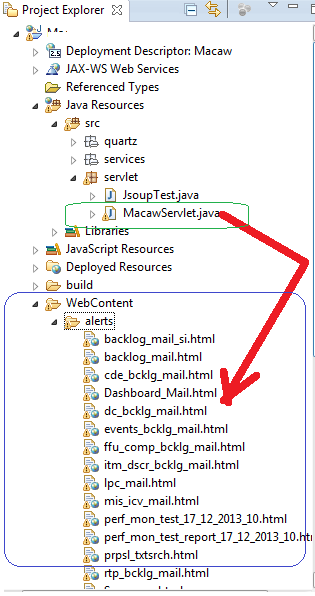
使用相对路径从WebContent中的Servlet访问文件:
protected Element getSummary(String value) throws IOException
{
    Element element=null;
    Summary summary = Summary.valueOf(value);
    switch(summary) {
    case rtp_summary:
        element=parseDIV(new File("../../WebContent/alerts/rtp_bcklg_mail.html"),"rtp_summary");
        break;
    case ffu_summary:
        element=parseDIV(new File("/../../WebContent/alerts/ffu_comp_bcklg_mail.html"),"ffu_summary");
        break;
    default:
        System.out.println("Enter a valid choice");
        break;
    }
    return element;
}使用相对路径从WebContent中访问Java 中的文件:
 public class WriteJSONFile implements Runnable{

WriteJSONFile(){
}

@Override

public void run()
{
    try {
        createJSONFile();
    } catch (IOException e) {

        e.printStackTrace();
    }
}

@SuppressWarnings("unchecked")
private static void createJSONFile() throws IOException
{
    String path="C:/Users/Thiru/Documents/Website Design/Macaw/";
    JSONArray jsonArray=new JSONArray();
    JSONObject rtpStatus=new JSONObject();
    rtpStatus.put("name","RTP");
    rtpStatus.put("status",parseDIV(new File(path+"WebContent/alerts/rtp_bcklg_mail.html"),"rtp_health"));
    jsonArray.add(rtpStatus);

    JSONObject proposalattribStatus=new JSONObject();
    proposalattribStatus.put("name","PROPOSAL ATTRIBUTE");
    proposalattribStatus.put("status",parseDIV(new File(path+"WebContent/alerts/prpsl_txtsrch.html"),"prpsl_attrb_health"));
    jsonArray.add(proposalattribStatus);

    writetoFile(jsonArray);
}


private static void writetoFile(JSONArray jsonArray) {
    try {
        String path="C:/Users/Thiru/Documents/Website Design/Macaw/";
        FileWriter file = new FileWriter(path+"WebContent/properties/status.json");
        file.write(jsonArray.toJSONString());
        file.flush();
        file.close();

    } catch (IOException e) {
        e.printStackTrace();
    }
}

protected static String parseDIV(File input, String divElement)
        throws IOException {
    Document doc = Jsoup.parse(input, "UTF-8");
    String content = doc.getElementById(divElement).val();
    System.out.println(divElement +" "+content);
    return content;
}
}
我还想使用相对路径从RESTful web service方法访问web内容中的文件。提前谢谢。
回答 4
Stack Overflow用户
回答已采纳
发布于 2014-01-28 20:24:53
使用ServletContext.getRealPath()定位磁盘上的文件。请注意,只有在部署期间webapp“爆炸”时,这才有效。
例如:
File f = new File(getServletContext().getRealPath("alerts/rtp_bcklg_mail.html"));Stack Overflow用户
发布于 2014-01-28 20:25:03
文件的当前位置可视为安全问题。建议将此类文件放置在WEB-INF中。
String filePath = getServletContext().getRealPath("/WEB-INF/alerts/rtp_bcklg_mail.html");Stack Overflow用户
发布于 2017-10-04 10:55:35
Properties props=new Properties();
    props.load(this.getServletContext().getResourceAsStream("/alerts/"+your_fileName+".html"));
通过调用ServletContext对象,我们可以从现在开始获取WebContext根,我们可以静态地传递我们的文件。
页面原文内容由Stack Overflow提供。腾讯云小微IT领域专用引擎提供翻译支持
原文链接:
https://stackoverflow.com/questions/21415413
复制相关文章
相似问题
腾讯云开发者

Copyright © 2013 - 2026 Tencent Cloud. All Rights Reserved. 腾讯云 版权所有
深圳市腾讯计算机系统有限公司 ICP备案/许可证号:粤B2-20090059  粤公网安备44030502008569号
腾讯云计算(北京)有限责任公司 京ICP证150476号 | 京ICP备11018762号