
应用MahApps.Metro黑暗主题
应用MahApps.Metro黑暗主题
提问于 2014-01-26 11:46:36
我对WPF比较陌生,我正在尝试将Windows主题应用到我的整个应用程序中。
我在我的Apps.xaml中使用了下面的内容,我可以正确地看到主题。
<Application.Resources>
    <ResourceDictionary>
        <ResourceDictionary.MergedDictionaries>
            <ResourceDictionary Source="pack://application:,,,/MahApps.Metro;component/Styles/Controls.xaml" />
            <ResourceDictionary Source="pack://application:,,,/MahApps.Metro;component/Styles/Fonts.xaml" />
            <ResourceDictionary Source="pack://application:,,,/MahApps.Metro;component/Styles/Colors.xaml" />
            <ResourceDictionary Source="pack://application:,,,/MahApps.Metro;component/Styles/Accents/Blue.xaml" />
            <ResourceDictionary Source="pack://application:,,,/MahApps.Metro;component/Styles/Accents/BaseLight.xaml" />
        </ResourceDictionary.MergedDictionaries>
    </ResourceDictionary>
</Application.Resources>
现在我想把主题改成黑暗。我知道我总能用,
ThemeManager.ChangeTheme()
但是,我认为应该有一种方法可以对应用程序的所有窗口有效地使用XAML。
我的问题:能指点我如何做到这一点而无需在源代码中使用ThemeManager吗?
回答 1
Stack Overflow用户
回答已采纳
发布于 2014-01-26 12:27:41
尝试使用BaseDark而不是BaseLight。尝试更改这一行:
<ResourceDictionary Source="pack://application:,,,/MahApps.Metro;component/Styles/Accents/BaseLight.xaml" />对此:
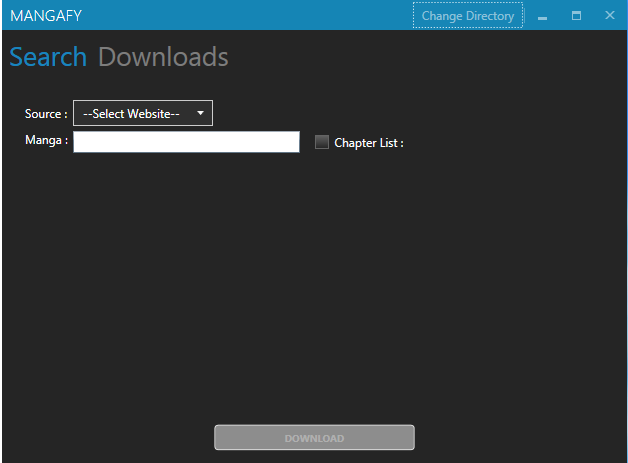
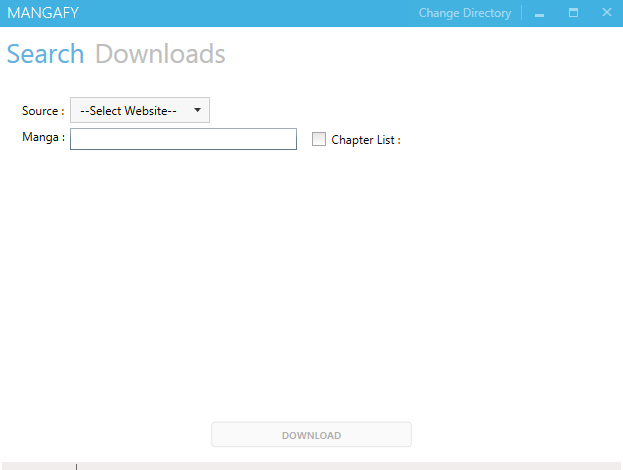
<ResourceDictionary Source="pack://application:,,,/MahApps.Metro;component/Styles/Accents/BaseDark.xaml" />这对我起了作用。使用MahApps BaseDark和BaseLight口音的应用程序屏幕截图:
BaseDark
BaseLight
页面原文内容由Stack Overflow提供。腾讯云小微IT领域专用引擎提供翻译支持
原文链接:
https://stackoverflow.com/questions/21362935
复制相关文章
相似问题
腾讯云开发者

Copyright © 2013 - 2026 Tencent Cloud. All Rights Reserved. 腾讯云 版权所有
深圳市腾讯计算机系统有限公司 ICP备案/许可证号:粤B2-20090059  粤公网安备44030502008569号
腾讯云计算(北京)有限责任公司 京ICP证150476号 | 京ICP备11018762号