
Python绘图甘特图
Python绘图甘特图
提问于 2014-01-24 01:59:55
我有一组值,我需要从它创建一个甘特图,值是这样的
1   0,000000    4,219309    4,219309    8,988674    8,988674    10,848450
2   4,219309    7,414822    7,414822    12,430150   12,430150   14,198310
3   8,000000    10,478795   10,478795   15,417747   15,417747   17,297929
1   11,000000   14,257995   14,257995   19,009302   19,009302   20,873072
2   14,257995   17,410029   17,410029   22,304447   22,304447   24,123009
3   18,000000   20,494690   20,494690   25,678852   25,678852   27,521070
1   21,000000   24,197839   24,197839   29,070650   29,070650   30,889371
2   24,197839   27,269837   27,269837   32,357236   32,357236   34,232483
4   27,269837   30,432503   30,432503   35,207464   35,207464   37,120424
1   31,000000   34,215182   34,215182   39,079631   39,079631   40,928846
3   34,215182   37,219774   37,219774   41,988526   41,988526   43,868911
2   37,219774   40,423759   40,423759   45,411568   45,411568   47,280815
1   41,000000   43,647413   43,647413   48,378227   48,378227   50,217919
因此,第一个值表示一台机器。第二次和第三次--进程A的开始时间和结束时间,等等--列4、5、6、7。
import numpy as np
import matplotlib.pyplot as plt

# Read data from file into variables
cps, s_load, f_load, s_process, f_process, s_unload, f_unload = np.loadtxt('arena.txt', unpack=True)

# Map value to color
color_mapper = np.vectorize(lambda x: {1: 'red', 2: 'blue', 3: 'green', 4: 'black'}.get(x))

# Plot a line for every line of data in your file
plt.hlines(cps, s_load, f_load, colors=color_mapper(cps))
plt.show()
但我也想区分同一台机器中进程的颜色,而不仅仅是机器之间的颜色。
回答 2
Stack Overflow用户
回答已采纳
发布于 2014-01-24 02:34:09
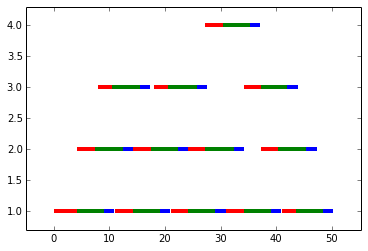
由于在Y轴上分隔了不同的CPU,所以我认为不必为每个CPU设置不同的颜色:
import numpy as np
import matplotlib.pyplot as plt

# Read data from file into variables
cps, s_load, f_load, s_process, f_process, s_unload, f_unload = np.loadtxt('arena.txt', unpack=True)

# Plot a line for every line of data in your file
plt.hlines(cps, s_load, f_load, colors="red", lw=4)
plt.hlines(cps, s_process, f_process, colors="green", lw=4)
plt.hlines(cps, s_unload, f_unload, color="blue", lw=4)
plt.margins(0.1)
plt.show()
产出:
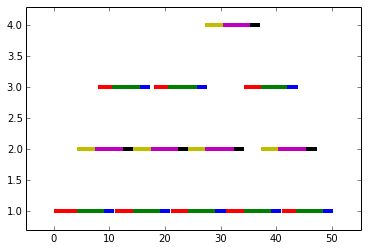
如果您真的想为CPU和进程设置不同的颜色,可以:
import numpy as np
import matplotlib.pyplot as plt

# Read data from file into variables
cps, s_load, f_load, s_process, f_process, s_unload, f_unload = np.loadtxt('arena.txt', unpack=True)

colormap = {
    (1, 1):"r",
    (1, 2):"g",
    (1, 3):"b",
    (2, 1):"y",
    (2, 2):"m",
    (2, 3):"k",
    (3, 1):"r",
    (3, 2):"g",
    (3, 3):"b",
    (4, 1):"y",
    (4, 2):"m",
    (4, 3):"k",
}

color_mapper = lambda cps, p:[colormap[c,p] for c in cps]


# Plot a line for every line of data in your file
plt.hlines(cps, s_load, f_load, colors=color_mapper(cps, 1), lw=4, )
plt.hlines(cps, s_process, f_process, colors=color_mapper(cps, 2), lw=4)
plt.hlines(cps, s_unload, f_unload, colors=color_mapper(cps, 3), lw=4)
plt.margins(0.1)
plt.show()
产出:
Stack Overflow用户
发布于 2017-07-28 16:19:46
如果您只是绘制了几个甘特图表,包巧妙地有一些良好的图表以及。大多数人喜欢matplotlib,但这些看起来更好。使用下面的代码查看示例或在https://plot.ly/python/gantt/上查看它们的文档
import plotly.plotly as py
import plotly.figure_factory as ff

df = [dict(Task="Job A", Start='2009-01-01', Finish='2009-02-28'),
  dict(Task="Job B", Start='2009-03-05', Finish='2009-04-15'),
  dict(Task="Job C", Start='2009-02-20', Finish='2009-05-30')]

fig = ff.create_gantt(df)
py.iplot(fig, filename='gantt-simple-gantt-chart', world_readable=True)页面原文内容由Stack Overflow提供。腾讯云小微IT领域专用引擎提供翻译支持
原文链接:
https://stackoverflow.com/questions/21323032
复制相关文章
相似问题
腾讯云开发者

Copyright © 2013 - 2026 Tencent Cloud. All Rights Reserved. 腾讯云 版权所有
深圳市腾讯计算机系统有限公司 ICP备案/许可证号:粤B2-20090059  粤公网安备44030502008569号
腾讯云计算(北京)有限责任公司 京ICP证150476号 | 京ICP备11018762号