
使用setOrigin方法实现ScrolledComposite
使用setOrigin方法实现ScrolledComposite
提问于 2014-01-22 23:06:45
如何使我的ScrolledComposite滚动显示顶部的指定控件?
这是我之前关于how to make a ScrolledComposite programmatically scroll to a child control的一个问题的后续。那里给出的建议给了我一些关于如何在概念上尝试它的想法,例如使用setOrigin方法,但我无法成功地获得给定的示例或我自己的示例来实现相当的功能。以下是我迄今为止所做的工作:
我做了一个像这样的壳:
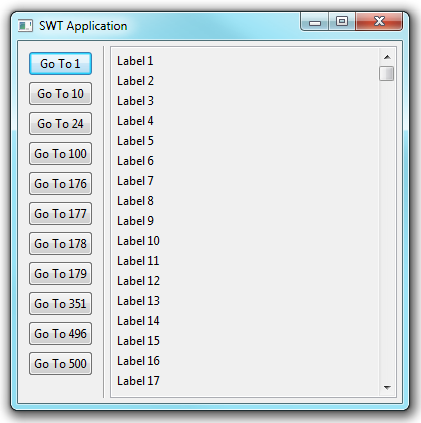
我有一堆来自1-500的标签,还有一些特定的按钮,我想让ScrolledComposite在各自的标签上居中,如下所示:
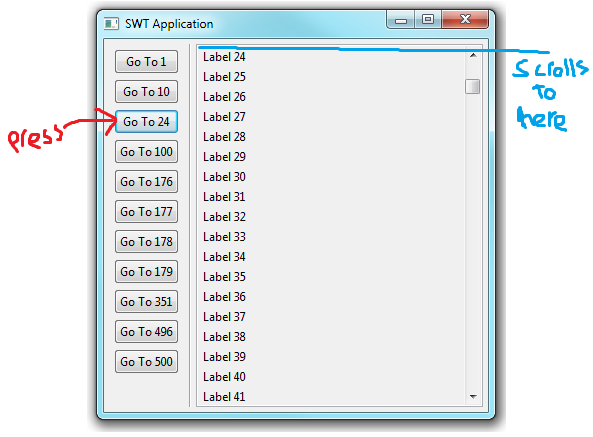
以下是代码:
import java.util.HashMap;

public class ScrollableTest2 extends Shell {

    private static final int NUM_OF_LABELS = 500;
    private static final int[] SEEKABLES = new int[] {0, 9, 23, 99, 175, 176, 177, 178, 350, 495, 499};

    Map<Integer, Control> controlMap = new HashMap<Integer, Control>();

    private Composite cmpButtons;
    private Label vr;
    private ScrolledComposite scroller;
    private Composite cmpScrollInner;

    /**
     * Launch the application.
     * @param args
     */
    public static void main(String args[]) {
        try {
            Display display = Display.getDefault();
            ScrollableTest2 shell = new ScrollableTest2(display);
            shell.layout();
            shell.open();
            while (!shell.isDisposed()) {
                if (!display.readAndDispatch()) {
                    display.sleep();
                }
            }
        } catch (Exception e) {
            e.printStackTrace();
        }
    }

    /**
     * Create the shell.
     * @param display
     */
    public ScrollableTest2(Display display) {
        super(display, SWT.SHELL_TRIM);
        createContents();
    }

    /**
     * Create contents of the shell.
     */
    protected void createContents() {
        setSize(400, 400);
        setText("SWT Application");
        GridLayout gridLayout = new GridLayout();
        gridLayout.numColumns = 3;
        setLayout(gridLayout);

        cmpButtons = new Composite(this, SWT.NONE);
        cmpButtons.setLayoutData(new GridData(SWT.LEFT, SWT.TOP, false, false, 1, 1));
        cmpButtons.setLayout(new GridLayout(1, false));

        for (int seekable : SEEKABLES) {
            Button button = new Button(cmpButtons, SWT.NONE);
            button.setLayoutData(new GridData(SWT.FILL, SWT.CENTER, true, false, 1, 1));
            button.setText("Go To " + String.valueOf(seekable+1));

            final int index = seekable;
            button.addSelectionListener(new SelectionAdapter() {
                @Override
                public void widgetSelected(SelectionEvent e) {
                    seekToLabel(index);
                }
            });
        }

        vr = new Label(this, SWT.SEPARATOR | SWT.VERTICAL);
        vr.setLayoutData(new GridData(SWT.LEFT, SWT.FILL, false, true, 1, 1));

        scroller = new ScrolledComposite(this, SWT.BORDER | SWT.V_SCROLL);
        scroller.setLayoutData(new GridData(SWT.FILL, SWT.FILL, true, true, 1, 1));
        scroller.setExpandHorizontal(true);
        scroller.setExpandVertical(true);

        cmpScrollInner = new Composite(scroller, SWT.NONE);
        cmpScrollInner.setLayout(new GridLayout(1, false));

        scroller.setContent(cmpScrollInner);

        for (int i = 0; i < NUM_OF_LABELS; i++) {
            Label label = new Label(cmpScrollInner, SWT.NONE);
            label.setText("Label " + String.valueOf(i+1));
        }

        scroller.setMinSize(cmpScrollInner.computeSize(SWT.DEFAULT, SWT.DEFAULT));
        scroller.setContent(cmpScrollInner);
        scroller.addControlListener(new ControlAdapter() {
            public void controlResized(ControlEvent e) {
                Rectangle r = scroller.getClientArea();
                scroller.setMinSize(cmpScrollInner.computeSize(r.width,
                        SWT.DEFAULT));
            }
        });

    }

    @Override
    protected void checkSubclass() {
        // Disable the check that prevents subclassing of SWT components
    }

    protected void seekToLabel(int index) {
        Control showCntrl = controlMap.get(new Integer(index));
        if(showCntrl != null){
            scroller.setOrigin(showCntrl.getLocation());
        }
    }

}
尽管我相信我正确地设置了听者,但按钮似乎没有做任何事情。因此,我必须假设我滥用了setOrigin命令。我遗漏了什么?
回答 1
Stack Overflow用户
发布于 2014-01-22 23:09:57
所有的人!结果,我只是忘记将控件添加到控件的Map中。一旦我这么做了,它就完美地工作了。
    for (int i = 0; i < NUM_OF_LABELS; i++) {
        Label label = new Label(cmpScrollInner, SWT.NONE);
        label.setText("Label " + String.valueOf(i+1));
        controlMap.put(new Integer(i), label);
    }
毕竟这是个愚蠢的错误。
页面原文内容由Stack Overflow提供。腾讯云小微IT领域专用引擎提供翻译支持
原文链接:
https://stackoverflow.com/questions/21295967
复制相关文章
相似问题
腾讯云开发者

Copyright © 2013 - 2026 Tencent Cloud. All Rights Reserved. 腾讯云 版权所有
深圳市腾讯计算机系统有限公司 ICP备案/许可证号:粤B2-20090059  粤公网安备44030502008569号
腾讯云计算(北京)有限责任公司 京ICP证150476号 | 京ICP备11018762号