
在控制台中以Python并发打印2行
在控制台中以Python并发打印2行
提问于 2014-01-20 16:20:44
我使用Python 3在控制台中输出两个进度条,如下所示:
100%|###############################################|
 45%|######################                         |
这两个条在单独的线程中同时增长。
线程操作很好,两个进度条都在执行它们的工作,但是当我想打印出它们时,它们会在控制台的一行上互相打印。我刚刚得到了一行进度条,它交替显示这两个进度条。
这些进度条有可能同时在不同的线上生长吗?
回答 1
Stack Overflow用户
回答已采纳
发布于 2014-01-20 16:41:20
您需要一个CLI框架。如果您正在使用Unix,Curses是完美的(这里有一个用于Windows的端口:https://stackoverflow.com/a/19851287/1741450 )
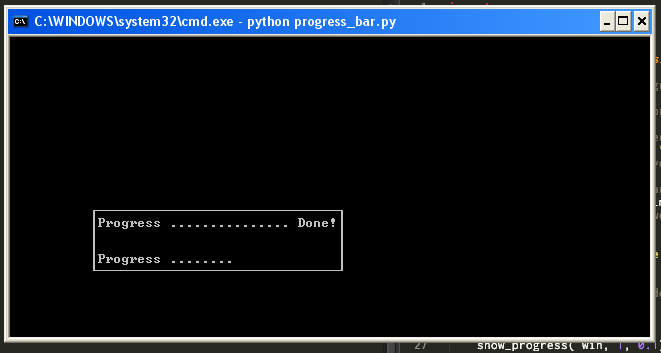
import curses
import time
import threading

def show_progress(win,X_line,sleeping_time):

    # This is to move the progress bar per iteration.
    pos = 10
    # Random number I chose for demonstration.
    for i in range(15):
        # Add '.' for each iteration.
        win.addstr(X_line,pos,".")
        # Refresh or we'll never see it.
        win.refresh()
        # Here is where you can customize for data/percentage.
        time.sleep(sleeping_time)
        # Need to move up or we'll just redraw the same cell!
        pos += 1
    # Current text: Progress ............... Done!
    win.addstr(X_line,26,"Done!")
    # Gotta show our changes.
    win.refresh()
    # Without this the bar fades too quickly for this example.
    time.sleep(0.5)

def show_progress_A(win):
    show_progress( win, 1, 0.1)

def show_progress_B(win):
    show_progress( win, 4 , 0.5)

if __name__ == '__main__':
    curses.initscr()


    win = curses.newwin(6,32,14,10)
    win.border(0)
    win.addstr(1,1,"Progress ")
    win.addstr(4,1,"Progress ")
    win.refresh()

    threading.Thread( target = show_progress_B, args = (win,) ).start()
    time.sleep(2.0)
threading.Thread( target = show_progress_A, args = (win,)).start()页面原文内容由Stack Overflow提供。腾讯云小微IT领域专用引擎提供翻译支持
原文链接:
https://stackoverflow.com/questions/21239032
复制相关文章
相似问题
腾讯云开发者

Copyright © 2013 - 2026 Tencent Cloud. All Rights Reserved. 腾讯云 版权所有
深圳市腾讯计算机系统有限公司 ICP备案/许可证号:粤B2-20090059  粤公网安备44030502008569号
腾讯云计算(北京)有限责任公司 京ICP证150476号 | 京ICP备11018762号