
Android对话框-自定义背景,而不是调光或模糊
Android对话框-自定义背景,而不是调光或模糊
提问于 2014-01-18 07:18:36
我已经创建了我自己的自定义对话框,它可以正常工作,但我希望将变暗的背景更改为自定义模式(例如,图像文件或xml形状)。我怎样才能做到这一点?
请注意,我不想改变调光的强度,但我只想用一个模式来代替这个调光。
回答 2
Stack Overflow用户
回答已采纳
发布于 2014-01-18 08:31:52
我找到了解决这个问题的方法,我从@vipul mittal的答案中得到了这个答案,
我应该将对话主题设置为:
<item name="android:windowIsFloating">false</item>
<item name="android:windowIsTranslucent">true</item>
<item name="android:windowBackground">@android:color/transparent</item>
有了这个主题,我的对话将是:
- 全屏,因为
windowIsFloating设置为false - 周围区域是完全透明的,因为
windowBackground被设置为@android:color/transparent
现在,我应该用一个包装器包装我的对话框xml布局内容,这个包装器在周围的区域中扮演角色,在本例中,我选择了FrameLayout:
<FrameLayout xmlns:android="http://schemas.android.com/apk/res/android"
    android:layout_width="fill_parent"
    android:layout_height="fill_parent"
    android:background="@drawable/dialog_back"> <!-- this is surrounding area drawable -->

    <!-- dialog contents goes here -->

</FrameLayout>
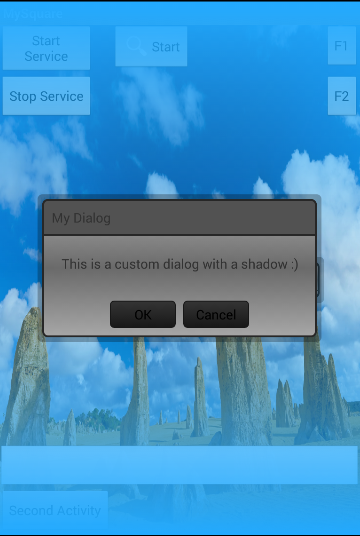
下面是我最后一个对话的截图:
Stack Overflow用户
发布于 2014-01-18 07:30:11
将对话框主题更改为:
<style name="CustomDialogTheme" parent="@android:style/Theme.Dialog">
    <item name="android:windowBackground">@android:color/white</item>
    <item name="android:windowIsFloating">false</item>
    <item name="android:windowNoTitle">true</item>
</style>
在自定义对话框中,当您调用超级调用时:
public CustomDialog(Context context) {
    super(context, R.style.CustomDialogTheme);
}页面原文内容由Stack Overflow提供。腾讯云小微IT领域专用引擎提供翻译支持
原文链接:
https://stackoverflow.com/questions/21201272
复制相关文章
相似问题
腾讯云开发者

Copyright © 2013 - 2026 Tencent Cloud. All Rights Reserved. 腾讯云 版权所有
深圳市腾讯计算机系统有限公司 ICP备案/许可证号:粤B2-20090059  粤公网安备44030502008569号
腾讯云计算(北京)有限责任公司 京ICP证150476号 | 京ICP备11018762号