
动画动画取消
假设我正在将一个按钮从x=0动画到x=200,使用:
ObjectAnimator animator = ObjectAnimator.ofFloat(button, "x", 0f, 200f);
animator.setInterpolator(new AccelerateDecelerateInterpolator());
animator.start();现在,当按钮在x=100时,我想取消动画。当我调用animator.cancel()时,按钮突然停止。我试图实现的是,x值逐渐减慢(有点像DecelerateInterpolator),并且整齐地停在(比方说) x=120上。
当然,我可以cancel()动画和启动一个新的减速动画师。然而,这并没有考虑到按钮当前的速度,导致了奇怪的行为。
我该怎么做?
回答 2
Stack Overflow用户
发布于 2014-01-14 19:52:48
正如@Gil正确指出的那样,您必须处理自定义Interpolator实现。好消息是,你实际上不需要自己实现所有的东西。您可以组合两个不同的插值公式:主动画的加/减速和取消的减速内插。
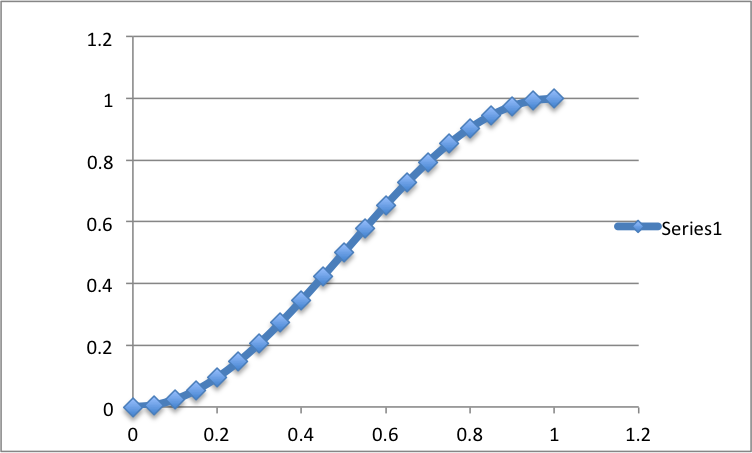
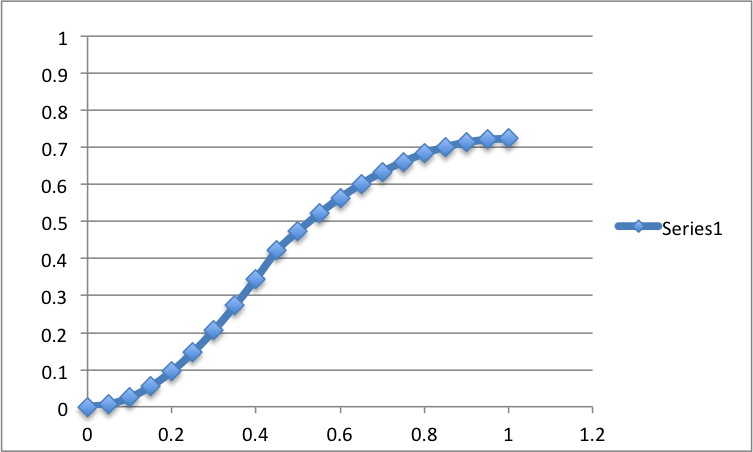
本质上这就是你想要的:
正常加速/减速动画:
当您在中间某个地方取消动画时:
下面是我的快速内插器实现:
static class MyInterpolator extends AccelerateDecelerateInterpolator {

    private float phaseShift = 0f;
    private boolean isCancelled = false;
    private float lastInput = 0f;

    /**
     * Maps a value representing the elapsed fraction of an animation to a value that represents
     * the interpolated fraction. This interpolated value is then multiplied by the change in
     * value of an animation to derive the animated value at the current elapsed animation time.
     *
     * @param input A value between 0 and 1.0 indicating our current point
     *              in the animation where 0 represents the start and 1.0 represents
     *              the end
     * @return The interpolation value. This value can be more than 1.0 for
     * interpolators which overshoot their targets, or less than 0 for
     * interpolators that undershoot their targets.
     */
    @Override
    public float getInterpolation(float input) {
        lastInput = input;
        if(!isCancelled)
        {
            return super.getInterpolation(input);
        }
        else
        {
            return getCancellationInterpolation(input) - phaseShift;
        }
    }

    public void cancel()
    {
        isCancelled = true;
        this.phaseShift = getCancellationInterpolation(lastInput) - super.getInterpolation(lastInput);

    }

    private float getCancellationInterpolation(float input)
    {
        return (1.0f - (1.0f - input) * (1.0f - input));
    }
}如您所见,我对普通动画使用默认的内插,并在动画被取消时切换减速。显然,这段代码并不完美(如果使用重复模式,它不会重置phaseShift值和isCancelled标志,从而导致计算错误),但希望您能够自己找出:)
我创建了示例项目论GitHub,这样您就可以看到它的样子了。
后续--我更多地使用了公式,并学习了DecelerateInterpolator实现的第二部分。我引入了factor参数,它帮助您控制取消的速度(某种牵引力)。将factor设置为1.5使我获得以下信息:
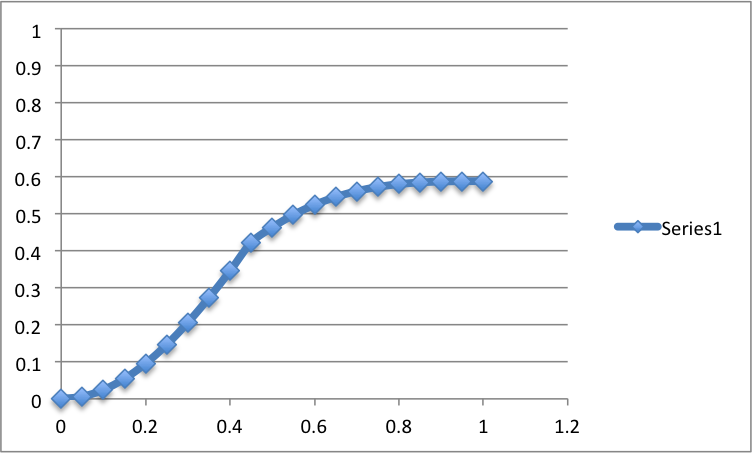
正如您所看到的,当我在大约0.5点点击cancel时,动画会被更快地取消(所以它不会像前面的例子那样一直到0.7的距离)。它给人更好的感觉,真实的物体。更高的factor -更快的你的动画将停止。
下面是一个更新的内插器:
static class MyInterpolator extends AccelerateDecelerateInterpolator {

    ......
    private float factor = 1.5f;
    .......

    private float getCancellationInterpolation(float input)
    {
        if(factor == 1)
        {
            return (1.0f - (1.0f - input) * (1.0f - input));
        }
        else
        {
            return (float)(1.0f - Math.pow((1.0f - input), 2 * factor));
        }
    }
}Stack Overflow用户
发布于 2014-01-14 18:44:52
你一直运行你的动画,你实现了你的TimeInterpolator,在加速后“慢下来”。
您需要实现getInterpolation(float)方法:这表示一个数学函数,它将时间瞬间映射到在0到1之间标准化的位置值x。例如,如果您想从x = 0运行到x = 120,则值x = 100对应于规范化值。
100/x 120-0 x= 0.83
找到正确的函数需要一些数学技巧和一些猜测,但是这个教程应该让您开始工作。
https://stackoverflow.com/questions/21119624
复制相似问题
腾讯云开发者

Copyright © 2013 - 2026 Tencent Cloud. All Rights Reserved. 腾讯云 版权所有
深圳市腾讯计算机系统有限公司 ICP备案/许可证号:粤B2-20090059  粤公网安备44030502008569号
腾讯云计算(北京)有限责任公司 京ICP证150476号 | 京ICP备11018762号