
RoutedEvent“成员不被识别或不可访问”
RoutedEvent“成员不被识别或不可访问”
提问于 2014-01-09 23:39:53
与其使用输入设备生成的事件,我希望使用将在代码隐藏中以编程方式引发的自定义事件作为EventTrigger。
这应该是可笑的简单,但我在任何地方都找不到例子。
下面是我从研究WPF4 (第6章,路由事件实现,EventTrigger.RoutedEvent性质,自定义RoutedEvent作为EventTrigger,以及其他许多方面)中得出的结论:
MainWindow.xaml.cs:
namespace RoutedEventTrigger
{
    public partial class MainWindow : Window
    {
        public MainWindow()
        {
            InitializeComponent();
            RaiseEvent(new RoutedEventArgs(fooEvent, this));
        }
        public static readonly RoutedEvent fooEvent = EventManager.RegisterRoutedEvent(
        "foo", RoutingStrategy.Direct, typeof(RoutedEventHandler), typeof(MainWindow));

        // Provide CLR accessors for the event
        public event RoutedEventHandler foo
        {
            add { AddHandler(fooEvent, value); }
            remove { RemoveHandler(fooEvent, value); }
        }
    }
}
MainWindow.xaml:
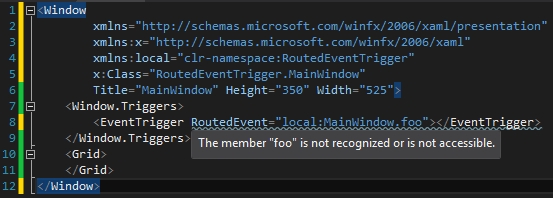
请温柔点,我对WPF比较陌生。
回答 3
Stack Overflow用户
回答已采纳
发布于 2014-01-09 23:51:47
冈马·斯科特
你试过建(重建)这个项目了吗?WPF要求您构建项目,以便XAML解析器可以看到项目更改。使用下面的代码构建得很好。
代码
public partial class MainWindow : Window
{
    public MainWindow() => InitializeComponent();

    public static readonly RoutedEvent fooEvent = EventManager.RegisterRoutedEvent("foo",
        RoutingStrategy.Direct, typeof(RoutedEventHandler), typeof(MainWindow));

    // Provide CLR accessors for the event
    public event RoutedEventHandler foo
    {
        add => AddHandler(fooEvent, value);
        remove => RemoveHandler(fooEvent, value);
    }
}
XAML。
<Window x:Class="WpfApplication3.MainWindow"
        xmlns="http://schemas.microsoft.com/winfx/2006/xaml/presentation"
        xmlns:x="http://schemas.microsoft.com/winfx/2006/xaml"
        xmlns:local="clr-namespace:WpfApplication3"
        Title="MainWindow" Height="350" Width="525">
    <Window.Triggers>
        <EventTrigger RoutedEvent="local:MainWindow.foo" />
    </Window.Triggers>
</Window>
编辑:在重新构建项目之前,会显示相同的解析器错误。
Stack Overflow用户
发布于 2015-09-28 11:02:24
<Window.Triggers>
    <EventTrigger RoutedEvent="{x:Static local:MainWindow.foo}" />
</Window.Triggers>
我遇到了同样的问题,但你所有的解决方案对我都不管用。上面这个片段确实帮我解决了这个问题。
Stack Overflow用户
发布于 2015-06-10 16:50:03
我也有同样的问题,但在我重新开始演播室之前,重建对我来说并不管用。关闭了它,重新打开了Projekt,它运转良好。
页面原文内容由Stack Overflow提供。腾讯云小微IT领域专用引擎提供翻译支持
原文链接:
https://stackoverflow.com/questions/21033509
复制相关文章
相似问题
腾讯云开发者

Copyright © 2013 - 2026 Tencent Cloud. All Rights Reserved. 腾讯云 版权所有
深圳市腾讯计算机系统有限公司 ICP备案/许可证号:粤B2-20090059  粤公网安备44030502008569号
腾讯云计算(北京)有限责任公司 京ICP证150476号 | 京ICP备11018762号