
使用所需寻呼机样式的Gridview分页的自定义页码
我在网格视图中实现了一个功能显示记录,不是根据默认的页码,而是根据部门编号。我有20个系,其中有学生,所以我想显示部门标识,即D1,D2,D3.作为一个页码和点击,该部门的学生将被加载在网格中。
我想要像附加的图像一样分页,点击“.”在页码中,它应该带我进入下一组页码。
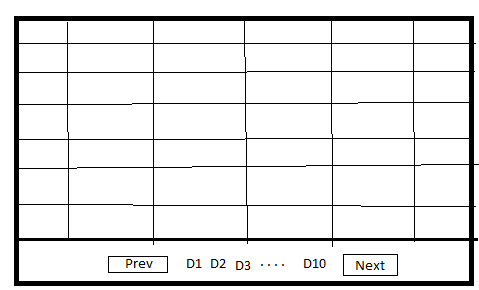
我应该如何为asp.net网格视图实现这样的分页?
回答 1
Stack Overflow用户
发布于 2014-01-08 13:01:51
它将使用“Next”和“Previous”按钮分页遍历记录。Label控件将在分页GridView中显示我们的当前位置。让我们首先设置一些变量。
protected int currentPageNumber = 1;
private const int PAGE_SIZE = 10;
currentPageNumber表示GridView的当前页面,PAGE_SIZE是显示在每个页面上的记录总数。您还可以允许用户使用DropDownList来调整页面大小,但这一点在本文中没有提到。
接下来,我们需要将数据源绑定到GridView。让我们检查一下整个BindData方法,稍后我将对它进行剖析,以便您有一个更好的想法。
private void BindData()
{
    string connectionString = "Server=localhost;" +
           "Database=Northwind;Trusted_Connection=true";
    SqlConnection myConnection = new SqlConnection(connectionString);
    SqlCommand myCommand = new SqlCommand("usp_GetProducts",
                                           myConnection);
    myCommand.CommandType = CommandType.StoredProcedure;

    myCommand.Parameters.AddWithValue("@startRowIndex",
                                      currentPageNumber);
    myCommand.Parameters.AddWithValue("@maximumRows", PAGE_SIZE);
    myCommand.Parameters.Add("@totalRows", SqlDbType.Int, 4);
    myCommand.Parameters["@totalRows"].Direction =
                       ParameterDirection.Output;

    SqlDataAdapter ad = new SqlDataAdapter(myCommand);

    DataSet ds = new DataSet();
    ad.Fill(ds);

    gvProducts.DataSource = ds;
    gvProducts.DataBind();

    // get the total rows
    double totalRows = (int)myCommand.Parameters["@totalRows"].Value;

    lblTotalPages.Text = CalculateTotalPages(totalRows).ToString();

    lblCurrentPage.Text = currentPageNumber.ToString();

    if (currentPageNumber == 1)
    {
        Btn_Previous.Enabled = false;

        if (Int32.Parse(lblTotalPages.Text) > 0)
        {
            Btn_Next.Enabled = true;
        }
        else
            Btn_Next.Enabled = false;

    }

    else
    {
        Btn_Previous.Enabled = true;

        if (currentPageNumber == Int32.Parse(lblTotalPages.Text))
            Btn_Next.Enabled = false;
        else Btn_Next.Enabled = true;
    }
}
现在,让我们更详细地看一下上面的代码。我将currentPageNumber和PAGE_SIZE发送到数据库中,以便获取当前页面的数据。totalRows变量返回表中的行总数。一旦我有了totalRows,我就会计算用于这个GridView的总页面数。页面总数是使用一个小助手函数计算的:
private int CalculateTotalPages(double totalRows)
{
    int totalPages = (int)  Math.Ceiling(totalRows / PAGE_SIZE);

    return totalPages;
}
在BindData方法的末尾,有一些条件检查,这些检查确保只在适用的情况下显示下一个按钮和以前的按钮。
将事件附加到按钮
剩下的最后一件事是将事件附加到Button控件。查看下面的代码,其中我创建了两个Button控件。
<asp:Button ID="Btn_Previous" CommandName="Previous"
            runat="server" OnCommand="ChangePage"
            Text="Previous" />
<asp:Button ID="Btn_Next" runat="server" CommandName="Next"
            OnCommand="ChangePage" Text="Next" />
这两个按钮都调用ChangePage事件,如下所示:
// This method will handle the navigation/ paging index
protected void ChangePage(object sender, CommandEventArgs e)
{

    switch (e.CommandName)
    {
        case "Previous":
            currentPageNumber = Int32.Parse(lblCurrentPage.Text) - 1;
            break;

        case "Next":
            currentPageNumber = Int32.Parse(lblCurrentPage.Text) + 1;
            break;
    }

    BindData();
}
ChangePage事件用于更改GridView的页码,并通过调用BindData方法更新标签文本。
https://stackoverflow.com/questions/20996181
复制相似问题
腾讯云开发者

Copyright © 2013 - 2026 Tencent Cloud. All Rights Reserved. 腾讯云 版权所有
深圳市腾讯计算机系统有限公司 ICP备案/许可证号:粤B2-20090059  粤公网安备44030502008569号
腾讯云计算(北京)有限责任公司 京ICP证150476号 | 京ICP备11018762号