
如何通过单击UserControl中的Button将显示在UserControl中的Textbox值传递给Aspx页面标签
TestUC.ascx设计规范
  <asp:TextBox ID="txtbox1"  runat="server" ClientIDMode="Static" placeholder="Enter Some Text" ></asp:TextBox><br />
  <asp:Button ID="btn1" runat="server" Text="Click" OnClick="btn1_Click" ClientIDMode="Static" />
Test.aspx页面代码
 <%@ Register Src="~/WebUserControls/TestUC.ascx" TagName="WebUserControlTest"
TagPrefix="uctest" %>

<asp:Content ID="Content1" ContentPlaceHolderID="cphBody" runat="server">
<asp:Label ID="lbl1" runat="server" >Label</asp:Label>
<uctest:WebUserControlTest ID="ucTest" runat="server"></uctest:WebUserControlTest>
</asp:Content>
OutPut:
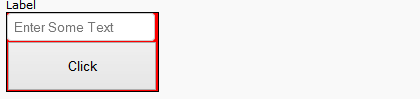
我需要..。
Step1:在文本框中输入一些文本
步骤2:然后单击按钮注意:这两个控件是从UserControl绑定的
步骤3:在TextBox中输入的文本是显示在Aspx页面中的标签注释标签
回答 5
Stack Overflow用户
发布于 2014-01-07 18:38:39
您需要有一个自定义事件&您还需要在您的Text中公开TextBox的TextBox属性,如下所示。
public partial class YourUserControl : UserControl
{
    public String Text
    {
        get
        {
            return this.txtBox1.Text;
        }
        //write the setter property if you would like to set the text
        //of the TextBox from your aspx page
        //set
        //{
        //    this.txtBox1.Text = value;
        //}
    }

    public delegate void TextAppliedEventHandler(Object sender, EventArgs e);
    public event TextAppliedEventHandler TextApplied;

    protected virtual void OnTextApplied(EventArgs e)
    {
        //Taking a local copy of the event,
        //as events can be subscribed/unsubscribed asynchronously.
        //If that happens after the below null check then
        //NullReferenceException will be thrown
        TextAppliedEventHandler handler = TextApplied;

        //Checking if the event has been subscribed or not...
        if (handler != null)
            handler(this, e);
    }

    protected void yourUserControlButton_Click(Object sender, EventArgs e)
    {
        OnTextApplied(EventArgs.Empty);
    }
}然后,在您的aspx页面中,您已经放置了YourUserControl (或者您是从后面的代码中动态添加它),您可以像这样订阅这个事件。
protected void Page_Load(Object sender, EventArgs e)
{
    if (!IsPostBack)
    {
        yourUserControl.TextApplied += new YourUserControl.TextAppliedEventHandler(yourUserControl_TextApplied)
    }
}
您可以在页面中使用用户控件的自定义事件,如下所示。
protected void yourUserControl_TextApplied(Object sender, EventArgs e)
{
    yourLabelInYourPage.Text = yourUserControl.Text;
}
你就完了..。
编辑:您可以根据需要重命名控件&事件。我用这些名字只是为了这个例子。
编辑:在网站项目中,如果您想动态添加用户控件,那么您可能需要在页面中包含名称空间ASP,如下所示。
using ASP;并将此Directive添加到页中的aspx标记中。
<%@ Reference Control="~/PathToYourUserControl/YourUserControl.ascx" %>Stack Overflow用户
发布于 2014-01-07 15:19:04
其他解决方案:在usercontrol中创建一个事件,在单击按钮中调用该事件。
在aspx页面的代码背后订阅此事件。这样,只有在提供了值的情况下,才能更新接口。
稍微复杂一点,但将来您可以将此逻辑重用到更复杂的控件/父控件功能中。
如果需要,我可以添加代码段。
Stack Overflow用户
发布于 2014-01-08 09:42:32
这个答案是由@Devraj Gadhavi i编辑的代码编写的。
UserControl页面设计代码
 <asp:TextBox ID="txtbox1"  runat="server" ClientIDMode="Static" placeholder="Enter Some Text" ></asp:TextBox><br />
 <asp:Button ID="btn1" runat="server" Text="Click" OnClick="btn1_Click" ClientIDMode="Static" />
UserControl页面代码
 public partial class TestUC : System.Web.UI.UserControl
{

    public String Text
    {
        get
        {
            return this.txtbox1.Text;
        }

    }

    public delegate void TextAppliedEventHandler(Object sender, EventArgs e);
    public event EventHandler TextApplied;

    protected virtual void OnTextApplied(EventArgs e)
    {

        if (TextApplied != null)
            TextApplied(this, e);
    }


    protected void btn1_Click(object sender, EventArgs e)
    {
        OnTextApplied(EventArgs.Empty);
    }
}
网页设计代码
<%@ Register Src="~/WebUserControls/TestUC.ascx" TagName="WebUserControlTest"
TagPrefix="uctest" %>

 <asp:Content ID="Content1" ContentPlaceHolderID="cphBody" runat="server">
   <asp:Label ID="lbl1" runat="server" >Label</asp:Label>
   <uctest:WebUserControlTest ID="ucTest" runat="server"></uctest:WebUserControlTest>
 </asp:Content>
Aspx文件代码
public partial class Test2 : System.Web.UI.Page
{
    protected void Page_Load(object sender, EventArgs e)
    {
        ucTest.TextApplied += new EventHandler(ucTest_TextApplied);


    }

    protected void ucTest_TextApplied(Object sender, EventArgs e)
    {
        lbl1.Text = ucTest.Text;

    }
}https://stackoverflow.com/questions/20975055
复制相似问题
腾讯云开发者

Copyright © 2013 - 2026 Tencent Cloud. All Rights Reserved. 腾讯云 版权所有
深圳市腾讯计算机系统有限公司 ICP备案/许可证号:粤B2-20090059  粤公网安备44030502008569号
腾讯云计算(北京)有限责任公司 京ICP证150476号 | 京ICP备11018762号